REAR PACKAGE TRAY SPEAKER INSTALLATION
PROCEDURE
-
INSTALL REAR NO. 3 SPEAKER ASSEMBLY
-
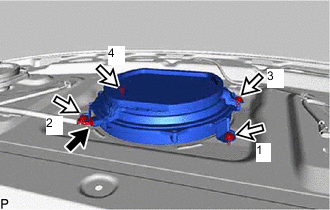
Connect the connector.
Note
Do not touch the speaker cone.
-
Install the rear No. 3 speaker assembly with the 4 bolts.
Tech Tips
Install the bolts in the order shown in the illustration.
-
-
INSTALL REAR HEADER SPEAKER ASSEMBLY (for 17 Speakers)
Tech Tips
Use the same procedure for the RH side and LH side.
-
Engage the clip.
Note
Do not touch the speaker cone.
-
Install the rear header speaker assembly with the bolt.
-
Connect the connector.
-
-
INSTALL PACKAGE TRAY TRIM PANEL ASSEMBLY
-
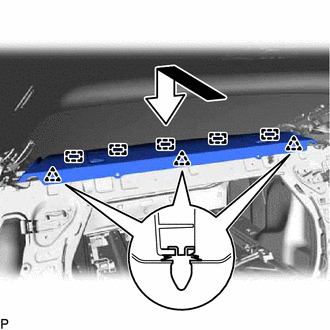
Engage the 5 guides and 3 clips as shown in the illustration.
-
Install the package tray trim panel assembly with the 2 clips.
-
-
INSTALL NO. 3 ROOM PARTITION COVER
-
Engage the 7 clips to install the No. 3 room partition cover.
-
-
INSTALL NO. 2 ROOM PARTITION COVER
-
Engage the guide.
-
Engage the 2 claws and clip.
-
Install the No. 2 room partition cover with the clip.
-
-
INSTALL NO. 1 ROOM PARTITION COVER
Tech Tips
Use the same procedure as for the No. 2 room partition cover.
-
INSTALL REAR SEAT SUB FLOOR PANEL
-
Engage the 3 clips to install the rear seat sub floor panel.
-
-
INSTALL FRONT LUGGAGE COMPARTMENT TRIM COVER
-
INSTALL NO. 1 LUGGAGE COMPARTMENT TRIM COVER
-
INSTALL INNER ROOF SIDE GARNISH ASSEMBLY LH
-
INSTALL FRONT QUARTER TRIM PANEL ASSEMBLY LH
-
INSTALL INNER ROOF SIDE GARNISH ASSEMBLY RH
Tech Tips
Use the same procedure as for the LH side.
-
INSTALL FRONT QUARTER TRIM PANEL ASSEMBLY RH
Tech Tips
Use the same procedure as for the LH side.
-
INSTALL FRONT DOOR SCUFF PLATE LH
-
INSTALL FRONT DOOR SCUFF PLATE RH
Tech Tips
Use the same procedure as for the LH side.
-
INSTALL REAR SEAT ASSEMBLY