ELECTRONICALLY CONTROLLED BRAKE SYSTEM Brake Warning Light Remains ON
DESCRIPTION
The skid control ECU assembly is connected to the combination meter assembly via CAN communication.
If any of the following is detected, the brake warning light / red (malfunction) remains on:
-
The skid control ECU assembly connector is disconnected from the skid control ECU assembly.
-
The brake fluid level is insufficient.
-
EBD operation has been disabled.
WIRING DIAGRAM
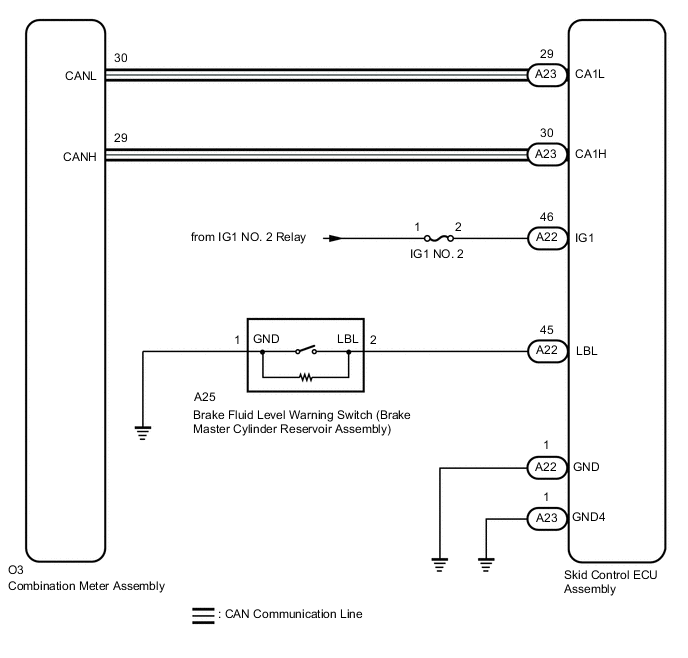
CAUTION / NOTICE / HINT
Note
-
When replacing the skid control ECU assembly, perform initialization and calibration of the linear solenoid valve.
-
Inspect the fuses for circuits related to this system before performing the following procedure.
PROCEDURE
-
CHECK DTC
-
Check if ABS, VSC and/or electronically controlled brake system DTCs are output.
Chassis > ABS/VSC/TRC > Trouble CodesResult Result Proceed to DTCs are not output. A DTCs are output. B
B 
REPAIR CIRCUITS INDICATED BY OUTPUT DTCS Click here
A 
-
-
CHECK CAN COMMUNICATION SYSTEM
-
Check if CAN communication system DTCs are output.
Result Result Proceed to DTCs are not output. A DTCs are output. B
B
INSPECT CAN COMMUNICATION SYSTEM Click here
A
-
-
CHECK IF SKID CONTROL ECU ASSEMBLY CONNECTOR IS SECURELY CONNECTED
-
Check if the skid control ECU assembly connector is securely connected.
OK The connector is securely connected. Result Proceed to OK NG
NG
CONNECT CONNECTOR TO SKID CONTROL ECU ASSEMBLY CORRECTLY
OK
-
-
CHECK AUXILIARY BATTERY
-
Check the auxiliary battery voltage.
Standard Voltage Tester Connection Condition Specified Condition Auxiliary battery Power switch on (IG) 11 to 14 V Auxiliary battery Power switch on (READY) 11 to 15.5 V Result Proceed to OK NG
NG
CHARGE OR REPLACE AUXILIARY BATTERY
OK
-
-
CHECK HARNESS AND CONNECTOR (IG1 TERMINAL)
-
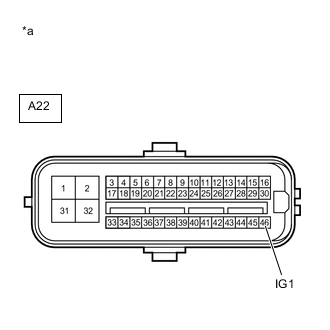
*a Front view of wire harness connector
(to Skid Control ECU Assembly)
Disconnect the A22 skid control ECU assembly connector.
-
Turn the power switch on (IG).
-
Measure the voltage according to the value(s) in the table below.
Standard Voltage Tester Connection Condition Specified Condition A22-46 (IG1) - Body ground Power switch on (IG) 11 to 14 V Result Proceed to OK NG
NG
REPAIR OR REPLACE HARNESS OR CONNECTOR (IG1 CIRCUIT)
OK
-
-
CHECK HARNESS AND CONNECTOR (GND TERMINAL)
-
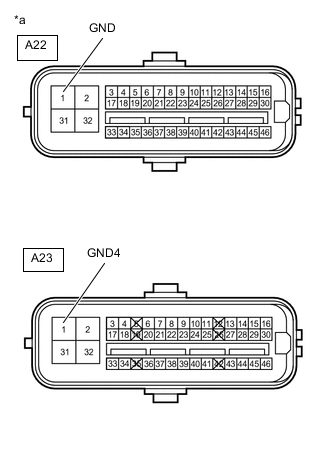
*a Front view of wire harness connector
(to Skid Control ECU Assembly)
Turn the power switch off.
-
Disconnect the A23 skid control ECU assembly connector.
-
Measure the resistance according to the value(s) in the table below.
Standard Resistance Tester Connection Condition Specified Condition A22-1 (GND) - Body ground Always Below 1 Ω A23-1 (GND4) - Body ground Always Below 1 Ω Result Proceed to OK NG
NG
REPAIR OR REPLACE HARNESS OR CONNECTOR (GND CIRCUIT)
OK
-
-
READ VALUE USING GTS (BRAKE WARNING LIGHT / RED (MALFUNCTION))
-
Reconnect the A22 and A23 skid control ECU assembly connectors.
-
Select the Data List on the GTS.
Chassis > ABS/VSC/TRC > Data ListTester Display Measurement Item Range Normal Condition Diagnostic Note Brake Warning Light Brake warning light / red (malfunction) ON or OFF ON: Warning light on
OFF: Warning light off
-
Chassis > ABS/VSC/TRC > Data ListTester Display Brake Warning Light -
Check the GTS display condition of the brake warning light / red (malfunction).
Result Result Proceed to OFF is displayed. A ON is displayed. B Tech Tips
If troubleshooting has been carried out according to Problem Symptoms Table, refer back to the table and proceed to the next step before replacing the parts.
A
INSPECT METER / GAUGE SYSTEM Click here
B
REPLACE SKID CONTROL ECU ASSEMBLY for LHD: Click here
REPLACE SKID CONTROL ECU ASSEMBLY for RHD: Click here -