FRONT CAMERA REMOVAL

CAUTION / NOTICE / HINT
Note
-
When replacing the forward recognition camera, replace it with a new one.
-
Do not touch the camera lens or the front windshield glass in front of the camera.
-
If the forward recognition camera has been struck or dropped, replace it with a new one.
-
When replacing the windshield glass of a vehicle equipped with a forward recognition camera, make sure to use a Lexus genuine part. If a non-Lexus genuine part is used, the forward recognition camera may not be able to be installed due to a missing bracket. Also, the dynamic radar cruise control system, lane departure alert system, pre-collision system, forward recognition camera system or automatic high beam system may not operate properly due to a difference in the transmissivity or black ceramic border.
PROCEDURE
-
REMOVE NO. 2 FORWARD RECOGNITION COVER
-
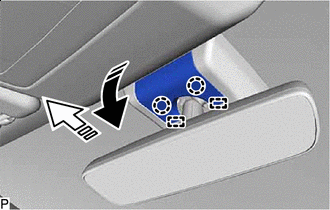

Remove in this Direction (1) 
Remove in this Direction (2) Pull the No. 2 forward recognition cover in the direction indicated by the arrow (1) shown in the illustration to disengage the 2 claws.
Note
If these claws are disengaged separately, they may break. Insert a molding remover between them and pull it down to disengage the claws simultaneously.
-
Pull the No. 2 forward recognition cover in the direction indicated by the arrow (2) shown in the illustration to disengage the 2 guides and remove the No. 2 forward recognition cover.
-
-
REMOVE NO. 1 FORWARD RECOGNITION COVER
-
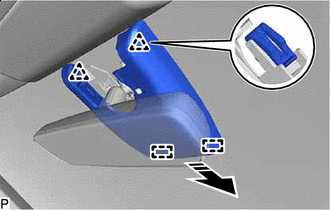
Remove in this Direction Disengage the 2 clips and 2 guides to remove the No. 1 forward recognition cover as shown in the illustration.
Note
To avoid damaging the guides, always slide the No. 1 forward recognition cover parallel to the windshield glass.
-
-
REMOVE FORWARD RECOGNITION LATCH
-
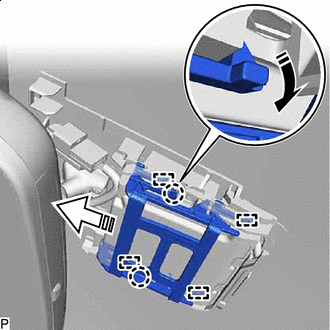
Remove in this Direction (1) Remove in this Direction (2) Disengage the 2 claws in the direction indicated by the arrow (1) shown in the illustration.
-
Disengage the 4 guides in the direction indicated by the arrow (2) shown in the illustration to remove the forward recognition latch.
-
-
REMOVE FORWARD RECOGNITION CAMERA
-
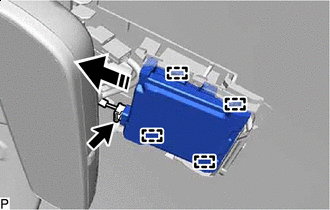
Remove in this Direction Disconnect the connector.
-
Disengage the 4 guides and remove the forward recognition camera as shown in the illustration.
Note
-
Do not pull the harness forcibly when disconnecting the connector.
-
If the forward recognition camera bracket is deformed or damaged, replace it together with the windshield glass.
-
If the forward recognition camera has been struck or dropped, replace it with a new one.
-
Do not touch the camera lens.
-
-