ADAPTIVE HIGH BEAM SYSTEM CUSTOMIZE PARAMETERS
-
CUSTOMIZE LIGHTING SYSTEM (EXT)
Note
-
When the customer requests a change in a function, first make sure that the function can be customized.
-
Be sure to make a note of the current settings before customizing.
-
When troubleshooting a function, first make sure that the function is set to the default setting.
Tech Tips
The following items can be customized.
-
Customizing with the GTS
-
Connect the GTS to the DLC3.
-
Turn the engine switch on (IG).
-
Turn the GTS on.
-
Enter the following menus: Body Electrical / Main Body / Utility / Customize / Light Control.
-
Select the setting by referring to the table below.
Light ControlTester Display Description Default Setting ECU AHS Function
-
Adaptive high beam system ON/OFF setting
-
Operates as automatic high beam system when set to OFF
ON 0:ON,1:OFF Headlight ECU sub-assembly LH Residential Area Mode Setting Adaptive high beam system residential mode setting ON 0:ON,1:OFF Headlight ECU sub-assembly LH AFS (Electronic Swivel) Function Adaptive high beam system swivel function setting ON 0:ON,1:OFF Headlight ECU sub-assembly LH Leading Vehicle Low Beam Range Adjust Function Projection distance adjustment of the low beams according to the distance to a preceding vehicle ON 0:ON,1:OFF Headlight ECU sub-assembly LH AHS Operation Speed Pattern Setting Adaptive high beam system speed pattern setting*1 Pattern 1 00:Pattern 1,01:Pattern 2,10:Pattern 3 Headlight ECU sub-assembly LH Left Headlight Shade Angle Setting Left headlight shade angle setting*2 Standard 00:Standard,01:Small,10:Large Headlight ECU sub-assembly LH Right Headlight Shade Angle Setting Right headlight shade angle setting*2 Standard 00:Standard,01:Small,10:Large Headlight ECU sub-assembly LH
-
*1:The customize function item "AHS Operation Speed Pattern Setting" can be set as shown below.
Pattern 1 (Default) Residential Area Mode Normal Mode High Speed Mode Operation Speed Cancellation Speed Operation Speed Cancellation Speed Operation Speed Cancellation Speed Except Europe 15 km/h (9 mph) or more 10 km/h (6 mph) less than 30 km/h (19 mph) or more 25 km/h (16 mph) less than 80 km/h (50 mph) or more 60 km/h (37 mph) less than Europe Not Available Not Available 60 km/h (37 mph) or more 40 km/h (25 mph) less than 120 km/h (75 mph) or more 100 km/h (62 mph) less than Pattern 2 Residential Area Mode Normal Mode High Speed Mode Operation Speed Cancellation Speed Operation Speed Cancellation Speed Operation Speed Cancellation Speed Except Europe Not Available Not Available 30 km/h (19 mph) or more 25 km/h (16 mph) less than 80 km/h (50 mph) or more 60 km/h (37 mph) less than Europe Not Available Not Available 60 km/h (37 mph) or more 40 km/h (25 mph) less than 100 km/h (62 mph) or more 80 km/h (50 mph) less than Pattern 3 Residential Area Mode Normal Mode High Speed Mode Operation Speed Cancellation Speed Operation Speed Cancellation Speed Operation Speed Cancellation Speed Except Europe Not Available Not Available Not Available Not Available 80 km/h (50 mph) or more 60 km/h (37 mph) less than Europe Not Available Not Available 60 km/h (37 mph) or more 40 km/h (25 mph) less than 80 km/h (50 mph) or more 80 km/h (50 mph) less than -
*2:The customize function item "Left Headlight Shade Angle Setting" and "Right Head Shade Angle Setting" can be set as shown below.
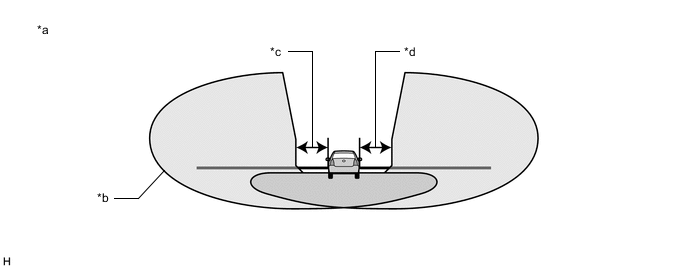
*a When vehicles ahead are within the illumination area of the high beam *b Illumination Area *c Left Headlight Shaded Area *d Right Headlight Shaded Area
-
-
-