THEFT DETERRENT SYSTEM Tilt Sensor Circuit
DESCRIPTION
The main body ECU (multiplex network body ECU) communicates with the tilt sensor (theft warning tilt sensor)*1 or tilt sensor (yaw rate and acceleration sensor)*2 via the CSIF communication line. The tilt sensor (theft warning tilt sensor)*1 or tilt sensor (yaw rate and acceleration sensor)*2 sends information regarding changes in the vehicle tilt angle to the main body ECU (multiplex network body ECU). The main body ECU (multiplex network body ECU) checks whether the vehicle body is being tilted without authorization.
Tech Tips
In the following situations, the tilt sensor (theft warning tilt sensor)*1 or tilt sensor (yaw rate and acceleration sensor)*2 may operate and cause the theft deterrent system to operate even when the sensor is normal.
-
The vehicle is transported by a ferry, trailer or train.
-
The vehicle is parked in a multi-story parking facility.
-
The vehicle is washed by an automatic car wash.
-
A tire blows out.
-
The vehicle is jacked up for a tire or wheel change.
-
An earthquake occurs or the road subsides.
-
Goods such as skis or snowboards are loaded or unloaded.
-
*1: for Optitron Meter Type
-
*2: for TFT Meter Type
WIRING DIAGRAM
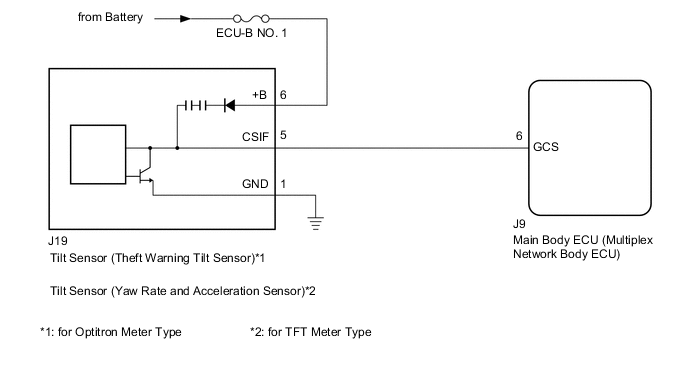
CAUTION / NOTICE / HINT
Note
-
Before replacing the main body ECU (multiplex network body ECU), refer to Service Bulletin.
-
When replacing the tilt sensor (yaw rate and acceleration sensor), perform zero point calibration.*
-
*: for TFT Meter Type
-
Inspect the fuses for circuits related to this system before performing the following procedure.
-
The vehicle battery supplies power to the main body ECU (multiplex network body ECU) via the door control battery. Therefore, before proceeding with troubleshooting, perform an on-vehicle inspection and confirm that the main body ECU (multiplex network body ECU) power source circuit is normal.*
-
*: w/o Canister Pump Module with Door Ajar Warning Buzzer Function
PROCEDURE
-
READ VALUE USING GTS (TILT SENSOR)
-
Connect the GTS to the DLC3.
-
Turn the engine switch on (IG).
-
Turn the GTS on.
-
Enter the following menus: Body Electrical / Main Body / Data List.
-
Read the Data List according to the display on the GTS.
Note
After setting the theft deterrent system, wait at least 30 seconds (until the vehicle is in the armed state), tilt the vehicle (jack up the vehicle so that the tires are in the air) and check the Data List.
Body Electrical > Main Body > Data ListTester Display Measurement Item Range Normal Condition Diagnostic Note Tilt Sensor Detection status of the tilt sensor ON or OFF ON: Change in pitch angle detected
OFF: Change in pitch angle not detected
-
Body Electrical > Main Body > Data ListTester Display Tilt Sensor OK The GTS display changes correctly in response to the detection condition of the tilt sensor (theft warning tilt sensor)*1 or tilt sensor (yaw rate and acceleration sensor)*2
-
*1: for Optitron Meter Type
-
*2: for TFT Meter Type
Result Proceed to OK NG -
OK 
PROCEED TO NEXT SUSPECTED AREA SHOWN IN PROBLEM SYMPTOMS TABLE Click here
NG 
-
-
CHECK TILT SENSOR
-
Using an oscilloscope, check the waveform.
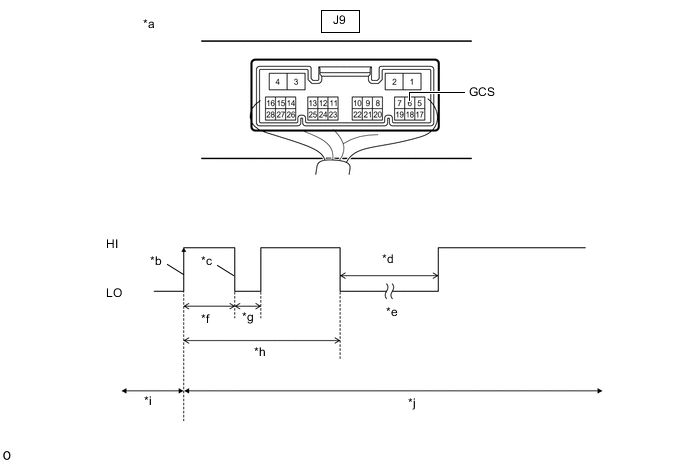
*a Component with harness connected
(Main Body ECU (Multiplex Network Body ECU))
*b CSIF Initial Signal *c CSIF Initial Response *d Approximately 1.0 Second *e Initial Diagnosis *f Approximately 1.0 to 1.6 Seconds *g Approximately 0.05 Seconds *h Approximately 5.5 Seconds *i Disarmed State *j Arming Preparation State Measurement Condition Item Content Tester Connection J9-6 (GCS) - Body ground Tool Setting 2 V/DIV., 100 ms./DIV. Condition Theft deterrent system is set (system changes from disarmed state to arming preparation state) Tech Tips
-
If the tilt sensor (theft warning tilt sensor)*1 or tilt sensor (yaw rate and acceleration sensor)*2 is normal, an initial response is output in response to the HI input from the main body ECU (multiplex network body ECU).
-
*1: for Optitron Meter Type
-
*2: for TFT Meter Type
-
If the waveform output remains LO, there may be a problem with the main body ECU (multiplex network body ECU), as there is no input from the main body ECU (multiplex network body ECU).
OK The waveform is output properly (HI is 6.5 V or higher and LO is below 1 V). Result Proceed to OK NG -
NG
REPLACE MAIN BODY ECU (MULTIPLEX NETWORK BODY ECU) Click here
OK
-
-
CHECK HARNESS AND CONNECTOR (TILT SENSOR - MAIN BODY ECU (MULTIPLEX NETWORK BODY ECU))
-
Disconnect the J9 main body ECU (multiplex network body ECU) connector.
-
Disconnect the J19 tilt sensor (theft warning tilt sensor) connector.*1
-
Disconnect the J19 tilt sensor (yaw rate and acceleration sensor) connector.*2
-
*1: for Optitron Meter Type
-
*2: for TFT Meter Type
-
-
Measure the resistance according to the value(s) in the table below.
Standard Resistance Tester Connection Condition Specified Condition J9-6 (GCS) - J19-5 (CSIF) Always Below 1 Ω J9-6 (GCS) - Body ground Always 10 kΩ or higher J19-5 (CSIF) - Body ground Always 10 kΩ or higher Result Result Proceed to OK (for Optitron Meter Type) A OK (for TFT Meter Type) B NG C
A
REPLACE TILT SENSOR (THEFT WARNING TILT SENSOR) Click here
B
REPLACE TILT SENSOR (YAW RATE AND ACCELERATION SENSOR) Click here
C
REPAIR OR REPLACE HARNESS OR CONNECTOR
-