FRONT CONSOLE BOX INSTALLATION
PROCEDURE
-
INSTALL CONSOLE BOX ASSEMBLY
-
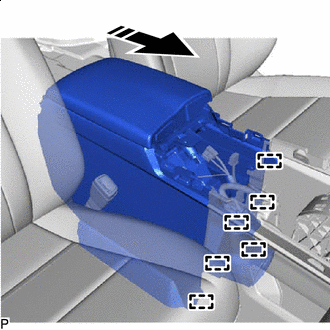

Install in this Direction Engage the 6 guides as shown in the illustration.
-
Connect each connector.
-
Install the console box assembly with the 4 bolts and 2 screws.
-
Connect the connector.
-
Engage the clamp.
-
w/o Telematics Transceiver:
-
Engage the clamp.
-
-
-
INSTALL CONSOLE REAR END PANEL SUB-ASSEMBLY
-
w/ Rear Seat Entertainment System:
-
Engage the 3 claws.
-
-
Connect each connector.
-
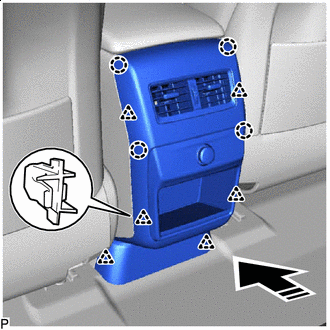
Install in this Direction Engage the 6 clips and 4 claws to install the console rear end panel sub-assembly as shown in the illustration.
-
-
INSTALL MAYDAY BATTERY WITH BRACKET (w/ Telematics Transceiver for G-BOOK)
-
INSTALL ANTENNA DIVIDER (w/ Telematics Transceiver except G-BOOK)
-
INSTALL INSTRUMENT PANEL CUP HOLDER ASSEMBLY
-
Install the instrument panel cup holder assembly with the 6 screws.
-
-
INSTALL CONSOLE PANEL SUB-ASSEMBLY
-
Connect each connector.
-
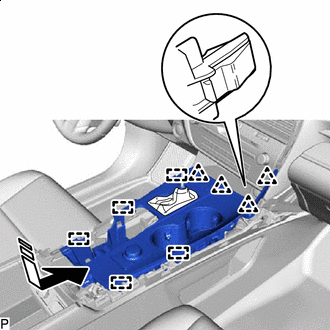
Install in this Direction Engage the 5 guides and 4 clips to install the console panel sub-assembly as shown in the illustration.
-
Install the 2 screws.
-
Move the shift lever to P.
-
Engage the clamp.
-
-
INSTALL INSTRUMENT CLUSTER FINISH PANEL ORNAMENT
-
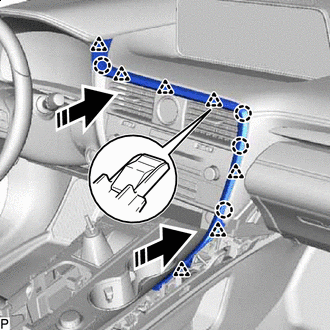
Install in this Direction Engage the 7 clips and 4 claws to install the instrument cluster finish panel ornament as shown in the illustration.
-
-
INSTALL SHIFT LEVER KNOB SUB-ASSEMBLY
-
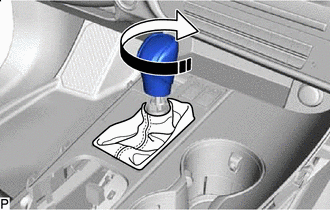
Install in this Direction Turn the shift lever knob sub-assembly clockwise to install it.
-
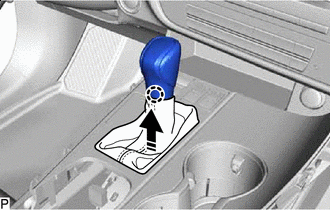
Install in this Direction Engage the claw to connect the shift hole cover sub-assembly as shown in the illustration.
-
-
INSTALL LOWER NO. 1 INSTRUMENT PANEL FINISH PANEL
-
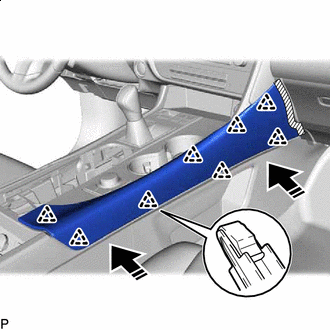
Install in this Direction Engage the 8 clips to install the lower No. 1 instrument panel finish panel as shown in the illustration.
-
-
INSTALL LOWER NO. 2 INSTRUMENT PANEL FINISH PANEL
-
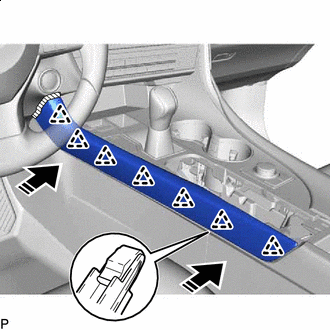
Install in this Direction Engage the 7 clips to install the lower No. 2 instrument panel finish panel as shown in the illustration.
-
-
INSTALL REMOTE TOUCH ASSEMBLY