POWER BACK DOOR SYSTEM OPERATION CHECK
-
CHECK BASIC OPERATION
Note
-
This check is possible only when the "Power Back Door Function" customize setting is set to ON on the multi-information display in the combination meter assembly. (The default setting is ON.)
-
Before performing an operation check, make sure that the customize settings of the power back door system are set to their default setting.
Tech Tips
When the ambient temperature is very low, a clicking sound may be heard from the multiplex network door ECU. This is not a malfunction.
-
Conditions necessary for the power back door to open:
-
The back door is unlocked (except wireless one motion function).
-
The vehicle speed is 3 km/h (2 mph) or less (only when the engine switch is on (IG)).
-
The shift lever is in P, the brake pedal is depressed or the parking brake is applied (only when the engine switch is on (IG)).
-
-
Check the opening operation.
-
With the back door fully closed, push the combination switch assembly and check that the power back door warning buzzer sounds for 0.8 seconds, the hazard warning lights flash twice* and the back door starts opening.
-
With the back door fully closed, push the transmitter switch (electrical key transmitter sub-assembly) and check that the power back door warning buzzer sounds for 0.8 seconds, the hazard warning lights flash twice* and the back door starts opening.
-
With the back door fully closed, push the back door opener switch assembly (open switch) and check that the power back door warning buzzer sounds for 0.8 seconds, the hazard warning lights flash twice* and the back door starts opening.
-
*: w/ Power Back Door Hazard Warning Light
-
-
-
Check the close operation.
-
With the back door fully open, push the combination switch assembly and check that the power back door warning buzzer sounds for 0.8 seconds, the hazard warning lights flash twice* and the back door starts closing.
-
With the back door fully open, push the transmitter switch (electrical key transmitter sub-assembly) and check that the power back door warning buzzer sounds for 0.8 seconds, the hazard warning lights flash twice* and the back door starts closing.
-
With the back door fully open, push the back door control switch and check that the power back door warning buzzer sounds for 0.8 seconds, the hazard warning lights flash twice* and the back door starts closing.
-
*: w/ Power Back Door Hazard Warning Light
-
-
-
Check the operation when another input is detected during the opening or closing operation.
-
During a power back door opening operation, push the combination switch assembly or transmitter switch (electrical key transmitter sub-assembly), and check that the power back door warning buzzer sounds for 0.2 seconds and the back door stops.
-
During a power back door closing operation, push the combination switch assembly, back door control switch or transmitter switch (electrical key transmitter sub-assembly), and check that the power back door warning buzzer sounds for 0.2 seconds and the back door stops. After the closing operation stops, press the combination switch assembly, back door control switch or transmitter switch (electrical key transmitter sub-assembly) and check that the power back door opens until it reaches the fully open position or the automatic opening operation stop position.
-
During a power back door opening or closing operation, push the back door opener switch assembly (open switch), and check that the power back door warning buzzer sounds for 0.2 seconds and the back door operation switches to manual operation mode.
-
-
-
CHECK WIRELESS ONE MOTION FUNCTION
Note
-
This check is possible only when the "Power Back Door Function" customize setting is set to ON on the multi-information display in the combination meter assembly. (The default setting is ON.)
-
Before performing an operation check, make sure that the customize settings of the power back door system are set to their default setting.
-
This check is possible only when the "One Motion with Unlock Door" customize setting is set to 0.8s or 2 Op on the GTS. (The default setting is Not Use.)
-
Check the wireless one motion operation.
-
With all of the doors locked, push the transmitter switch (electrical key transmitter sub-assembly) and check that the power back door warning buzzer sounds for 0.8 seconds, the hazard warning lights flash twice* and the back door starts opening.
-
*: w/ Power Back Door Hazard Warning Light
-
-
-
-
CHECK JAM PROTECTION FUNCTION
Tech Tips
-
Each power back door unit assembly set detects changes in the operating speed of the back door while the power back door is operating. If a change in the operating speed is out of the normal range, it will be judged that a foreign object is in the path of the power back door and the operation will stop if the door is operating in the opening direction or move a certain amount in the reverse direction if the door is operating in the closing direction.
-
When the power back door is closing, if either of the power back door sensor assemblies built into the sides of the back door are compressed, it is judged that a foreign object is in the path of the power back door and the power back door will operate in the opposite direction a small amount and then stop.
-
Check the jam protection function while the power back door is closing (power back door sensor assembly).
Note
Do not check this function using a part of your body, such as your hand. Do not allow anything to become caught in the back door by accident while performing this inspection.
-
Fully open the back door.
-
Press a switch to close the power back door.
-
While the back door is closing, press a power back door sensor assembly using the handle of a hammer or equivalent.
-
Check that the power back door warning buzzer sounds twice for 0.1 seconds, the jam protection function is immediately activated and the power back door reverses a certain amount and stops.
-
-
Check the jam protection function while the power back door is closing (pulse sensor in power back door unit assembly set).
Note
Do not check this function using a part of your body, such as your hand. Do not allow anything to become caught in the back door by accident while performing this inspection.
-
Fully open the back door.
-
Press a switch to close the power back door.
-
While the back door is closing, insert a tire or equivalent between the back door panel and vehicle body, in order to interrupt the closing operation.
-
Check that the power back door warning buzzer sounds twice for 0.1 seconds, the jam protection function is immediately activated and the power back door reverses a certain amount and stops.
-
-
Check the jam protection function while the power back door is opening.
Note
Do not allow anything to become caught on the back door by accident while performing this inspection.
-
Fully close the back door.
-
Press a switch to open the power back door.
-
While the back door is opening, use your hands to press on the outside surface of the back door panel so that the operating speed decreases.
-
Check that the power back door warning buzzer sounds twice for 0.1 seconds, the jam protection function is immediately activated and the power back door stops.
-
-
-
CHECK ASSIST OPERATION
-
Check that the power back door automatically starts to fully close when the back door is manually moved in the closing direction when it is stopped.
-
-
CHECK OPENING OPERATION AUTOMATIC STOP POSITION MEMORIZATION FUNCTION (When not using GTS)
-
Record an open operation automatic stop position in memory.
-
Press a switch to open the power back door.
-
Press a switch to stop the open operation when the back door reaches the desired automatic stop position.
-
Press and hold back door control switch for 2 seconds or more with the back door stopped at the desired position. When the buzzer sounds 4 times, the open operation automatic stop position will be recorded.
-
Press a switch to open the power back door and check that it stops at the recorded automatic stop position.
-
-
Clear the open operation automatic stop position memory.
-
Press a switch to open the power back door.
-
Press a switch to stop the power back door.
-
With the back door at the open operation automatic stop position, press and hold back door control switch for 7 seconds or more. When the power back door warning buzzer sounds twice, the open operation automatic stop position will be cleared.
-
-
-
CHECK OPENING OPERATION AUTOMATIC STOP POSITION MEMORIZATION FUNCTION (When using GTS)
-
Record an open operation automatic stop position in memory.
-
Using the GTS, select the "Power Back Door Opening Adjust" customize setting.
-
According to the display on the GTS, set the customize setting.
-
Press a switch to open the power back door and check that it stops at the recorded automatic stop position set by the customize setting.
-
-
Clear the open operation automatic stop position memory.
-
Press a switch to open the power back door.
-
Press a switch to stop the power back door.
-
With the back door at the open operation automatic stop position, press and hold back door control switch for 7 seconds or more. When the power back door warning buzzer sounds twice the automatic stop position will be cleared.
-
-
-
CHECK OPENING OPERATION AUTOMATIC STOP POSITION MEMORIZATION FUNCTION (When using Multi-display)
-
Record an open operation automatic stop position in memory.
-
Select the "Power back door opening adjust" customize setting on the multi-display.
-
According to the screen on the multi-display, set the customize setting.
-
Press a switch to open the power back door and check that it stops at recorded automatic stop position set by the customize setting.
-
-
Clear the open operation automatic stop position memory.
-
Press a switch to open the power back door.
-
Press a switch to stop the power back door.
-
With the back door at the open operation automatic stop position, press and hold back door control switch for 7 seconds or more. When the power back door warning buzzer sounds twice the automatic stop position will be cleared.
-
-
-
CHECK OPENING OPERATION AUTOMATIC STOP POSITION MEMORIZATION FUNCTION (When using Multi-information display (combination meter assembly))
-
Record an open operation automatic stop position in memory.
-
Select the "Power Back Door Opening Aadjustment" customize setting on the multi-information display (combination meter assembly).
-
According to the screen on the multi-display, set the customize setting.
-
Press a switch to open the power back door and check that it stops at recorded automatic stop position set by the customize setting.
-
-
Clear the open operation automatic stop position memory.
-
Press a switch to open the power back door.
-
Press a switch to stop the power back door.
-
With the back door at the open operation automatic stop position, press and hold back door control switch for 7 seconds or more. When the power back door warning buzzer sounds twice the automatic stop position will be cleared.
-
-
-
CHECK TOUCHLESS POWER BACK DOOR OPENING OPERATION (w/ Touchless Power Back Door)
-
Check the following operations with the back door fully closed and while carrying an electrical key transmitter sub-assembly.
Tech Tips
Before performing an operation check, make sure that the customize settings of the power back door system are set to their default setting.
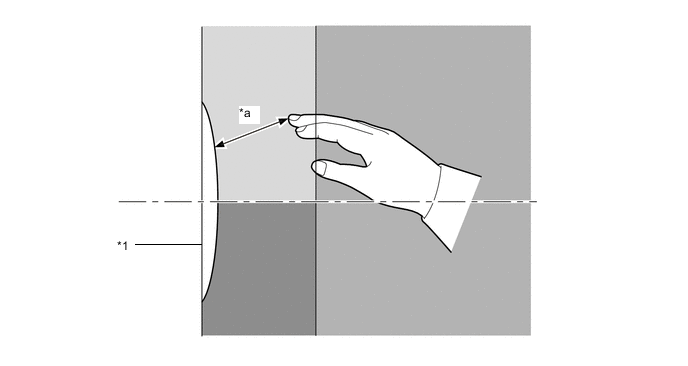

Non-detection area 
Operation area 
Operation prohibited area - - *1 Rear emblem sensor assembly - - *a 30 mm - - Tech Tips
Make sure to keep your hand out of the operation prohibition area.
-
When the back door is locked:
- Type A*
-
Hold a hand 30 mm from the upper part of the rear emblem sensor assembly so that it is not inside the operation prohibition area. Within 0.8 seconds of the power back door buzzer beginning to sound move the hand away and check that all of the doors unlock and the power back door begins opening.
- Type B*
-
Hold a hand 30 mm from the upper part of the rear emblem sensor assembly so that it is not inside the operation prohibition area. Check that all of the doors unlock.
-
Hold a hand 30 mm from the upper part of the rear emblem sensor assembly so that it is not inside the operation prohibition area. Within 0.8 seconds of the power back door buzzer beginning to sound move the hand away and check that the power back door begins opening.
-
*: Opening operation differs depending on the country.
-
When the back door is not locked:
-
Hold a hand 30 mm from the upper part of the rear emblem sensor assembly so that it is not inside the operation prohibition area. Within 0.8 seconds of the power back door buzzer beginning to sound move the hand away and check that the power back door begins opening.
-
Hold a hand 30 mm from the upper part of the rear emblem sensor assembly so that it is not inside the operation prohibition area. Continue holding the hand in that position. After the power back door buzzer sounds, check that the power back door buzzer sounds twice and the opening operation is canceled. Wait 30 seconds after the opening operation is canceled and check that all of the doors are lock.
-
-
Hold a hand over the rear emblem sensor assembly while the power back door is opening and check that the power back door stops.
-
-
CHECK POWER BACK DOOR CLOSE AND LOCK FUNCION
-
With no electrical key transmitter sub-assemblies in the vehicle, the back door open and all of the other doors closed, while carrying an electrical key transmitter sub-assembly perform the following operations and check that the power back door close and lock function operates.
-
With the back door fully open and all of the other doors closed, carry an electrical key transmitter sub-assembly into the rear door exterior detection area, press the back door control switch twice and check that the power back door closes and then all of the doors lock.
Tech Tips
If the back door control switch is pressed by a hand which is holding the electrical key transmitter sub-assembly, the electrical key transmitter sub-assembly may be detected as outside of the back door exterior detection area and the power back door may not operate.
-
With the back door fully open and all of the other doors closed, close the power back door using any power back door close operation. While the power back door is closing, operate the lock switch on the electrical key transmitter sub-assembly and check that all of the doors lock when the power back door is fully closed.
-
With the back door fully open and all of the other doors closed, close the power back door using any power back door close operation. While the power back door is closing, carry an electrical key transmitter sub-assembly into an exterior detection area, operate the lock sensor of a door outside handle assembly and check that all of the doors lock when the power back door is fully closed.
-
-