POWER BACK DOOR SYSTEM Power Back Door cannot be Opened or Closed Using the Power Back Door Switch
DESCRIPTION
If the power back door cannot be opened or closed using the combination switch assembly, there may be a malfunction in one of the following: 1) combination switch assembly circuit, 2) multiplex network door ECU or 3) main body ECU (multiplex network body ECU).
WIRING DIAGRAM
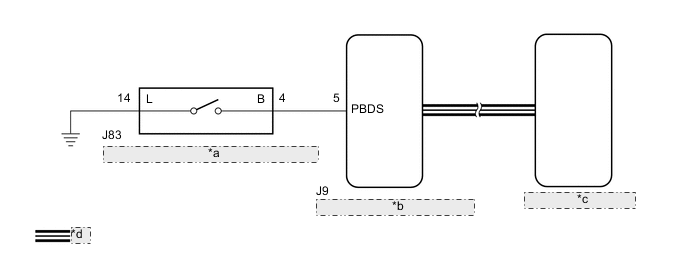
| *a | Power Back Door Switch (Integration Control and Panel Assembly) |
| *b | Main Body ECU (Multiplex Network Body ECU) |
| *c | Multiplex Network Door ECU |
| *d | CAN Communication Line |
CAUTION / NOTICE / HINT
Note
-
The power back door system uses the CAN communication system. Inspect the communication function by following How to Proceed with Troubleshooting. Troubleshoot the power back door system after confirming that the CAN communication system is functioning properly.
-
If the multiplex network door ECU has been removed and installed or replaced, or if any of the connectors has been disconnected, initialize the power back door system.
-
If the main body ECU (multiplex network body ECU) is replaced, refer to Service Bulletin.
-
As the door control battery is installed between the vehicle battery and main body ECU (multiplex network body ECU), inspect the main body ECU (multiplex network body ECU) power source circuit for malfunctions before performing this troubleshooting procedure.*
-
*: w/o Canister Pump Module with Door Ajar Warning Function
PROCEDURE
-
READ VALUE USING GTS (Back Door Open SW)
-
Connect the GTS to the DLC3.
-
Turn the engine switch on (IG).
-
Turn the GTS on.
-
Enter the following menus: Body Electrical / Main Body / Data List.
-
Read the Data List according to the display on the GTS.
Body Electrical > Main Body > Data ListTester Display Measurement Item Range Normal Condition Diagnostic Note Back Door Open SW Combination switch assembly signal OFF or ON OFF: Combination switch assembly not pressed
ON: Combination switch assembly pressed
-
Body Electrical > Main Body > Data ListTester Display Back Door Open SW OK On the GTS screen, ON or OFF is displayed accordingly. Result Proceed to OK NG
NG 
INSPECT POWER BACK DOOR SWITCH (INTEGRATION CONTROL AND PANEL ASSEMBLY) Click here
OK 
-
-
REPLACE MULTIPLEX NETWORK DOOR ECU
-
Replace the multiplex network door ECU with a new or known good one.
Result Proceed to NEXT
NEXT
-
-
INITIALIZE MULTIPLEX NETWORK DOOR ECU
-
Initialize the multiplex network door ECU.
Result Proceed to NEXT
NEXT
-
-
CHECK POWER BACK DOOR SYSTEM
-
Check the power back door system operation.
OK Power back door system operates normally Result Proceed to OK NG
OK 
END (MULTIPLEX NETWORK DOOR ECU WAS MALFUNCTIONING)
NG
REPLACE MAIN BODY ECU (MULTIPLEX NETWORK BODY ECU) Click here
-
-
INSPECT POWER BACK DOOR SWITCH (INTEGRATION CONTROL AND PANEL ASSEMBLY)
-
Remove the power back door switch (integration control and panel assembly).
-
Inspect the power back door switch (integration control and panel assembly).
Result Proceed to OK NG
NG
REPLACE POWER BACK DOOR SWITCH (INTEGRATION CONTROL AND PANEL ASSEMBLY) Click here
OK
-
-
CHECK HARNESS AND CONNECTOR (INTEGRATION CONTROL AND PANEL ASSEMBLY - MAIN BODY ECU (MULTIPLEX NETWORK BODY ECU) AND BODY GROUND)
-
Disconnect the J83 power back door switch (integration control and panel assembly) connector.
-
Disconnect the J9 main body ECU (multiplex network body ECU) connector.
-
Measure the resistance according to the value(s) in the table below.
Standard Resistance Tester Connection Condition Specified Condition J83-4 (B) - J9-5 (PBDS) Always Below 1 Ω J83-14 (L) - Body ground Always Below 1 Ω J83-4 (B) or J9-5 (PBDS) - Body ground Always 10 kΩ or higher Result Proceed to OK NG
OK
REPLACE MAIN BODY ECU (MULTIPLEX NETWORK BODY ECU) Click here
NG
REPAIR OR REPLACE HARNESS OR CONNECTOR
-