POWER BACK DOOR SYSTEM, Diagnostic DTC:B2200, B2201
| DTC Code | DTC Name |
|---|---|
| B2200 | Emblem Sensor Calibration Malfunction |
| B2201 | Emblem Sensor Circuit |
DESCRIPTION
These DTCs are stored when the calibration of the rear emblem sensor is not completed successfully or when communication between the CPU and the sensor IC inside the rear emblem sensor assembly stops or is malfunctioning.
| DTC No. | Detection Item | DTC Detection Condition | Trouble Area |
|---|---|---|---|
| B2200 | Emblem Sensor Calibration Malfunction | Calibration of the rear emblem sensor is not completed successfully |
|
| B2201 | Emblem Sensor Circuit | Communication between the CPU and the sensor IC inside the rear emblem sensor assembly stops or is malfunctioning |
|
WIRING DIAGRAM
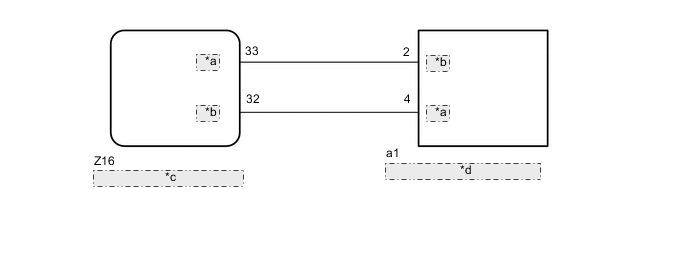
| *a | EMSR |
| *b | EMST |
| *c | Multiplex Network Door ECU |
| *d | Rear Emblem Sensor Assembly |
CAUTION / NOTICE / HINT
Note
-
Before troubleshooting, make sure that the rear emblem sensor assembly is not damaged.
-
Before troubleshooting, be sure to read Precautions for Touchless Power Back Door.
-
If the multiplex network door ECU has been removed and installed or replaced, or if any of the connectors has been disconnected, initialize the power back door system.
PROCEDURE
-
CHECK FOR DTC
-
Clear the DTCs.
Body Electrical > Back Door > Clear DTCs -
Check for DTCs.
Tech Tips
It is necessary to wait 5 minutes or more with the engine switch on (IG) after clearing DTCs in order for DTC B2200 to be stored.
Body Electrical > Back Door > Trouble CodesOK DTC B2220 and B2201 is not output. Result Proceed to OK NG
OK 
USE SIMULATION METHOD TO CHECK Click here
NG 
-
-
REPLACE REAR EMBLEM SENSOR ASSEMBLY
-
Temporarily replace the rear emblem sensor assembly with a new or known good one.
Result Proceed to NEXT
NEXT
-
-
CHECK FOR DTC
-
Clear the DTCs.
Body Electrical > Back Door > Clear DTCs -
Check for DTCs.
Tech Tips
It is necessary to wait 5 minutes or more with the engine switch on (IG) after clearing DTCs in order for DTC B2200 to be stored.
Body Electrical > Back Door > Trouble CodesOK DTC B2220 and B2201 is not output. Result Proceed to OK NG
OK
END (REAR EMBLEM SENSOR ASSEMBLY WAS DEFECTIVE)
NG
REPLACE MULTIPLEX NETWORK DOOR ECU Click here
-