MULTI-DISPLAY DISASSEMBLY
PROCEDURE
-
REMOVE MULTI-DISPLAY CONTROLLER BRACKET A (for 8 Inch Display)
-
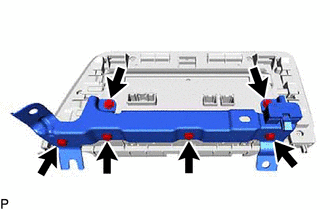
Remove the 6 screws and multi-display controller bracket A with clip base.
-
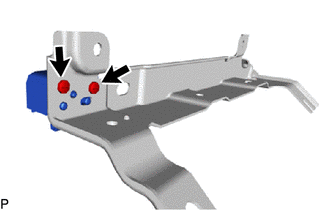
Remove the 2 screws and clip base from the multi-display controller bracket A.
-
-
REMOVE GAUGE WIRE (for 12.3 Inch Display)
-
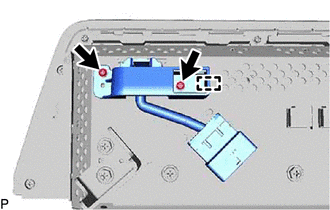
Remove the 2 screws.
-
Disengage the guide and remove the gauge wire bracket.
-
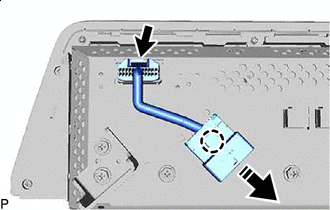

Remove in this Direction Disconnect the connector.
-
Disengage the claw and remove the gauge wire as shown in the illustration.
-
-
REMOVE MULTI INFORMATION DISPLAY CASE ASSEMBLY (for 12.3 Inch Display)
-
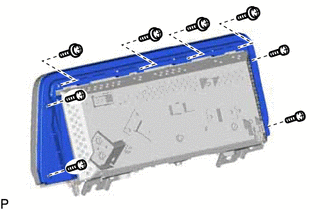
Remove the 8 screws.
-
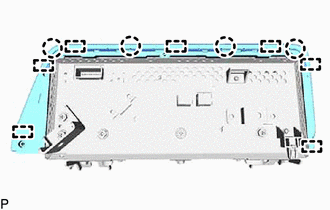
Disengage the 4 claws and 7 guides to remove the multi information display case assembly.
-
-
REMOVE ACCESSORY METER GLASS (for 12.3 Inch Display)
-
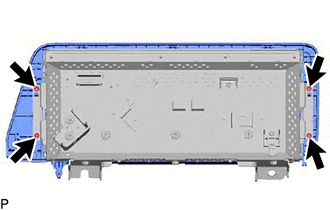
Remove the 4 screws.
-
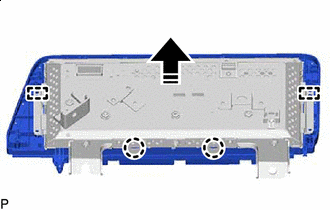
Remove in this Direction Disengage the 2 claws and 2 guides to remove the accessory meter glass as shown in the illustration.
-