REAR SEAT ENTERTAINMENT SYSTEM SYSTEM DESCRIPTION
-
OUTLINE
-
Using the Rear Seat Entertainment (RSE) system, the rear seat occupants can enjoy different audio and visual modes at the same time.
-
The rear seat occupants can control the audio and visual modes with the television switch and volume assembly, and listen to audio by using wired or wireless headphones.
-
The multi-display controller sub-assembly receives image and sound signals from the radio receiver assembly and distributes the signals to each television display assembly.
-
A television display assembly is installed to the back of each front seat.
-
The rear seat occupants can watch video from a connected external device.
-
MOST communication is used between the radio receiver assembly and multi-display controller sub-assembly. AVC-LAN communication is used between the multi-display controller sub-assembly and television display assemblies
-
Occupants in the front seats, rear left seat and rear right seat can enjoy different content at the same time. However, this is possible for the rear left and rear right seat only when VIDEO is selected for either the left or right seat and another source is selected for the other seat.
-
-
FUNCTION OF MAIN COMPONENTS
Component Function Television display assembly
-
Displays DVD and video images in accordance with video signals from the multi-display controller sub-assembly.
-
Receives signals from the television switch and volume assembly and outputs them to the multi-display controller sub-assembly.
-
Outputs audio signals to the wireless headphones in the form of infrared signals.
-
Displays the audio and visual control screen.
-
Displays the adjustment screen.
-
Displays the diagnosis screen. The diagnosis screen appears when diagnosis mode is started on the multi-display assembly.
-
Even if the engine switch is turned from on (IG) to off or on (ACC), the display condition will continue (image adjustments will be maintained and sources will continue playing on the left and right sides).
Multi-display Controller Sub-assembly
-
Processes audio and video signals from the HDMI terminal and DVD image and audio signals from the radio receiver assembly, and outputs them to the television display assemblies and headphone terminals.
-
Controls the distribution of the audio and visual content to the rear left and rear right television display assembly.
-
Outputs audio signals for the video to the front seats.
Television Switch and Volume Assembly Outputs various control signals to the television display assembly in the form of infrared signals. Wireless headphones
-
Receives audio signals from the television display assembly in the form of infrared signals.
-
Adjusts output volume by a bulit-in volume adjuster.
Headphone Terminal
-
Outputs audio signals to wired headphones that are connected.
-
Adjusts the volume of wired headphones in accordance with volume control.
HDMI terminal Allows an external device to be connected. Radio receiver assembly Outputs audio and video signals to the multi-display controller sub-assembly. -
-
DISC PLAYER OUTLINE
-
A disc player uses a laser pickup to read digital signals recorded on CDs, DVDs or BDs. By converting the digital signals to analog, music and other content can be played.
CAUTION:
Do not look directly at the laser pickup because the disc player uses an invisible laser beam. Be sure to operate the player only as instructed.
Note
-
Do not disassemble any part of the disc player.
-
Do not apply oil to the disc player.
-
Do not insert anything but a CD, a DVD or a BD into the disc player.
-
-
Usable discs
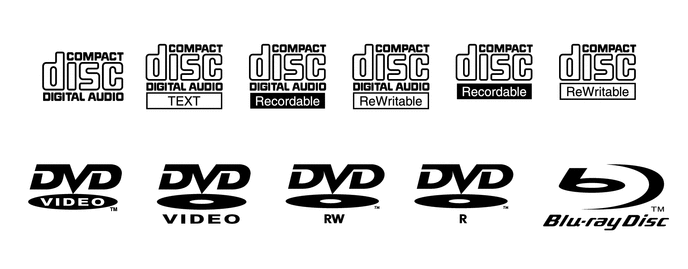
-
Precautions for use of discs
Note
-
Copy-protected CDs cannot be played.
-
CD-Rs, CD-RWs, DVD-Rs or DVD-RWs may not be played depending on the recording conditions or characteristics of the discs, or due to damage, dirt, or deterioration caused by leaving the discs in the cabin for a long time.
-
Unfinalized CD-Rs, CD-RWs, DVD-Rs and DVD-RWs cannot be played.
-
NTSC and PAL discs can be played.
-
Dual Discs that mate DVD recorded material on one side with CD digital audio material on the other cannot be played.
-
Keep discs away from dirt. Be careful not to damage discs or leave fingerprints on them.
-
Hold discs by the outer edge and center hole with the label side up.
-
Leaving a disc exposed halfway out of the slot for a long time after pressing the disc eject button may cause deformation of the disc, making the disc unusable.
-
If discs have adhesive tape, stickers, disc labels, or any traces of such labels attached, the discs may not be ejected or player malfunctions may result.
-
Keep discs away from direct sunlight. (Exposure to direct sunlight may cause deformation of the disc, making the disc unusable.)
-
Do not use odd-shaped discs because they may cause player malfunctions.
-
Do not use discs whose recording portion is transparent or translucent because they may not be inserted, ejected, or played normally.
Tech Tips
-
When it is cold or raining, if the windows fog up, mist and condensation may form in the player. In such a case, a disc may skip or stop in the middle of play. Ventilate or dehumidify the cabin for a while before using the player.
-
The disc may skip if the player experiences strong vibrations when the vehicle is driven on rough road or similar uneven surfaces.
-
-
Cleaning
Note
Do not use a lens cleaner because it may cause a malfunction in the pickup portion of the player.
-
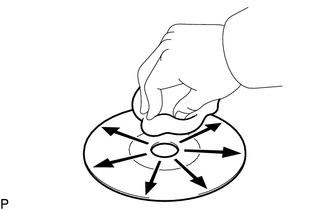
If dirt is on the disc surface, wipe it clean with a soft dry cloth such as an eyeglass cleaner for plastic lenses from the inside to the outside in a radial direction.
Note
-
Pressing on the disc by hand or rubbing the disc with a hard cloth may scratch the disc surface.
-
Use of solvents such as record spray, antistatic agents, alcohol, benzine, thinners or a chemical cloth may cause damage to the disc, making the disc unusable.
-
-
-
-
COMMUNICATION SYSTEM
-
SD CARD SLOT OUTLINE
-
The SD card slot can only play JPEG files and AVCHD format video recorded on SD cards.
-
-
DIAGNOSIS FUNCTION
-
When the diagnosis screen is displayed on the navigation system, the television display assemblies will display "REAR Check".
-