MAYDAY BATTERY(w/ Telematics Transceiver except G-BOOK) REMOVAL
CAUTION / NOTICE / HINT
The necessary procedures (adjustment, calibration, initialization, or registration) that must be performed after parts are removed and installed, or replaced during mobile phone battery removal/installation are shown below.
| Replaced Part or Performed Procedure | Necessary Procedure | Effect/Inoperative Function when Necessary Procedure not Performed | Link |
|---|---|---|---|
| Mobilephone battery | Reset mobilephone battery condition | Emergency call service |
PROCEDURE
-
PRECAUTION
-
REMOVE TELEMATICS TRANSCEIVER
-
REMOVE MOBILE PHONE BATTERY
-
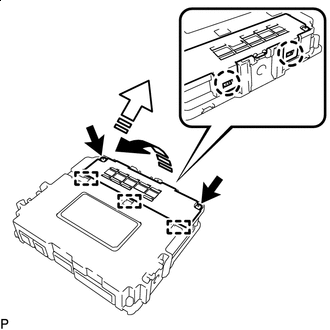

Remove in this Direction (1) 
Remove in this Direction (2) Loosen the 2 screws.
Tech Tips
The 2 screws cannot be removed because they are integrated into the battery cover sub-assembly.
-
Disengage the 2 claws and 3 guides as shown in the illustration to remove the battery cover sub-assembly.
-
Lift the battery, disconnect the connector and remove the battery as shown in the illustration.
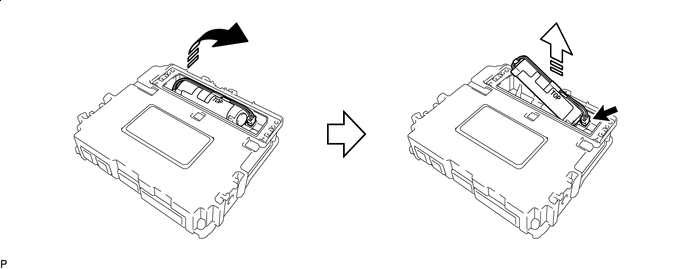
Remove in this Direction (1) Remove in this Direction (2)
-