MAYDAY BATTERY(w/ Telematics Transceiver for G-BOOK) REMOVAL
PROCEDURE
-
REMOVE REMOTE TOUCH ASSEMBLY
-
REMOVE LOWER NO. 2 INSTRUMENT PANEL FINISH PANEL
-
REMOVE LOWER NO. 1 INSTRUMENT PANEL FINISH PANEL
-
REMOVE SHIFT LEVER KNOB SUB-ASSEMBLY
-
REMOVE INSTRUMENT CLUSTER FINISH PANEL ORNAMENT
-
REMOVE CONSOLE PANEL SUB-ASSEMBLY
-
REMOVE MAYDAY BATTERY WITH BRACKET
-
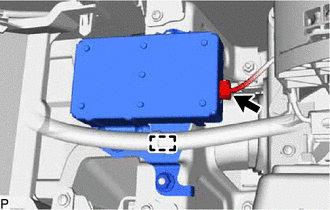
Disconnect the connector.
-
Disengage the clamp.
-
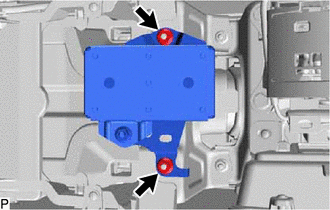
Remove the 2 nuts and mayday battery with bracket.
-
-
REMOVE NO. 1 TELEPHONE BRACKET
-
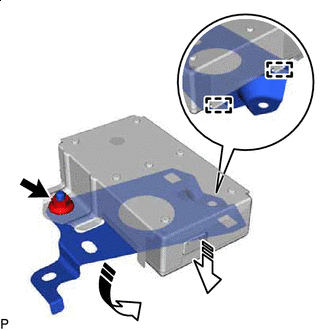

Remove in this Direction (1) 
Remove in this Direction (2) Remove the nut.
-
Disengage the 2 guides to remove the No. 1 telephone bracket as shown in the illustration.
-
-
REMOVE NO. 2 TELEPHONE BRACKET
-
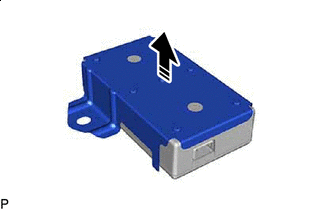
Remove in this Direction Remove the No. 2 telephone bracket as shown in the illustration.
-
-
REMOVE MAYDAY BATTERY