FRONT WHEEL ALIGNMENT ADJUSTMENT
CAUTION / NOTICE / HINT
The necessary procedures (adjustment, calibration, initialization, or registration) that must be performed after completing the front wheel alignment procedure are shown below.
| Replaced Part or Performed Procedure | Necessary Procedure | Effect/Inoperative Function when Necessary Procedure not Performed | Link |
|---|---|---|---|
| Front wheel alignment adjustment |
|
|
PROCEDURE
-
INSPECT TIRES
-
MEASURE VEHICLE HEIGHT
Note
-
Before inspecting the wheel alignment, adjust the vehicle height to the specified value.
-
Be sure to perform measurement on a level surface.
-
If it is necessary to go under the vehicle for measurement, confirm that the parking brake is applied and the vehicle is secured with chocks.
-
Inspect while the vehicle is unloaded.
-
The standard value shown here is a value that is used for performing a wheel alignment and does not indicate the height of an actual vehicle.
-
Bounce the vehicle up and down at the corners to stabilize the suspension.
-
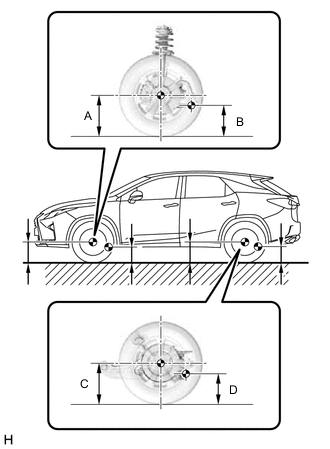
Measure the vehicle height.
-
A: Ground clearance of front wheel center
Measurement Points:
-
B: Ground clearance of front lower suspension arm assembly x front suspension member sub-assembly set bolt center
-
C: Ground clearance of rear wheel center
-
D: Ground clearance of rear No. 2 suspension arm assembly x rear suspension member sub-assembly set bolt center
Vehicle Height (Unloaded Vehicle) Engine Model Tire Size Front A - B Rear C - D for 2GR-FKS 2WD 235/65R18 120.5 mm (4.74 in.) 48.4 mm (1.91 in.) 235/55R20 120.5 mm (4.74 in.) 48.4 mm (1.91 in.) AWD 235/65R18 120.6 mm (4.75 in.) 49.4 mm (1.94 in.) 235/55R20 120.7 mm (4.75 in.) 49.5 mm (1.95 in.) for 8AR-FTS 2WD 235/65R18 120.5 mm (4.74 in.) 48.4 mm (1.91 in.) 235/55R20 120.5 mm (4.74 in.) 48.7 mm (1.92 in.) AWD 235/65R18 120.6 mm (4.75 in.) 49.4 mm (1.94 in.) 235/55R20 120.7 mm (4.75 in.) 49.7 mm (1.96 in.) -
-
-
INSPECT CAMBER, CASTER AND STEERING AXIS INCLINATION
Note
Inspect while the vehicle is unloaded.
-
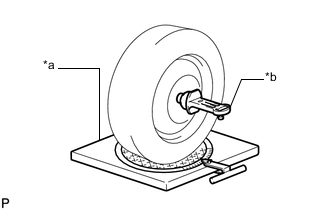
*a Turning Radius Gauge *b Camber-caster-kingpin Gauge Install a camber-caster-kingpin gauge and place the front wheels on the center of a turning radius gauge.
-
Inspect the camber, caster and steering axis inclination.
Camber (Unloaded Vehicle) Camber Inclination Right-left Difference -0°41' +/- 0°45' (-0.68° +/- 0.75°) 0°45' (0.75°) or less Caster (Unloaded Vehicle) Model Caster Inclination Right-left Difference 2WD 2°44' +/- 0°45' (2.73° +/- 0.75°) 0°45' (0.75°) or less AWD 2°45' +/- 0°45' (2.75° +/- 0.75°) Steering Axis Inclination (Unloaded Vehicle) Steering Axis Inclination Right-left Difference 11°02' +/- 0°45' (11.03° +/- 0.75°) 0°45' (0.75°) or less
-
-
ADJUST CAMBER
Note
Inspect toe-in after the camber has been adjusted.
-
Remove the front wheel.
-
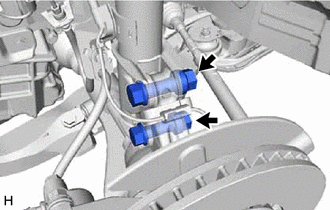
Remove the 2 nuts on the lower side of the front shock absorber assembly.
Note
Keep the bolts inserted.
-
Remove the top and bottom bolts one at a time and confirm that the steering knuckle can move freely in the front shock absorber assembly.
Tech Tips
-
Reinstall each bolt after removing it and confirming steering knuckle movement.
-
If the steering knuckle does not move freely in the front shock absorber assembly, clean the contact surfaces of the front shock absorber assembly and the steering knuckle.
-
-
Temporarily install the 2 nuts. (Step A)
-
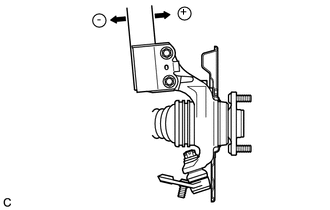
Fully push or pull the front axle hub in the direction of the required adjustment. (Step B)
-
Tighten the 2 nuts.
- Torque:
- 290 N*m { 2957 kgf*cm, 214 ft.*lbf }
Note
Keep the bolts from rotating when tightening the nuts.
-
Install the front wheel.
-
Bounce the vehicle up and down at the corners to stabilize the suspension.
-
Check the camber.
Camber (Unloaded Vehicle) Camber Inclination Right-left Difference -0°41' +/- 0°45' (-0.68° +/- 0.75°) 0°45' (0.75°) or less
-
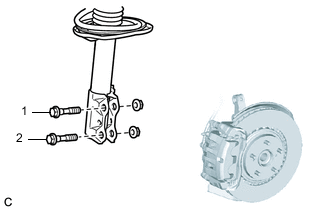
If the measured value is not within the specification, calculate the required adjustment amount using the formula below.
Camber adjustment amount = center of the specified range - measured value
Check the combination of the installed bolts. Select appropriate bolts from the tables below to adjust the camber to the specified values.
Tech Tips
Try to adjust the camber to the center of the specified values.
To move the axle hub toward (+) in step B To move the axle hub toward (-) in step B Refer to table (1) (To move the axle hub toward the positive side) Refer to table (2) (To move the axle hub toward the negative side) The vehicle body and suspension may be damaged if the camber cannot be correctly adjusted according to the table above.
Note
Replace the nut with a new one when replacing the bolt.
-
Table (1) (To move the axle hub toward the positive side)
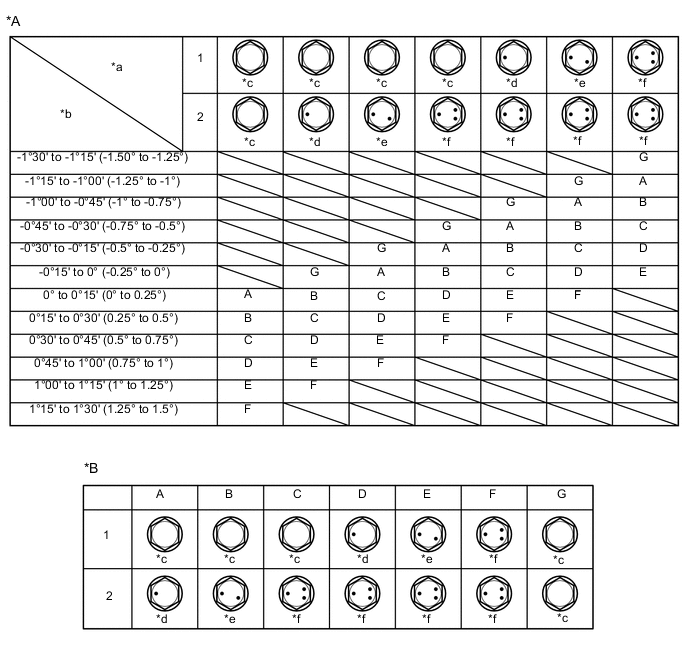
*A Table (1) (To move the axle hub toward the positive side) *B Selected Bolt Combination *a Installed Bolt *b Adjusting Value *c Standard Bolt *d 90105-17013 *e 90105-17014 *f 90105-17015 -
Table (2) (To move the axle hub toward the negative side)
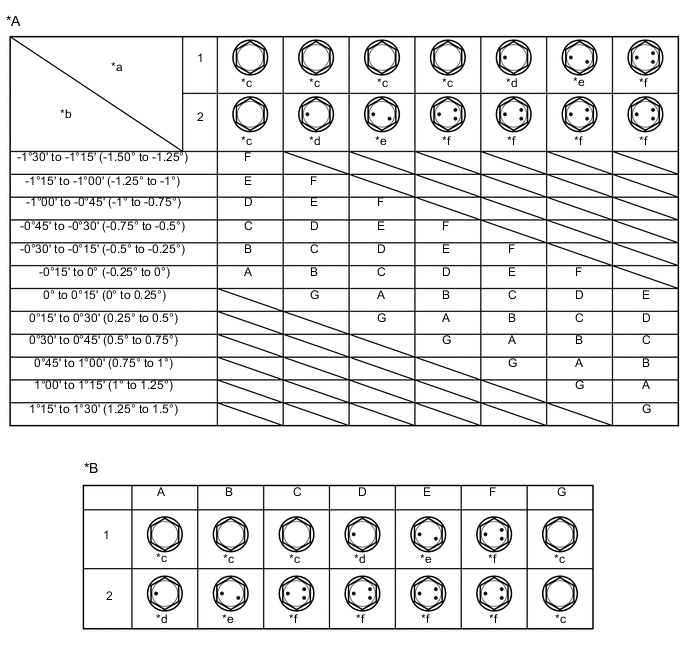
*A Table (2) (To move the axle hub toward the negative side) *B Selected Bolt Combination *a Installed Bolt *b Adjusting Value *c Standard Bolt *d 90105-17013 *e 90105-17014 *f 90105-17015
-
-
If the camber was out of adjustment in the previous step, perform the adjust camber steps mentioned above. In step A, replace the existing bolts with the selected bolts.
Tech Tips
Replace one bolt at a time when replacing both bolts.
-
-
INSPECT TOE-IN
Note
Inspect while the vehicle is unloaded.
-
Bounce the vehicle up and down at the corners to stabilize the suspension.
-
Release the parking brake and move the shift lever to N.
-
Push the vehicle straight ahead approximately 5 m (16.4 ft.). (Step C)
-
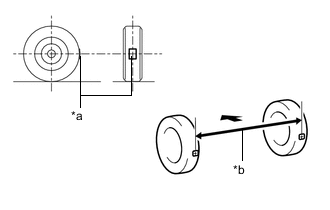
*a Tread Center Mark *b Dimension B 
Front of the Vehicle Put tread center marks on the rearmost points of the front wheels and measure the distance between the marks (dimension B).
-
Slowly push the vehicle straight ahead to cause the front wheels to rotate 180°. Use the front tire valve as a reference point.
Tech Tips
Do not allow the wheels to rotate more than 180°. If the wheels rotate more than 180°, perform the procedure from step C again.
-
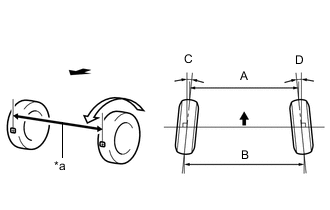
*a Dimension A Front of the Vehicle Measure the distance between the tread center marks on the front of the wheels (dimension A).
Toe-in (Unloaded Vehicle) Specified Condition C + D: 0°05' +/- 0°10' (0.08° +/- 0.16°) B - A: 1.0 +/- 2.0 mm (0.0394 +/- 0.0787 in.) Tech Tips
Measure "B - A" only when "C + D" cannot be measured.
If the toe-in is not within the specified range, adjust it at the steering rack ends.
-
-
ADJUST TOE-IN
-
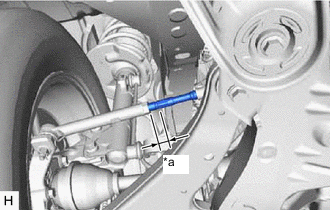
*a Thread Length Make sure that the thread length of the right and left steering rack ends are approximately the same.
Standard Difference 1.5 mm (0.0591 in.) or less -
Remove the steering rack boot clips.
-
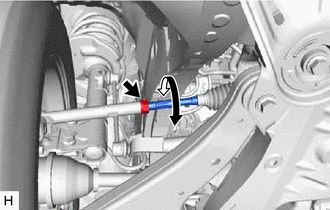
Loosen the tie rod end sub-assembly lock nuts.
-
Adjust the steering rack ends if the difference in thread length between the right and left steering rack ends is not within the specified range.
-
If the toe-in measurement is greater than the specified range (too much toe-out), extend the shorter rack end so that the difference in length is within the specified range.
-
If the toe-in measurement is less than the specified range (too much toe-in), shorten the longer rack end so that the difference in length is within the specified range.
-
Measure the toe-in.
-
-
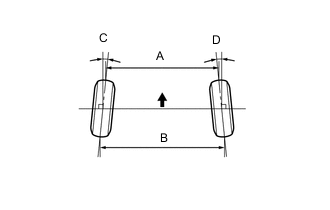
Front of the Vehicle Turn the right and left steering rack ends by an equal amount to adjust the toe-in.
Toe-in (Unloaded Vehicle) Specified Condition C + D: 0°05' +/- 0°10' (0.08° +/- 0.16°) B - A: 1.0 +/- 2.0 mm (0.0394 +/- 0.0787 in.) Tech Tips
Perform adjustments so that the value is as close as possible to the median of the specified range.
-
Make sure that the thread length of the right and left steering rack ends are the same.
-
Tighten the tie rod end sub-assembly lock nuts.
- Torque:
- 88 N*m { 897 kgf*cm, 65 ft.*lbf }
-
Place the steering rack boots on the seats and install the steering rack boot clips.
Tech Tips
Make sure that the steering rack boots are not twisted.
-
-
INSPECT WHEEL ANGLE
-
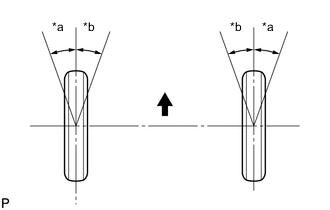
*a Inside *b Outside Front of the Vehicle Put tread center marks on the rearmost points of a turning radius gauge.
-
Turn the steering wheel fully to the left and right and measure the turning angle.
Note
Inspect while the vehicle is unloaded.
Wheel Turning Angle (Unloaded Vehicle) Inside Wheel Outside Wheel 35°28' +/- 1°30' (35.47° +/- 1.50°) 31°11' (31.18°)
-
If the right and left inside wheel angles differ from the specified value, check and adjust the right and left steering rack end lengths.
-
-
-
ALIGN FRONT WHEELS FACING STRAIGHT AHEAD
-
PERFORM YAW RATE AND ACCELERATION SENSOR ZERO POINT CALIBRATION AND STORE SYSTEM INFORMATION