HEADLIGHT ECU REMOVAL

CAUTION / NOTICE / HINT
The necessary procedures (adjustment, calibration, initialization, or registration) that must be performed after parts are removed, installed, or replaced during the headlight control computer assembly LH removal/installation are shown below.
| Replacement Part or Procedure | Necessary Procedure | Effect/Inoperative when not Performed | Link |
|---|---|---|---|
| Removal/installation of headlight control computer assembly LH |
|
Headlight leveling function | |
| Removal/installation of front bumper assembly | Adjust millimeter wave radar sensor assembly |
|
Tech Tips
-
Use the same procedure for the RH side and LH side.
-
The following procedure listed below is for LH side.
PROCEDURE
-
REPLACE PRECAUTION
Note
-
Be sure to read Precaution thoroughly before servicing.
-
Handle components indoors as much as possible to prevent foreign matter from entering and adhering to headlight assembly components.
-
Do not reuse parts which have reduced fastening ability due to thread damage.
-
When installing components, make sure that the wire harness is not pinched or pulled.
-
Do not use solvent to clean components. Only clean them with a dry cloth.
-
-
REMOVE HEADLIGHT ASSEMBLY
-
REMOVE HEADLIGHT CONTROL COMPUTER ASSEMBLY
Note
-
Prevention of static electricity is required during this procedure.
-
Use static electricity countermeasures SST (desktop antistatic mat set) and observe all precautions to prevent damage to the system by electrostatic discharge (ESD).
-
Perform work using clean rubber gloves.
-
Do not touch the headlight control computer assembly connector with bare hands.
- SST
- 09890-47010 ( 09891-04010, 09891-04020, 09891-04030, 09891-04040 )
-
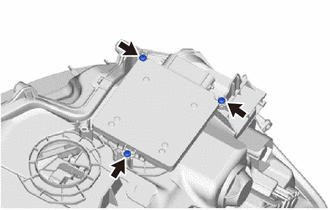
Remove the 3 screws.
-
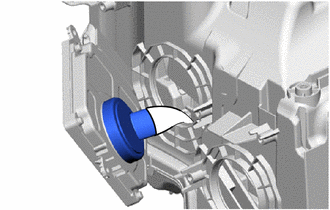
Remove the cover.
-
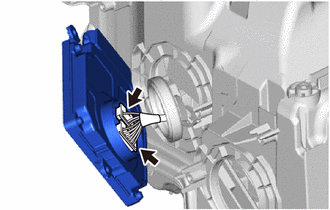
Disconnect the 2 connectors to remove the headlight control computer assembly.
-
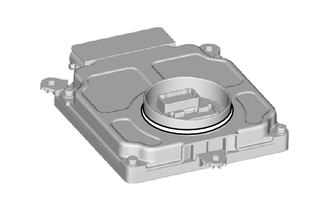
Remove the headlight control computer assembly gasket.
-