ADAPTIVE HIGH BEAM SYSTEM CUSTOMIZE PARAMETERS
-
CUSTOMIZE LIGHTING SYSTEM (EXT)
Note
-
When the customer requests a change in a function, first make sure that the function can be customized.
-
Be sure to make a note of the current settings before customizing.
-
When troubleshooting a function, first make sure that the function is set to the default setting.
Tech Tips
The following items can be customized.
-
Customizing with the GTS
-
Connect the GTS to the DLC3.
-
Turn the engine switch on (IG).
-
Turn the GTS on.
-
Enter the following menus: Body Electrical / Main Body / Utility / Customize / Light Control.
-
Select the setting by referring to the table below.
Light ControlTester Display Description Default Setting ECU AHS Function
-
Adaptive high beam system ON/OFF setting
-
Operates as automatic high beam system when set to OFF
ON 0:ON,1:OFF Headlight control computer assembly LH AFS Function Electronic swivel control settings of adaptive high beam system ON 0:ON,1:OFF Headlight control computer assembly LH Residential Area Mode Setting Residential area mode control setting of adaptive high beam system ON 0:ON,1:OFF Headlight control computer assembly LH Leading Vehicle Low Beam Range Adjust Function Setting for function which adjusts illumination range of low beams according to distance to preceding vehicle ON 0:ON,1:OFF Headlight control computer assembly LH AHS Operation Speed Pattern Setting Operation speed setting of adaptive high beam system*1 Pattern 1 00:Pattern 1,01:Pattern 2,10:Pattern 3 Headlight control computer assembly LH Left Headlight Shade Angle Setting Setting of left headlight shade angle*2 Standard 00:Standard,01:Small,10:Large Headlight control computer assembly LH Right Headlight Shade Angle Setting Setting of right headlight shade angle*2 Standard 00:Standard,01:Small,10:Large Headlight control computer assembly LH
-
*1: The customization function item "AHS Operation Speed Pattern Setting" can be used to customize the light distribution control of the adaptive high beam system as follows.
Pattern 1 (Default) Residential Mode Normal Mode High-speed Mode Starting Speed Cancellation Speed Starting Speed Cancellation Speed Starting Speed Cancellation Speed except Europe 15 km/h (9 mph) or more 10 km/h (6 mph) less than 30 km/h (19 mph) or more 25 km/h (16 mph) less than 80 km/h (50 mph) or more 60 km/h (37 mph) less than for Europe (LHD) No setting No setting 60 km/h (37 mph) or more 40 km/h (25 mph) less than 120 km/h (75 mph) or more 100 km/h (62 mph) less than Pattern 2 Residential Mode Normal Mode High-speed Mode Starting Speed Cancellation Speed Starting Speed Cancellation Speed Starting Speed Cancellation Speed except Europe No setting No setting 30 km/h (19 mph) or more 25 km/h (16 mph) less than 80 km/h (50 mph) or more 60 km/h (37 mph) less than for Europe (LHD) No setting No setting 60 km/h (37 mph) or more 40 km/h (25 mph) less than 100 km/h (62 mph) or more 80 km/h (50 mph) less than Pattern 3 Residential Mode Normal Mode High-speed Mode Starting Speed Cancellation Speed Starting Speed Cancellation Speed Starting Speed Cancellation Speed except Europe No setting No setting No setting No setting 80 km/h (50 mph) or more 60 km/h (37 mph) less than for Europe (LHD) No setting No setting 60 km/h (37 mph) or more 40 km/h (25 mph) less than 80 km/h (50 mph) or more 60 km/h (37 mph) less than -
*2: The customization function items "Left Headlight Shade Angle Setting" and "Right Headlight Shade Angle Setting" can be used to customize the angles as follows.
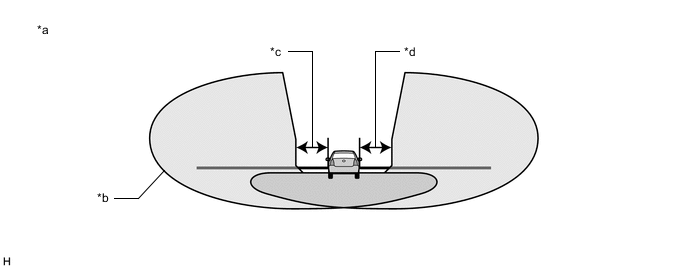
*a Preceding Vehicle Illuminated by High Beams of This Vehicle *b Illumination *c Left Headlight Shade Angle *d Right Headlight Shade Angle
-
-
-