LIGHTING SYSTEM CUSTOMIZE PARAMETERS
-
CUSTOMIZE LIGHTING SYSTEM (EXT)
Note
-
When the customer requests a change in a function, first make sure that the function can be customized.
-
Be sure to make a note of the current settings before customizing.
-
When troubleshooting a function, first make sure that the function is set to the default setting.
Tech Tips
The following items can be customized.
-
Customizing with the GTS
-
Connect the GTS to the DLC3.
-
Turn the engine switch on (IG).
-
Turn the GTS on.
-
Enter the following menus: Body Electrical / Main Body / Utility / Customize / Light Control or Illuminated Entry.
-
Select the setting by referring to the table below.
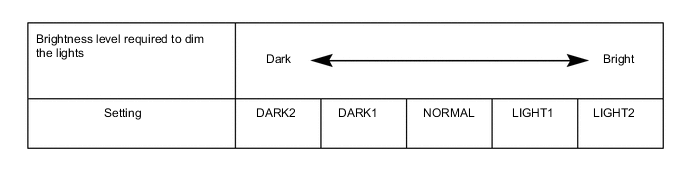
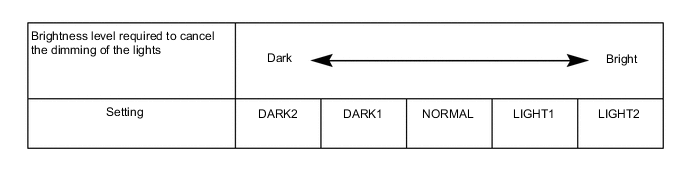
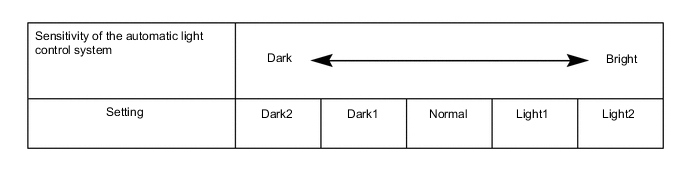
Light ControlTester Display Description Default Setting ECU Disp Ex ON Sen Changes the ambient brightness level required to dim the lights such as the indicator lights of the combination meter, A/C indicator light and clock.*A NORMAL 000:NORMAL,001:DARK2,010:DARK1,011:LIGHT1,100:LIGHT2 Main Body ECU (Multiplex Network Body ECU) Disp Ex OFF Sen Changes the ambient brightness level required to cancel the dimming of the lights such as the indicator lights of the combination meter, A/C indicator light and clock.*B NORMAL 000:NORMAL,001:DARK2,010:DARK1,011:LIGHT1,100:LIGHT2 Main Body ECU (Multiplex Network Body ECU) Sensitivity Adjusts the sensitivity of the automatic light control system.*C Normal 000:Normal,001:Dark2,010:Dark1,011:Light1,100:Light2 Main Body ECU (Multiplex Network Body ECU) DRL Function Turns the DRL function on/off.*2 ON 0:OFF,1:ON Main Body ECU (Multiplex Network Body ECU) Follow Me Home Lighting Time Sets the headlight lighting time after the engine switch is turned off.*1 30 s 00:30 s,01:60 s,10:90 s,11:120 s Main Body ECU (Multiplex Network Body ECU) Light up Clearance Lights at Door Unlock Function Turns on the clearance lights and the taillights for 15 seconds when the doors are unlocked by the smart key or the wireless key. ON 0:OFF,1:ON Main Body ECU (Multiplex Network Body ECU)
-
*1: w/ Follow Me Home System
-
*2: Vehicles displaying the Item "DRL Function" on the GTS
Tech Tips
The sensitivity adjustment may be difficult to confirm. Check by driving the vehicle.
-
*A
-
*B
-
*C
-
-
-
Customizing using the accessory meter assembly*1 or multi-display*2
-
*1: w/ Navigation System
-
*2: w/o Navigation System
-
Turn the engine switch on (IG).
-
Enter the following menus: MENU / Setup / Vehicle / Vehicle customization / Lights settings.
-
Select the setting by referring to the table below.
Lights settings Tester Display Description Default Setting ECU Light sensor sensitivity Adjusts the sensitivity of the automatic light control system.*A 0 -2, -1, 0, +1 or +2 Main Body ECU (Multiplex Network Body ECU) Exterior lights off timer Changes the lighting time of the outside handle foot lights. 15 sec. Off, 7.5 sec., 15 sec. or 30 sec. Main Body ECU (Multiplex Network Body ECU) Tech Tips
The sensitivity adjustment may be difficult to confirm. Check by driving the vehicle.
-
*A
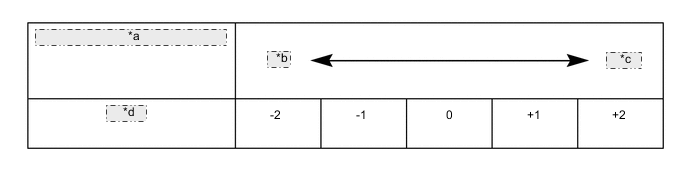
*a Sensitivity of the automatic light control system *b Dark *c Bright *d Setting
-
-
-
Customization of lane change flasher and turn cancel functions
-
Customize the lane change flasher and turn cancel functions by following the procedures shown below.
Step Operation Remark 1
-
Turn the engine switch off.
-
Move the windshield wiper switch assembly and headlight dimmer switch assembly to the NEUTRAL position.
- 2
-
Set the number of blinks for the lane change flasher control.
-
Refer to the following items and select wiper speed switch position P1, P2 or P3.
-
Blinks 3 times: P1
-
Blinks 5 times: P2
-
Blinks 7 times: P3
When setting the lane change flasher control to on:
-
Select wiper speed switch position P4.
When setting the lane change flasher control to off:
Do not operate the wiper speed switch after step 3. 3
-
Move the windshield wiper switch assembly from the NEUTRAL position to the OFF position and hold it there.
-
Steps 3, 4 and 5 are operations for changing to lane change flasher setting mode.
-
If operations other than those described in steps 3, 4 or 5 are performed, the control will change to normal mode. Start from step 1 again.
4
-
Turn the engine switch on (IG).
5
-
Keep the windshield wiper switch assembly in the OFF position for 5 seconds or more.
-
Move the windshield wiper switch assembly from the OFF position to the WPDN position.
-
Keep the windshield wiper switch assembly in the WPDN position for 5 seconds or more.
-
Move the windshield wiper switch assembly from the WPDN position to the OFF position.
-
Perform operations 1 to 3 again.
-
Move the windshield wiper switch assembly from the WPDN position to the NEUTRAL position.
Perform the following operations:
6
-
Check that the mode has changed to lane change flasher control setting mode.
- OK:
-
The right turn signal lights blink once.
While changing to lane change flasher control setting mode, wiper control and turn signal light control cannot be performed. 7
-
Confirm the selected setting (number of blinks) by performing the following operations:
-
Move the headlight dimmer switch assembly from the NEUTRAL position to the left lane change position.
-
Move the headlight dimmer switch assembly to the NEUTRAL position.
-
Set and confirm the canceling method by performing the following operations:
-
Canceling by operating the lever in the opposite direction
-
Move the headlight dimmer switch assembly from the NEUTRAL position to the left lane change position.
-
Move the headlight dimmer switch assembly to the NEUTRAL position.
-
Canceling by operating the lever in the same direction
-
Move the headlight dimmer switch assembly from the NEUTRAL position to the right lane change position.
-
Move the headlight dimmer switch assembly to the NEUTRAL position.
-
If operations other than those described in step 7 are performed, the control will change to normal mode. Start from step 1 again.
-
Make sure to finish step 7 within approximately 20 seconds.
8
-
Check the answer back for completion of setting the number of blinks of the lane change flasher control.
-
Blinks 3 times
- OK:
-
The left turn signal lights blink once.
-
Blinks 5 times
- OK:
-
The left turn signal lights blink twice.
-
Blinks 7 times
- OK:
-
The left turn signal lights blink 3 times.
-
Check the answer back for completion of changing the turn cancel function.
-
Canceling by operating the lever in the opposite direction
- OK:
-
Canceling by operating the lever in the opposite direction
-
Canceling by operating the lever in the same direction
- OK:
-
The left turn signal lights blink 5 times.
-
If 20 seconds or more had elapsed while performing step 7, the control will have changed to normal mode. Start from step 1 again.
If the answer back cannot be confirmed:
9 Setting is complete. Lane change flasher control setting mode changes to normal mode. -
-
for LHD
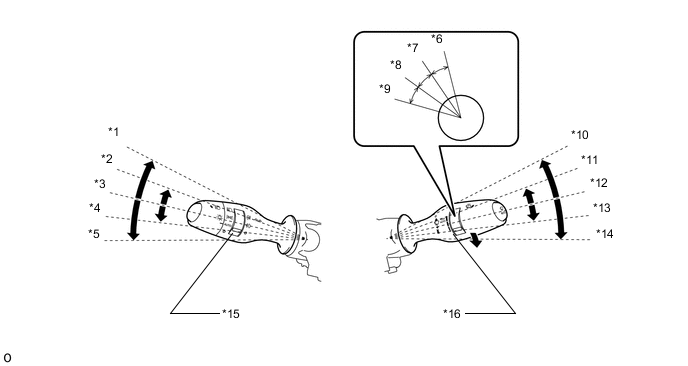
*1 Right Turn *2 Right Lane Change *3 NEUTRAL *4 Left Lane Change *5 Left Turn *6 Wiper Speed Setting P4 *7 Wiper Speed Setting P3 *8 Wiper Speed Setting P2 *9 Wiper Speed Setting P1 *10 Off *11 WPDN *12 NEUTRAL *13 WPUP *14 HI *15 Headlight Dimmer Switch Assembly *16 Windshield Wiper Switch Assembly -
for RHD (Dimmer Switch RH Side)
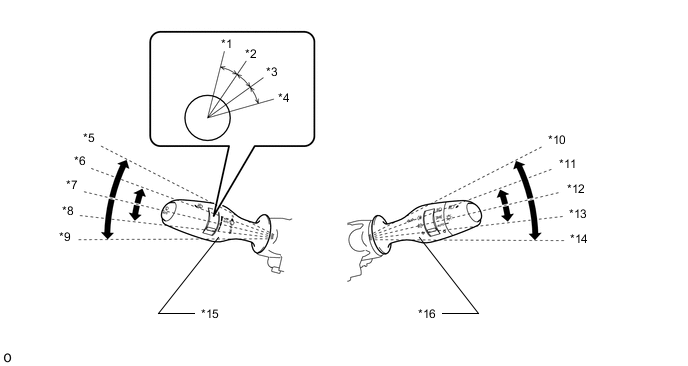
*1 Wiper Speed Setting P4 *2 Wiper Speed Setting P3 *3 Wiper Speed Setting P2 *4 Wiper Speed Setting P1 *5 Off *6 WPDN *7 NEUTRAL *8 WPUP *9 HI *10 Left Turn *11 Left Lane Change *12 NEUTRAL *13 Right Lane Change *14 Right Turn *15 Windshield Wiper Switch Assembly (for LH Side) *16 Headlight Dimmer Switch Assembly (for RH Side) -
for RHD (Dimmer Switch LH Side)
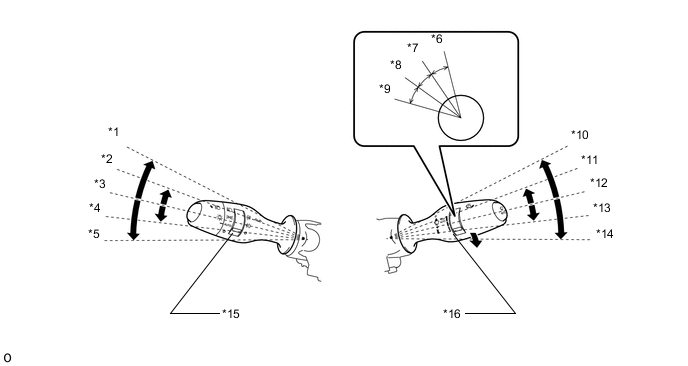
*1 Right Turn *2 Right Lane Change *3 NEUTRAL *4 Left Lane Change *5 Left Turn *6 Wiper Speed Setting P4 *7 Wiper Speed Setting P3 *8 Wiper Speed Setting P2 *9 Wiper Speed Setting P1 *10 Off *11 WPDN *12 NEUTRAL *13 WPUP *14 HI *15 Headlight Dimmer Switch Assembly (for LH Side) *16 Windshield Wiper Switch Assembly (for RH Side)
-
-