HEADLIGHT CLEANER ACTUATOR INSTALLATION
PROCEDURE
-
INSTALL WASHER BRACKET NO.2
Tech Tips
When installing the No. 2 washer bracket, heat the front bumper cover and No. 2 washer bracket using an infrared light.
Heating Temperature Item Temperature Front Bumper Cover 20 to 30°C (68 to 86°F)
3 to 5 minutes
No. 2 washer bracket 20 to 30°C (68 to 86°F)
3 to 5 minutes
Note
Do not heat the front bumper cover and No. 2 washer bracket excessively.
-
Clean the vehicle body surface.
-
Using an infrared light, heat the front bumper cover.
-
Using a piece of cloth, rub the adhesive off the front bumper cover.
Note
-
Installing the No. 2 washer bracket while any of the old double-sided tape remains could result in adhesion failure, so continue cleaning until the old tape is fully removed.
-
Removing the tape with a tool such as a screwdriver will damage the surface and cause adhesion failure, so use a piece of cloth or similar to clean away the old tape.
-
-
Using a non-residue solvent, clean the attachment surface.
-
-
Using a protective tape, cover the installation hole of headlight washer actuator sub-assembly.
-
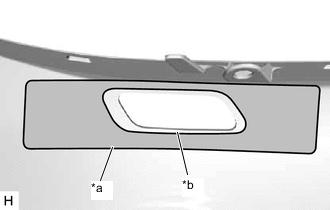
*a Mark-off Line *b Installation Hole of Headlight Washer Actuator Sub-assembly 
Area to Apply Primer Apply primer.
-
Using a brush or felt, apply primer to the area within the mark-off line.
Note
-
If the brush or felt is dirty or hardened, replace it with a new one.
-
If primer adheres, it may leave faint stains, so when using a liquid type primer, protect the painted areas with tape.
-
Do not touch the surface with the primer applied until applying the tape.
-
Do not allow the primer to adhere to any painted surfaces.
-
-
-
Allow the primer to dry thoroughly.
Suggested drying time 10 minutes or more (at 23 °C (73 °F)) -
After the primer is dry to the touch, remove the protective tape.
-
Remove the peeling paper from a new No. 2 washer bracket.
-
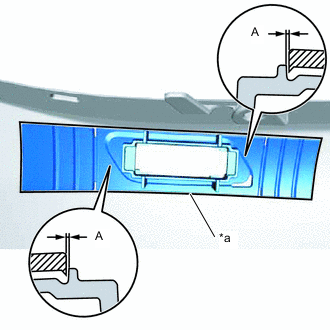
*a Mark-off Line No. 2 Headlight Cleaner Tape 
Front Bumper Cover Align the No. 2 washer bracket with the mark-off line of the front bumper cover as shown in the illustration.
Note
Press the No. 2 washer bracket firmly to install it.
Standard Measurement Area Measurement A 0.3 mm (0.012 in.)
-
-
INSTALL NO. 1 HEADLIGHT CLEANER BRACKET
Tech Tips
Use the same procedure as for the No. 2 washer bracket.
-
INSTALL HEADLIGHT WASHER ACTUATOR SUB-ASSEMBLY LH
-
Install the spring nut to the headlight washer actuator sub-assembly LH.
-
Engage the guide and claws as shown in the illustration.
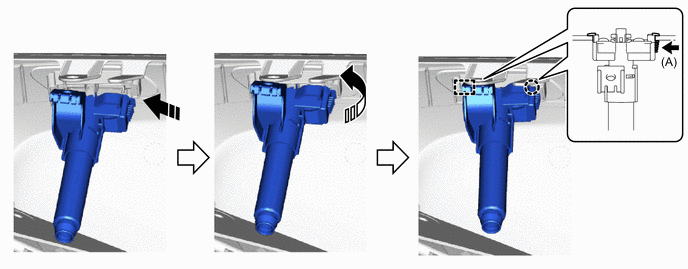

Install in this Direction (1) 
Install in this Direction (2) -
Install the headlight washer actuator sub-assembly LH with the screw.
- Torque:
- 4.6 N*m { 47 kgf*cm, 41 in.*lbf }
-
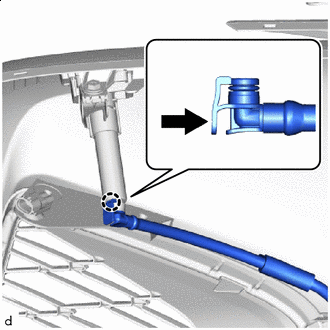

Push Engage the claw to connect the headlight cleaner hose as shown in the illustration.
-
-
INSTALL HEADLIGHT WASHER ACTUATOR SUB-ASSEMBLY RH
Tech Tips
Use the same procedure as for the LH side.
-
INSTALL HEADLIGHT WASHER COVER LH
-
INSTALL HEADLIGHT WASHER COVER RH
Tech Tips
Use the same procedure as for the LH side.
-
INSTALL FRONT BUMPER ASSEMBLY