LIGHTING SYSTEM Illumination Circuit
DESCRIPTION
The main body ECU and front multiplex network door ECU controls the interior illumination lights.
WIRING DIAGRAM
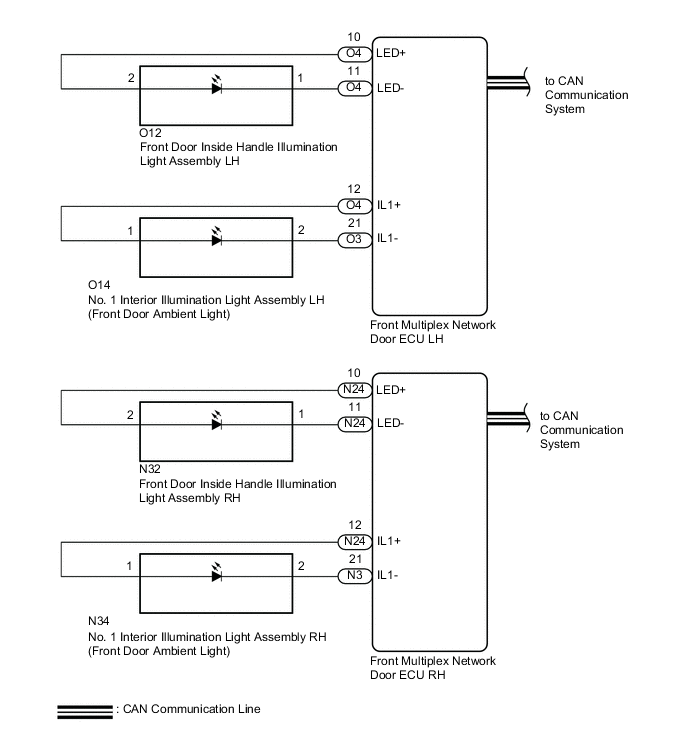
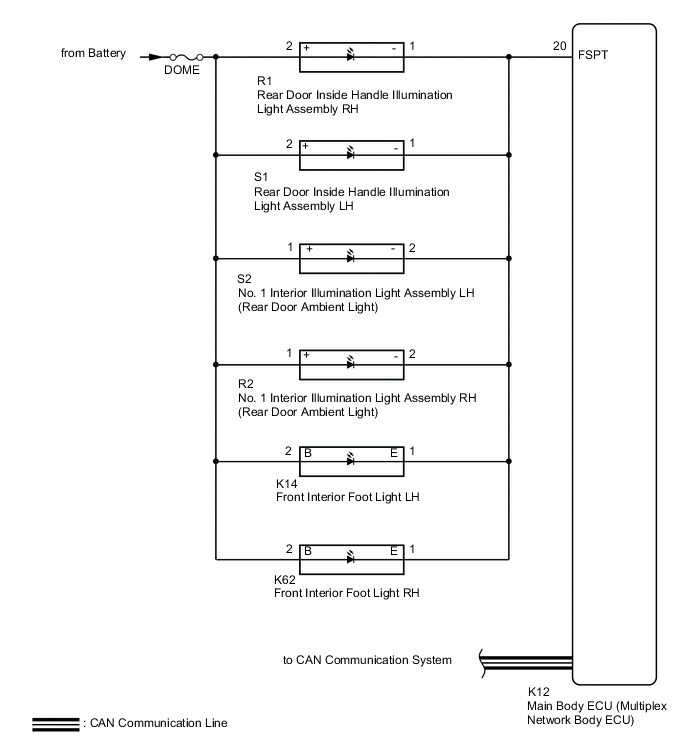
CAUTION / NOTICE / HINT
Note
-
First perform the communication function inspections in How to Proceed with Troubleshooting to confirm that there are no CAN communication malfunctions before troubleshooting this DTC.
-
Inspect the fuses for circuits related to this system before performing the following inspection procedure.
-
Recognition code registration is necessary when replacing the main body ECU (multiplex network body ECU).
-
If the main body ECU (multiplex network body ECU) is replaced, refer to Service Bulletin.
PROCEDURE
-
CHECK OPERATION
-
Check the operation of each light.
Result Result Proceed to Front door illumination does not illuminates A Rear door illumination and interior foot light do not illuminates B
B 
PERFORM ACTIVE TEST USING GTS (FR FOOT LIGHT) Click here
A 
-
-
PERFORM ACTIVE TEST USING GTS (ILLUMINATION LIGHT)
-
Connect the GTS to the DLC3.
-
Turn the engine switch on (IG).
-
Turn the GTS on.
-
Enter the following menus: Body Electrical / Front Left Door / Active Test.
-
Enter the following menus: Body Electrical / Front Right Door / Active Test.
-
Perform the Active Test according to the display on the GTS.
Body Electrical > Front Left Door > Active TestTester Display Measurement Item Control Range Diagnostic Note Inside Handle Light Front door inside handle illumination light LH ON/OFF - Interior Illumination Light Front door ambient light LH ON/OFF -
Body Electrical > Front Right Door > Active TestTester Display Measurement Item Control Range Diagnostic Note Inside Handle Light Front door inside handle illumination light RH ON/OFF - Interior Illumination Light Front door ambient light RH ON/OFF -
Body Electrical > Front Left Door > Active TestTester Display Inside Handle Light
Body Electrical > Front Left Door > Active TestTester Display Interior Illumination Light
Body Electrical > Front Right Door > Active TestTester Display Inside Handle Light
Body Electrical > Front Right Door > Active TestTester Display Interior Illumination Light OK Front door inside handle illumination light and front door ambient light illuminates. Result Result Proceed to OK A NG (front door inside handle illumination light does not illuminates) B NG (No. 1 interior illumination light [front door ambient light] does not illuminates) C
A 
PROCEED TO NEXT SUSPECTED AREA SHOWN IN PROBLEM SYMPTOMS TABLE Click here
C
INSPECT NO. 1 INTERIOR ILLUMINATION LIGHT (FRONT DOOR AMBIENT LIGHT) Click here
B
-
-
INSPECT FRONT DOOR INSIDE HANDLE ILLUMINATION LIGHT ASSEMBLY
-
Remove the front door inside handle illumination light.
-
Inspect the front door inside handle illumination light.
Result Proceed to OK NG
NG
REPLACE FRONT DOOR INSIDE HANDLE ILLUMINATION LIGHT ASSEMBLY Click here
OK
-
-
CHECK HARNESS AND CONNECTOR (FRONT MULTIPLEX NETWORK DOOR ECU - FRONT DOOR INSIDE HANDLE ILLUMINATION LIGHT)
-
for LH:
-
Disconnect the O4 front multiplex network door ECU LH connector.
-
Disconnect the O12 front door inside handle illumination light LH connector.
-
-
for RH:
-
Disconnect the N24 front multiplex network door ECU RH connector.
-
Disconnect the N32 front door inside handle illumination light RH connector.
-
-
Measure the resistance according to the value(s) in the table below.
Standard Resistance for LH Tester Connection Condition Specified Condition O4-11 (LED-) - O12-1 (-) Always Below 1 Ω O4-10 (LED+) - O12-2 (+) Always Below 1 Ω O4-11 (LED-) - Body ground Always 10 kΩ or higher O4-10 (LED+) - Body ground Always 10 kΩ or higher for RH Tester Connection Condition Specified Condition N24-11 (LED-) - N32-1 (-) Always Below 1 Ω N24-10 (LED+) - N32-2 (+) Always Below 1 Ω N24-11 (LED-) - Body ground Always 10 kΩ or higher N24-10 (LED+) - Body ground Always 10 kΩ or higher Result Proceed to OK NG
OK
REPLACE FRONT MULTIPLEX NETWORK DOOR ECU Click here
NG
REPAIR OR REPLACE HARNESS OR CONNECTOR
-
-
INSPECT NO. 1 INTERIOR ILLUMINATION LIGHT (FRONT DOOR AMBIENT LIGHT)
-
Remove the No. 1 interior illumination light (front door ambient light).
-
Inspect the No. 1 interior illumination light (front door ambient light).
Result Proceed to OK NG
NG
REPLACE NO. 1 INTERIOR ILLUMINATION LIGHT (FRONT DOOR AMBIENT LIGHT) Click here
OK
-
-
CHECK HARNESS AND CONNECTOR (FRONT MULTIPLEX NETWORK DOOR ECU - NO. 1 INTERIOR ILLUMINATION LIGHT [FRONT DOOR AMBIENT LIGHT])
-
for LH:
-
Disconnect the O3 and O4 front multiplex network door ECU LH connector.
-
Disconnect the O14 No. 1 interior illumination light LH (front door ambient light) connector.
-
-
for RH:
-
Disconnect the N3 and N24 front multiplex network door ECU RH connector.
-
Disconnect the N34 No. 1 interior illumination light RH (front door ambient light) connector.
-
-
Measure the resistance according to the value(s) in the table below.
Standard Resistance for LH Tester Connection Condition Specified Condition O3-21 (IL1-) - O14-2 Always Below 1 Ω O4-12 (IL1+) - O14-1 Always Below 1 Ω O3-21 (IL1-) - Body ground Always 10 kΩ or higher O4-12 (IL1+) - Body ground Always 10 kΩ or higher for RH Tester Connection Condition Specified Condition N3-21 (IL1-) - N34-2 Always Below 1 Ω N24-12 (IL1+) - N34-1 Always Below 1 Ω N3-21 (IL1-) - Body ground Always 10 kΩ or higher N24-12 (IL1+) - Body ground Always 10 kΩ or higher Result Proceed to OK NG
OK
REPLACE FRONT MULTIPLEX NETWORK DOOR ECU Click here
NG
REPAIR OR REPLACE HARNESS OR CONNECTOR
-
-
PERFORM ACTIVE TEST USING GTS (FR FOOT LIGHT)
-
Connect the GTS to the DLC3.
-
Turn the engine switch on (IG).
-
Turn the GTS on.
-
Enter the following menus: Body Electrical / Main Body / Active Test.
-
Perform the Active Test according to the display on the GTS.
Body Electrical > Main Body > Active TestTester Display Measurement Item Control Range Diagnostic Note Fr Foot Light Rear door inside handle illumination light, rear door ambient light and front interior foot light ON/OFF -
Body Electrical > Main Body > Active TestTester Display Fr Foot Light OK Rear door inside handle illumination light, rear door ambient light and front interior foot light illuminates. Result Proceed to OK NG
OK
PROCEED TO NEXT SUSPECTED AREA SHOWN IN PROBLEM SYMPTOMS TABLE Click here
NG
-
-
CHECK HARNESS AND CONNECTOR (REAR DOOR INSIDE HANDLE ILLUMINATION LIGHT - MAIN BODY ECU AND BODY GROUND)
-
Disconnect the K12 main body ECU (multiplex network body ECU) connector.
-
Disconnect the S1 rear door inside handle illumination light connector.
-
Measure the voltage according to the value(s) in the table below.
Standard Voltage Tester Connection Condition Specified Condition S1-2 (+) - Body ground Always 11 to 14 V -
Measure the resistance according to the value(s) in the table below.
Standard Resistance Tester Connection Condition Specified Condition S1-1 (-) - K12-20 (FSPT) Always Below 1 Ω S1-1 (-) - Body ground Always 10 kΩ or higher Result Proceed to OK NG
OK
REPLACE MAIN BODY ECU (MULTIPLEX NETWORK BODY ECU) Click here
NG
REPAIR OR REPLACE HARNESS OR CONNECTOR
-