WIRELESS DOOR LOCK CONTROL SYSTEM No Answer-Back
DESCRIPTION
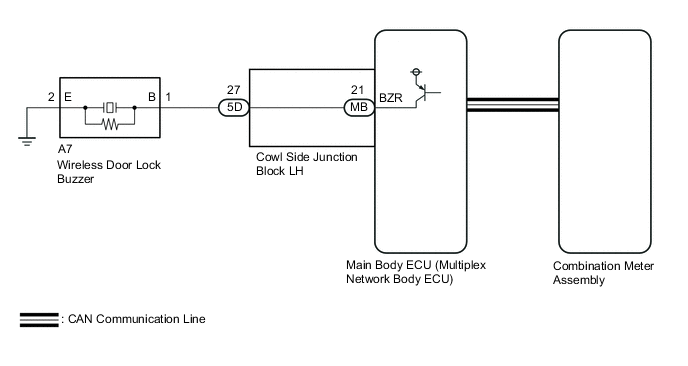
In some cases, wireless door lock control functions are normal but the hazard warning light and/or wireless door lock buzzer answer-back function*1 does not operate. In such cases, hazard warning light and wireless door lock buzzer signal outputs from the main body ECU (multiplex network body ECU) may be malfunctioning.
-
*1: w/ Wireless Door Lock Buzzer Answer-back Function
WIRING DIAGRAM
CAUTION / NOTICE / HINT
Note
-
The wireless door lock control system key reminder warning system uses the CAN communication system. Inspect the communication function by following How to Proceed with Troubleshooting. Troubleshoot the wireless door lock control system after confirming that the communication system is functioning properly.
-
If the main body ECU (multiplex network body ECU) is replaced, refer to Service Bulletin.
PROCEDURE
-
READ VALUE USING GTS (CUSTOMIZE SETTING)
-
Connect the GTS to the DLC3.
-
Turn the engine switch on (IG).
-
Turn the GTS on.
-
Enter the following menus: Customize Setting / Wireless Door Lock.
-
Select the setting by referring to the table below.
Wireless Door LockTester Display Description Default Setting ECU Hazard Answer Back When the doors are locked by wireless operation, the hazard warning lights flash once.
When the doors are unlocked by wireless operation, the hazard warning lights flash twice.
ON 0:OFF,1:ON Main body ECU (multiplex network body ECU) Wireless Buzzer Resp Wireless door lock buzzer response*1 ON 0:OFF,1:ON Main body ECU (multiplex network body ECU) Wireless Buzzer Vol Wireless door lock buzzer volume*1 Level 5 0000:Level7,0001:Level6,0010:Level5,0011:Level4,0100:Level3,0101:Level2,0110:Level1,0111:Level0 Main body ECU (multiplex network body ECU)
-
*1: w/ Wireless Door Lock Buzzer Answer-back Function
Result Result Proceed to Both items are ON and except Level 0 A Either item is OFF or Level 0 B -
B 
PERFORM CUSTOMIZE FUNCTION Click here
A 
-
-
CHECK WIRELESS DOOR LOCK CONTROL FUNCTIONS
-
Check the wireless door lock control function using the electrical key transmitter sub-assembly.
Result Result Proceed to Wireless door lock/unlock operates properly. A Wireless door lock/unlock does not operate properly. B
B
PROCEED TO NEXT SUSPECTED AREA SHOWN IN PROBLEM SYMPTOMS TABLE Click here
A
-
-
READ VALUE USING GTS (DOOR LOCK POSITION SWITCH)
-
Connect the GTS to the DLC3.
-
Turn the engine switch on (IG).
-
Turn the GTS on.
-
Enter the following menus: Body Electrical / Main Body / Data List.
-
Read the Data List according to the display on the GTS.
Body Electrical > Main Body > Data ListTester Display Measurement Item Range Normal Condition Diagnostic Note FR Door Lock Pos Front door RH unlock detection switch signal LOCK or UNLOCK LOCK: Front door RH locked
UNLOCK: Front door RH unlocked
- FL Door Lock Pos Front door LH unlock detection switch signal LOCK or UNLOCK LOCK: Front door LH locked
UNLOCK: Front door LH unlocked
- RR-Door Lock Pos SW Rear door RH unlock detection switch signal OFF or ON OFF: Rear door RH locked
ON: Rear door RH unlocked
- RL-Door Lock Pos SW Rear door LH unlock detection switch signal OFF or ON OFF: Rear door LH locked
ON: Rear door LH unlocked
-
Body Electrical > Main Body > Data ListTester Display FR Door Lock Pos FL Door Lock Pos RR-Door Lock Pos SW RL-Door Lock Pos SW OK The GTS display changes correctly in response to the lock/unlock operation. Result Proceed to OK NG
NG
GO TO LIGHTING SYSTEM (Proceed to Door Unlock Detection Switch Circuit) Click here
OK
-
-
CHECK WIRELESS ANSWER-BACK OPERATION
-
Check the wireless answer-back operation using the electrical key transmitter sub-assembly.
Result *: w/ Wireless Door Lock Buzzer Answer Back FunctionResult Proceed to Only wireless door lock buzzer answer-back does not occur*. A Only hazard warning light answer-back does not occur. B
B 
CHECK HAZARD WARNING LIGHTS OPERATION Click here
A
-
-
PERFORM ACTIVE TEST USING GTS (WIRELESS BUZZER)
-
Connect the GTS to the DLC3.
-
Turn the engine switch on (IG).
-
Turn the GTS on.
-
Enter the following menus: Body Electrical / Main Body / Active Test.
-
Perform the Active Test according to the display on the GTS.
Body Electrical > Main Body > Active TestTester Display Measurement Item Control Range Restrict Condition Wireless Buzzer Wireless door lock buzzer OFF or ON -
Body Electrical > Main Body > Active TestTester Display Wireless Buzzer Result Result Proceed to Wireless door lock buzzer does not turn on or off A Wireless door lock buzzer turns on or off B
B
REPLACE MAIN BODY ECU (MULTIPLEX NETWORK BODY ECU) Click here
A
-
-
CHECK HARNESS AND CONNECTOR (WIRELESS DOOR LOCK BUZZER - COWL SIDE JUNCTION BLOCK LH)
-
Disconnect the A7 wireless door lock buzzer connector.
-
Disconnect the 5D cowl side junction block LH connector.
-
Measure the resistance according to the value(s) in the table below.
Standard Resistance Tester Connection Condition Specified Condition A7-1 (B) - 5D-27 Always Below 1 Ω A7-2 (E) - Body ground Always Below 1 Ω A7-1 (B) or 5D-27 - Body ground Always 10 kΩ or higher Result Proceed to OK NG
NG
REPAIR OR REPLACE HARNESS OR CONNECTOR
OK
-
-
INSPECT COWL SIDE JUNCTION BLOCK LH
-
Remove the cowl side junction block LH.
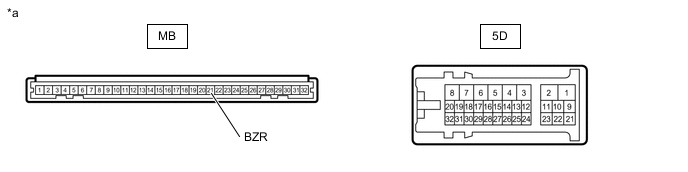
*a Component without harness connected
(Cowl Side Junction Block LH)
- - -
Measure the resistance according to the value(s) in the table below.
Standard Resistance Tester Connection Condition Specified Condition 5D-27 - MB-21 (BZR) Always Below 1 Ω 5D-27 or MB-21 (BZR) - Body ground Always 10 kΩ or higher Result Proceed to OK NG
NG
REPLACE COWL SIDE JUNCTION BLOCK LH
OK
-
-
REPLACE WIRELESS DOOR LOCK BUZZER
-
Temporarily replace the wireless door lock buzzer with a new one or normally functioning one.
Result Proceed to NEXT
NEXT
-
-
CHECK WIRELESS DOOR LOCK BUZZER OPERATION
-
Check the operation of the wireless answer-back function.
OK Wireless answer-back function operates normally. Result Proceed to OK NG
OK
END (WIRELESS DOOR LOCK BUZZER WAS DEFECTIVE)
NG
REPLACE MAIN BODY ECU (MULTIPLEX NETWORK BODY ECU) Click here
-
-
CHECK HAZARD WARNING LIGHTS OPERATION
-
Check that the hazard warning lights blink when the hazard warning signal switch is pressed.
OK Hazard warning lights blink. Result Proceed to OK NG
OK
REPLACE MAIN BODY ECU (MULTIPLEX NETWORK BODY ECU) Click here
NG
GO TO LIGHTING SYSTEM (Proceed to Hazard Warning Switch Circuit) Click here
-