MULTI-DISPLAY DISASSEMBLY
PROCEDURE
-
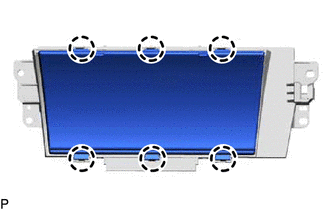
REMOVE MULTI-DISPLAY COVER (for 8 Inch)
Note
-
When removing and installing the multi-display cover, make sure not to touch the display panel.
-
Do not allow any dirt (fingerprints, grease, etc.) to adhere to the multi-display cover. If the multi-display cover is dirty, wipe it clean with a soft cloth.
-
Disengage the claws to remove the multi-display cover.
-
-
REMOVE ACCESSORY METER GLASS (for 12.3 Inch)
Note
-
When removing and installing the accessory meter glass, make sure not to touch the display panel.
-
Do not allow any dirt (fingerprints, grease, etc.) to adhere to the accessory meter glass. If the accessory meter glass is dirty, wipe it clean with a soft cloth.
-
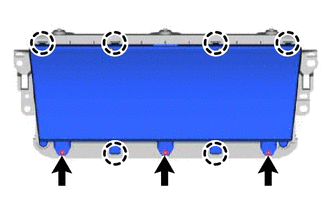
Remove the 3 screws.
-
Disengage the claws to remove the accessory meter glass.
-