NAVIGATION SYSTEM, Diagnostic DTC:B15DA
| DTC Code | DTC Name |
|---|---|
| B15DA | Rear Console Recognition Disconnected |
DESCRIPTION
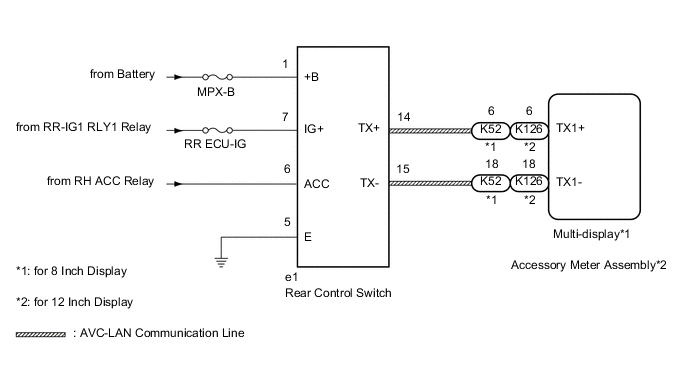
The rear control switch and radio receiver assembly are connected by the AVC-LAN communication line.
This DTC is stored when an AVC-LAN communication error occurs between the rear control switch and radio receiver assembly.
| DTC No. | Detection Item | DTC Detection Condition | Trouble Area |
|---|---|---|---|
| B15DA | Rear Console Recognition Disconnected | A device that is listed in the AVC-LAN connected device record of the master unit is missing |
|
-
*1: for 8 Inch Display
-
*2: for 12.3 Inch Display
WIRING DIAGRAM
CAUTION / NOTICE / HINT
Note
-
Depending on the parts that are replaced during vehicle inspection or maintenance, performing initialization, registration or calibration may be needed.
-
Inspect the fuses for circuits related to this system before performing the following procedure.
PROCEDURE
-
CHECK OPTIONAL COMPONENTS (INCLUDING ASSOCIATED WIRING)
-
Check for optional components.
-
Check that optional components (including associated wiring) which generate radio waves are not installed.
Result Result Proceed to Optional components (including associated wiring) are installed. A Optional components (including associated wiring) are not installed. B Tech Tips
-
Electrical noise from radio waves generated by optional components or the wiring for those components may affect AVC-LAN communication.
-
This DTC may be stored when an AVC-LAN communication error occurs due to electrical noise.
-
-
B 
GO TO STEP 3 Click here
A 
-
-
REMOVE OPTIONAL COMPONENTS (INCLUDING ASSOCIATED WIRING)
-
Remove optional components (including associated wiring).
Note
Do not remove optional components or associated wiring without the permission of the customer.
Result Proceed to NEXT
NEXT
-
-
CHECK DTC
-
Clear the DTCs.
Body Electrical > Navigation System > Clear DTCs -
Recheck for DTCs and check if the same DTC is output again.
Body Electrical > Navigation System > Trouble CodesOK No DTCs are output. Result Proceed to OK NG
OK 
END (COMMUNICATION MALFUNCTION DUE TO NOISE)
NG
-
-
CHECK HARNESS AND CONNECTOR (REAR CONTROL SWITCH POWER SOURCE)
-
Disconnect the rear control switch connector.
-
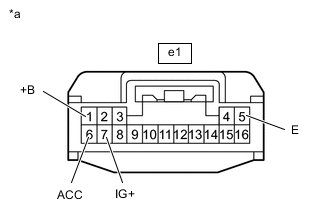
*a Front view of wire harness connector
(to Rear Control Switch)
Measure the resistance according to the value(s) in the table below.
Standard Resistance Tester Connection Condition Specified Condition e1-5 (E) - Body ground Always Below 1 Ω -
Measure the voltage according to the value(s) in the table below.
Standard Voltage Tester Connection Condition Specified Condition e1-1 (+B) - Body ground Always 11 to 14 V e1-6 (ACC) - Body ground Engine switch on (ACC) 11 to 14 V e1-7 (IG+) - Body ground Engine switch on (IG) 11 to 14 V Result Result Proceed to OK (for 8 Inch Display) A OK (for 12 Inch Display) B NG C
B
CHECK HARNESS AND CONNECTOR (REAR CONTROL SWITCH - ACCESSORY METER ASSEMBLY) Click here
C
REPAIR OR REPLACE HARNESS OR CONNECTOR
A
-
-
CHECK HARNESS AND CONNECTOR (REAR CONTROL SWITCH - MULTI-DISPLAY)
-
Disconnect the e1 rear control switch connector.
-
Disconnect the K52 multi-display connector.
-
Measure the resistance according to the value(s) in the table below.
Standard Resistance Tester Connection Condition Specified Condition e1-14 (TX+) - K52-6 (TX1+) Always Below 1 Ω e1-15 (TX-) - K52-18 (TX1-) Always Below 1 Ω e1-14 (TX+) - Body ground Always 10 kΩ or higher e1-15 (TX-) - Body ground Always 10 kΩ or higher Result Proceed to OK NG
NG
REPAIR OR REPLACE HARNESS OR CONNECTOR
OK
-
-
REPLACE REAR CONTROL SWITCH
-
Replace the rear control switch with a new or normally functioning one.
-
Clear the DTCs.
Body Electrical > Navigation System > Clear DTCs -
Recheck for DTCs and check that no DTCs are output.
Body Electrical > Navigation System > Trouble CodesResult Proceed to OK NG
OK
END (REAR CONTROL SWITCH WAS DEFECTIVE)
NG
REPLACE MULTI-DISPLAY Click here
-
-
CHECK HARNESS AND CONNECTOR (REAR CONTROL SWITCH - ACCESSORY METER ASSEMBLY)
-
Disconnect the e1 rear control switch connector.
-
Disconnect the K126 accessory meter assembly connector.
-
Measure the resistance according to the value(s) in the table below.
Standard Resistance Tester Connection Condition Specified Condition e1-14 (TX+) - K126-6 (TX1+) Always Below 1 Ω e1-15 (TX-) - K126-18 (TX1-) Always Below 1 Ω e1-14 (TX+) - Body ground Always 10 kΩ or higher e1-15 (TX-) - Body ground Always 10 kΩ or higher Result Proceed to OK NG
NG
REPAIR OR REPLACE HARNESS OR CONNECTOR
OK
-
-
REPLACE REAR CONTROL SWITCH
-
Replace the rear control switch with a new or normally functioning one.
-
Clear the DTCs.
Body Electrical > Navigation System > Clear DTCs -
Recheck for DTCs and check that no DTCs are output.
Body Electrical > Navigation System > Trouble CodesResult Proceed to OK NG
OK
END (REAR CONTROL SWITCH WAS DEFECTIVE)
NG
REPLACE ACCESSORY METER ASSEMBLY Click here
-