NAVIGATION SYSTEM, Diagnostic DTC:B1575
| DTC Code | DTC Name |
|---|---|
| B1575 | GVIF Disconnected (from EMV/MM Integrated Device to Multi Display) |
DESCRIPTION
The radio receiver assembly and multi-display*1 or accessory meter assembly*2 are connected via a video signal (digital) line.
This DTC is stored when a video signal (digital) line is disconnected.
| DTC No. | Detection Item | DTC Detection Condition | Trouble Area |
|---|---|---|---|
| B1575 | GVIF Disconnected (from EMV/MM Integrated Device to Multi Display) | Video signal (digital) is lost |
|
-
*1: for 8 Inch Display
-
*2: for 12.3 Inch Display
WIRING DIAGRAM
-
for 8 Inch Display
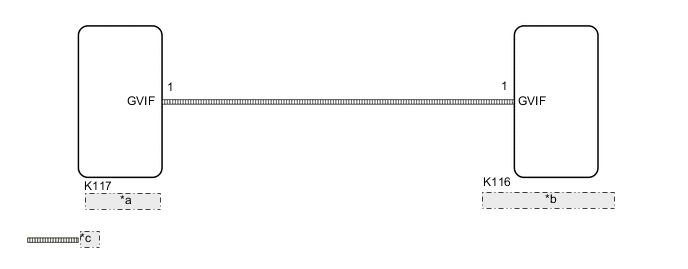
*a Multi-display *b Radio Receiver Assembly *c Video Signal (Digital) -
for 12.3 Inch Display
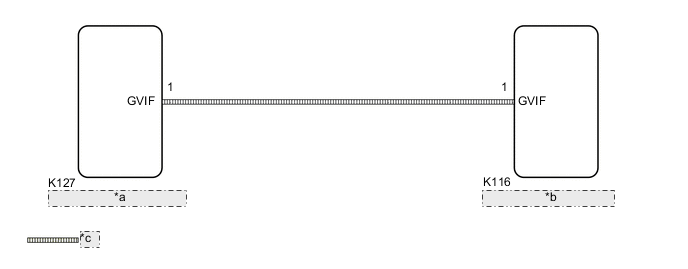
*a Accessory Meter Assembly *b Radio Receiver Assembly *c Video Signal (Digital)
CAUTION / NOTICE / HINT
Note
Depending on the parts that are replaced during vehicle inspection or maintenance, performing initialization, registration or calibration may be needed.
PROCEDURE
-
CHECK MODEL
-
Choose the model to be inspected.
Result Result Proceed to for 8 Inch Display A for 12.3 Inch Display B
B 
REPLACE HARNESS AND CONNECTOR (RADIO RECEIVER ASSEMBLY - ACCESSORY METER ASSEMBLY) Click here
A 
-
-
REPLACE HARNESS AND CONNECTOR (RADIO RECEIVER ASSEMBLY - MULTI-DISPLAY)
-
Replace the harness and connectors.
-
Clear the DTCs.
Body Electrical > Navigation System > Clear DTCs -
Recheck for DTCs and check that no DTCs are output.
Body Electrical > Navigation System > Trouble CodesOK No DTCs are output. Result Proceed to OK NG
OK 
END
NG
-
-
REPLACE MULTI-DISPLAY
-
Replace the multi-display with a new or known good one.
-
Clear the DTCs.
Body Electrical > Navigation System > Clear DTCs -
Recheck for DTCs and check that no DTCs are output.
Body Electrical > Navigation System > Trouble CodesOK No DTCs are output. Result Proceed to OK NG
OK
END
NG
REPLACE RADIO RECEIVER ASSEMBLY Click here
-
-
REPLACE HARNESS AND CONNECTOR (RADIO RECEIVER ASSEMBLY - ACCESSORY METER ASSEMBLY)
-
Replace the harness and connectors.
-
Clear the DTCs.
Body Electrical > Navigation System > Clear DTCs -
Recheck for DTCs and check that no DTCs are output.
Body Electrical > Navigation System > Trouble CodesOK No DTCs are output. Result Proceed to OK NG
OK
END
NG
-
-
REPLACE ACCESSORY METER ASSEMBLY
-
Replace the accessory meter assembly with a new or known good one.
-
Clear the DTCs.
Body Electrical > Navigation System > Clear DTCs -
Recheck for DTCs and check that no DTCs are output.
Body Electrical > Navigation System > Trouble CodesOK No DTCs are output. Result Proceed to OK NG
OK
END
NG
REPLACE RADIO RECEIVER ASSEMBLY Click here
-