REAR PACKAGE TRAY SPEAKER REMOVAL
CAUTION / NOTICE / HINT
The necessary procedures (adjustment, calibration, initialization, or registration) that must be performed after parts are removed, installed, or replaced during the rear package tray speaker removal/installation are shown below.
| Replacement Part or Procedure | Necessary Procedure | Effect/Inoperative when not Performed | Link |
|---|---|---|---|
| Disconnect cable from negative battery terminal | Correct the steering angle neutral point | Parking assist monitor system | |
| Lane departure alert system (w/ Steering Control) | |||
| Pre-crash safety system | |||
| Adaptive high beam system | |||
| Reset power trunk lid | Power trunk lid system |
PROCEDURE
-
REMOVE PACKAGE TRAY TRIM PANEL ASSEMBLY
-
REMOVE REAR NO. 3 SPEAKER ASSEMBLY
-
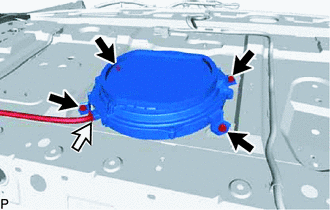
Disconnect the connector.
-
Remove the 4 bolts and rear No. 3 speaker assembly.
Note
Do not touch the cone of the speaker.
-
-
REMOVE NO. 2 PACKAGE TRAY TRIM PANEL ASSEMBLY (w/ Mark Levinson Speaker System)
-
REMOVE REAR HEADER SPEAKER ASSEMBLY (w/ Mark Levinson Speaker System)
Tech Tips
-
Use the same procedure for the RH and LH sides.
-
The procedure listed above is for the RH side.
-
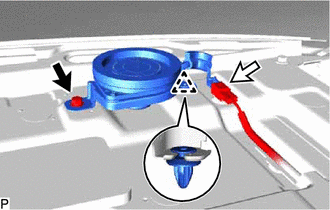
Remove the bolt.
-
Disconnect the connector.
-
Disengage the clip to remove the rear header speaker assembly.
Note
Do not touch the cone of the speaker.
-