TIRE AND WHEEL SYSTEM INSPECTION
PROCEDURE
-
INSPECT TIRES
-
Inspect the tires for wear and proper inflation pressure.
Cold Tire Inflation Pressure Tire Size Tire Inflation Pressure Front Rear 235/40ZR19 (96Y) 300 kPa (3.1 kgf/cm2, 44 psi)*1
250 kPa (2.5 kgf/cm2, 36 psi)*2
300 kPa (3.1 kgf/cm2, 44 psi)*1
250 kPa (2.5 kgf/cm2, 36 psi)*2
255/35ZR19 (92Y) 300 kPa (3.1 kgf/cm2, 44 psi)*1
250 kPa (2.5 kgf/cm2, 36 psi)*2
- 275/35ZR19 (96Y) - 300 kPa (3.1 kgf/cm2, 44 psi)*1
250 kPa (2.5 kgf/cm2, 36 psi)*2
*1: For driving at over 220 km/h (137 mph)
*2: For driving at under 220 km/h (137 mph)
Cold Tire Inflation Pressure (for Spare Tire) Tire Size kPa (kgf/cm2, psi)
225/40ZR19 (93Y) 290 kPa (2.9 kgf/cm2, 42 psi)
-
Tire pressure adjustment method when warm:
-
Turn the engine switch off.
-
Connect the GTS to the DLC3.
-
Turn the engine switch on (IG).
-
Turn the GTS on.
-
Enter the following menus: Chassis / Tire Pressure Monitor / Data List.
-
Adjust the tire pressure so that the displayed value is equal to the set pressure.
-
Perform initialization and check that initialization completes.
-
Check and record the value of the Data List item "Temperature in Tire". (Ts)
-
Check and record the ambient temperature during tire pressure adjustment. (Tm)
-
Readjust the tire pressure according to the difference between the tire internal temperature (Ts) and the ambient temperature (Tm). (P)
Tech Tips
Tire internal temperature: Ts, Ambient temperature: Tm, Tire pressure readjustment value: P
P = (Specified Pressure) + (Ts - Tm)
-
Check the pressure adjustment value with the Data List item "Tire Inflation Pressure".
Note
for ECE-R64 Type:If the tire pressure is decreased approximately 20 kPa (0.2 kgf/cm2, 2.9 psi) or more in order to adjust the tire pressure, even if the adjusted tire pressure is approximately 80% or more than the tire pressure set during system initialization, the tire pressure warning light may illuminate if the tire pressure drops below approximately 80% of the tire pressure set when the tires are warmed. In this case, perform initialization again.
-
-
-
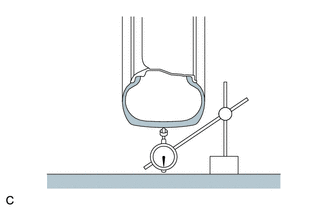
Using a dial indicator, check the runout of the tires.
Maximum Tire Runout 1.0 mm (0.0394 in.) Tech Tips
Remove the wheel assembly from the vehicle, and measure the wheel assembly alone.
-
-
ROTATE TIRES
-
Remove the wheel assembly.
-
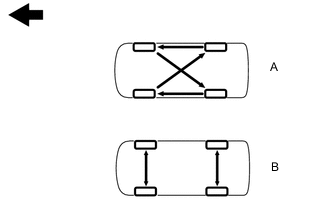

Front When the size of the front and rear tires are the same, rotate the tires as shown in the illustration (A). When the size of the front and rear tires are not the same, rotate the tires as shown in the illustration (B).
-
Install the wheel assembly.
-
-
INSPECT AND ADJUST WHEEL BALANCE
-
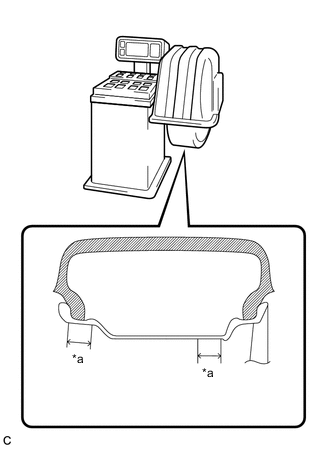
*a 25 mm (0.984 in.) Inspect and adjust the off-the-car balance.
Maximum Imbalance 8.0 g (0.0176 lb) Note
-
Use a cleaning detergent to remove dirt, oil and water from the surface where the balance weight is to be adhered.
-
Do not touch the adhesive surface of the balance weight.
-
Adhere a stick-on type balance weight to the flat surface*a shown in the illustration.
-
Push the balance weight with your finger to securely adhere it to the desired position.
-
Do not reuse balance weights.
-
Please use the LEXUS genuine sticking type balance weight.
Tech Tips
-
Use stick-on type balance weights for both the inner and outer side.
-
If the tires vibrate even after off-the-car balance adjustment, adjust the wheel balance with on-the-car balancing as necessary.
-
-
-
INSPECT FRONT AXLE HUB BEARING
-
INSPECT REAR AXLE HUB BEARING