SIMPLE INTELLIGENT PARKING ASSIST SYSTEM SYSTEM DESCRIPTION
-
FUNCTION OF COMPONENTS
-
The simple intelligent parking assist system consists of the following components:
Component Function Clearance Warning ECU Assembly
-
Sends operation signals to the power steering ECU assembly via CAN communication when simple intelligent parking assist system is operating.
-
Sends simple intelligent parking assist display request signals to the combination meter assembly via CAN communication.
-
Searches for empty parking spaces based on the signals from the ultrasonic sensors when the simple intelligent parking assist system is operating.
IPA Main Switch Assembly Sends the switch operation signal to the clearance warning ECU assembly.
-
No. 1 Clearance Warning Buzzer
-
No. 2 Clearance Warning Buzzer
Sounds to inform the driver according to the distance to an obstacle
-
Front Side Ultrasonic Sensor
-
Front Center Ultrasonic Sensor
-
Front Corner Ultrasonic Sensor
-
Rear Side Ultrasonic Sensor
-
Rear Center Ultrasonic Sensor
-
Rear Corner Ultrasonic Sensor
Controlled by the clearance warning ECU assembly and detects an available parking space Spiral Cable with Sensor Sub-assembly Detects the angle of the steering wheel and sends the resulting signals to the clearance warning ECU assembly via CAN communication. Power Steering ECU Assembly
-
Sends EPS failure, intervention steering, and other related vehicle condition signals to the clearance warning ECU assembly.
-
Performs steering control based on simple intelligent parking assist control signals and steering-related signals.
Skid Control ECU (Brake Booster with Master Cylinder Assembly) Sends the stop switch signal, vehicle speed signal, driving distance signal, and other vehicle condition signals to the clearance warning ECU assembly. ECM Sends status signals to the clearance warning ECU assembly via CAN communication. Hybrid Vehicle Control ECU Sends the shift state signal to the clearance warning ECU assembly via CAN communication Air Conditioning Amplifier Assembly Sends the outside temperature signal to the clearance warning ECU assembly via CAN communication. Combination Meter Assembly
- Multi-information Display
-
Displays information on the multi-information display in accordance with the operation condition and state of the simple intelligent parking assist system, based on the received display request signal.
-
Displays the position of an obstruction and the distance between the vehicle and the obstruction on the multi-information display.
-
Sends turn signal switch signals to the clearance warning ECU assembly.
-
Sounds the buzzer in accordance with the operation condition and state of the simple intelligent parking assist system, based on the received buzzer sound signal.
-
Illuminates the S-IPA indicator light when the system is operating.
Airbag Sensor Assembly Sends acceleration and yaw rate sensor signal to the clearance warning ECU assembly via CAN communication. Main Body ECU (Multiplex Network Body ECU) Sends the vehicle information signal to the clearance warning ECU assembly via CAN communication. -
-
-
METER DISPLAY OPERATION
-
When the simple intelligent parking assist system is operating normally (no DTCs are stored) and the IPA main switch assembly is pressed, the display screen changes.
Note
It is not possible to select a display screen if all display conditions are not met. Refer to the display conditions for each screen.
Tech Tips
A buzzer sounds when the IPA main switch assembly is pressed and the screen changes.
-
Parallel parking mode and back-in parking mode
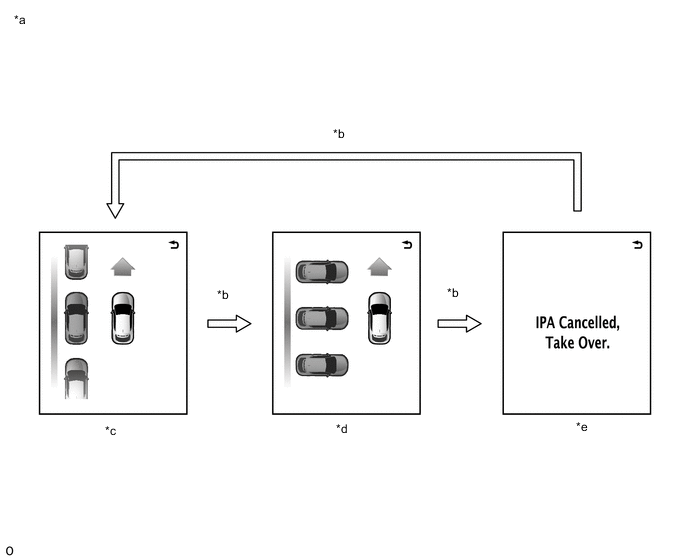
*a Parking Mode Selection: *b IPA Main Switch Assembly Pressed *c Parallel Parking Mode *d Back-in Parking Mode *e System Off - - -
Exit parallel parking mode
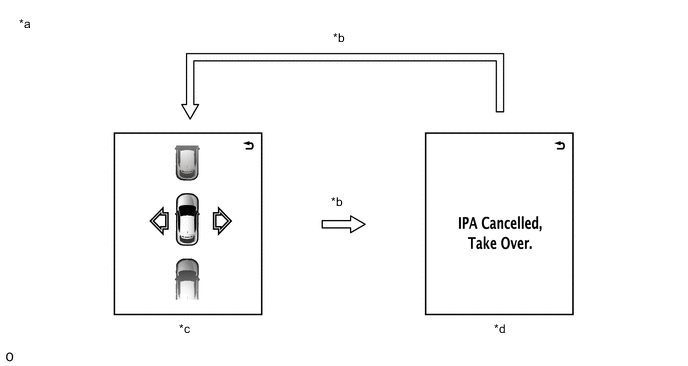
*a Parking Mode Selection: *b IPA Main Switch Assembly Pressed *c Exit Parallel Parking Mode *d System Off
-
-
-
PERPENDICULAR PARKING MODE
-
Perpendicular parking mode operation
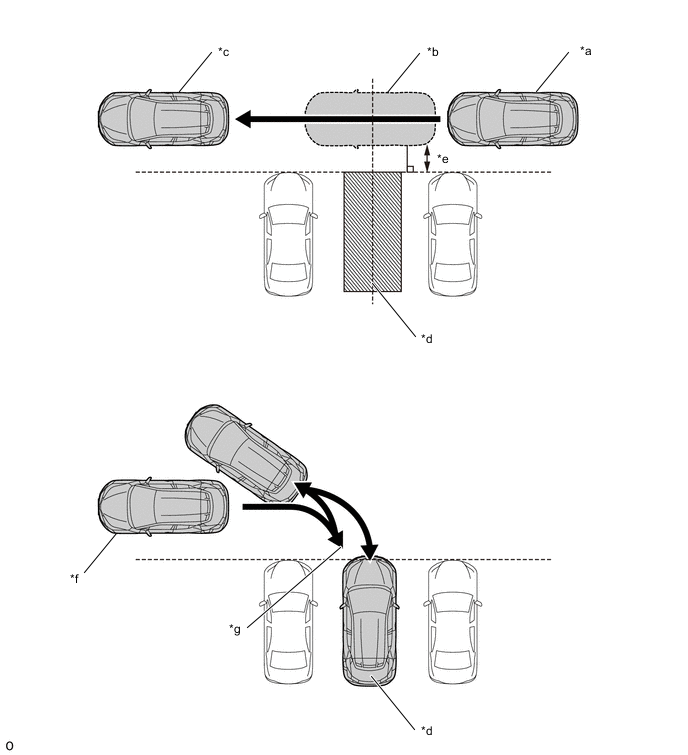
*a In Front of the Target Parking Space *b Empty Parking Space Detection *c Target Parking Space Detected *d Desired Parking Space *e Approximately 1 m (3.28 ft.) *f Point at Which Automatic Operation of the Steering Wheel Begins *g Point at Which the Direction of the Vehicle Needs to Be Changed - -
-
In front of the target parking space, with the shift lever in a position other than P or R and at a vehicle speed of 20 km/h or less, press the IPA main switch assembly 2 times to select the perpendicular parking assist mode.
-
Keep the vehicle moving forward parallel to and at a distance of approximately 1 meter from the other parked cars in the area or around the target parking space, and the parking space detection sensor (ultrasonic sensor) will begin attempting to detect available parking spaces, and so continue to drive the vehicle forward until a long beep sound is heard.
Tech Tips
-
Depending on the vehicle speed, angle of movement, and distance with regard to the parked cars in the target area or around the target parking space, the parking space detection sensor (ultrasonic sensor) may be unable to detect an available parking space.
-
Depending on the conditions around the target parking space, the parking space detection sensor (ultrasonic sensor) may be unable to detect the target parking space.
-
-
When the vehicle has reached a position from which assistance can begin (long beep sound is heard), stop the vehicle.
Tech Tips
When the parking space detection sensor (ultrasonic sensor) cannot detect a target parking space, the meter display transition is not performed and the long beep does not sound.
-
Following the guidance on the screen, move the shift lever to the R position and the simple intelligent parking assist indicator illuminates and assist begins.
Tech Tips
-
During assist operation, keep the vehicle speed at 7 km/h (4 mph) or less.
-
The driver must operate the brake to decelerate and stop the vehicle.
-
When it is necessary to turn the steering wheel back and re-enter the parking space, a long beep will sound when the vehicle reaches the stopping point. In this situation, follow the guidance on the screen and stop the vehicle, then operate the shift lever and move the vehicle forward and then backward again.
-
-
When the vehicle arrives in the target parking space, a long beep sound is heard, an assist complete screen is shown on the multi-information display, and assist ends.
-
-
-
PARALLEL PARKING MODE
-
Parallel parking mode operation
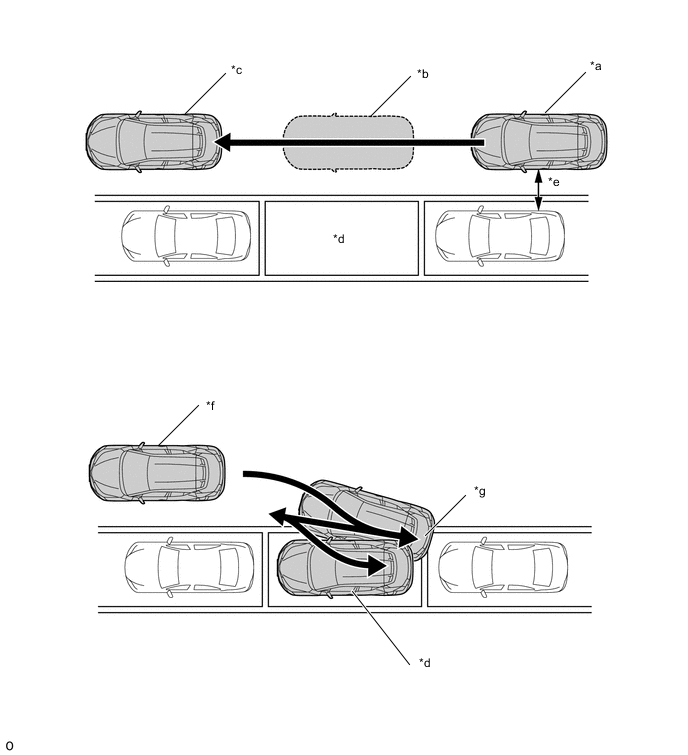
*a In Front of the Target Parking Space *b Empty Parking Space Detection *c Target Parking Space Detected *d Desired Parking Space *e Approximately 1 m (3.28 ft.) *f Point at Which Automatic Operation of the Steering Wheel Begins *g Point at Which the Direction of the Vehicle Needs to Be Changed - -
-
In front of the target parking space, with the shift lever in a position other than P or R and at a vehicle speed of 30 km/h or less, press the IPA main switch assembly 1 time to select the parallel parking mode.
-
Keep the vehicle moving forward parallel to and at a distance of approximately 1 meter from the other parked cars in the area or around the target parking space, and the parking space detection sensor (ultrasonic sensor) will begin attempting to detect available parking spaces, and so continue to drive the vehicle forward until a long beep sound is heard.
Tech Tips
-
Depending on the vehicle speed, angle of movement, and distance with regard to the parked cars in the target area or around the target parking space, the parking space detection sensor (ultrasonic sensor) may be unable to detect an available parking space.
-
Depending on the conditions around the target parking space, the parking space detection sensor (ultrasonic sensor) may be unable to detect the target parking space.
-
-
When the vehicle has reached a position from which assistance can begin (long beep sound is heard), stop the vehicle.
Tech Tips
When the parking space detection sensor (ultrasonic sensor) cannot detect a target parking space, the meter display transition is not performed and the long beep does not sound.
-
Following the guidance on the screen, move the shift lever to the R position, and the simple intelligent parking assist indicator illuminates and assist begins.
Tech Tips
-
During assist operation, keep the vehicle speed at 7 km/h (4 mph) or less.
-
The driver must operate the brake to decelerate and stop the vehicle.
-
When it is necessary to turn the steering wheel back and re-enter the parking space, a long beep will sound when the vehicle reaches the stopping point. In this situation, follow the guidance on the screen and stop the vehicle, then operate the shift lever and move the vehicle forward and then backward again.
-
-
When the vehicle arrives in the target parking space, a long beep sound is heard, an assist complete screen is shown on the multi-information display, and assist ends.
-
-
-
EXIT PARALLEL PARKING MODE
-
Exit parallel parking mode operation
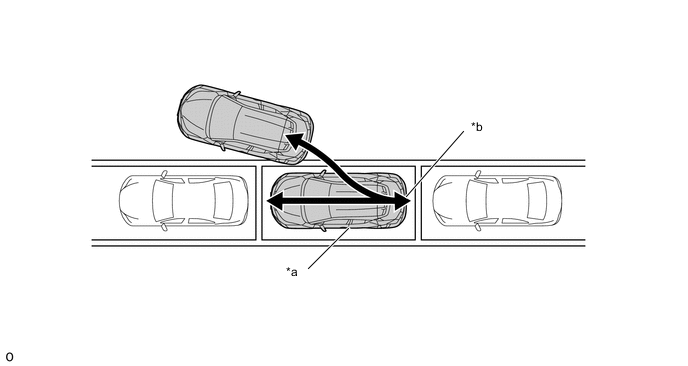
*a Point at Which Automatic Operation of the Steering Wheel Begins *b Point at Which the Direction of the Vehicle Needs to Be Changed
-
While the vehicle is stopped, press the IPA main switch assembly to select parallel parking departure assist mode.
Tech Tips
When parallel parking departure assist mode is selected, if there is no vehicle parked in front of this one, assistance will not operate.
-
Following the guidance on the screen, operate the headlight dimmer switch assembly to select the direction of departure, then the recommended shift state will be displayed.
-
Following the guidance on the screen, select the recommended shift state, then a long beep sound is heard, the simple intelligent parking assist indicator illuminates and automatic operation of the steering wheel begins.
Tech Tips
When the vehicle reaches a position where direction of the vehicle needs be changed, a long beep sound is heard and a notice to move the vehicle forward or backward is displayed.
-
When the vehicle reaches a position from departure is possible, a long beep sound is heard, an assist complete screen is shown on the multi-information display, and assist ends.
-
-
-
COMMUNICATION SYSTEM OUTLINE
-
CAN communication system
-
The simple intelligent parking assist system uses CAN communication for data communications between the clearance warning ECU assembly and each ECU.
-
If a problem occurs in the CAN communication line, the clearance warning ECU assembly outputs a CAN communication malfunction DTC. (To check, use the GTS.)
-
If a CAN communication line malfunction DTC is output, repair the malfunction in the communication line and troubleshoot the simple intelligent parking assist system when data communication is normal.
-
Since the CAN communication line has its own length and route, it cannot be repaired temporarily with a bypass wire, etc.
-
-