ELECTRIC PARKING BRAKE SYSTEM DTC CHECK / CLEAR
-
CHECK DTC AND FREEZE FRAME DATA (USING GTS)
-
Turn the power switch off.
-
Connect the GTS to the DLC3.
-
Turn the power switch on (IG).
-
Turn the GTS on.
-
Enter the following menus: Chassis / Electric Parking Brake / Trouble Codes.
Chassis > Electric Parking Brake > Trouble Codes -
Check for DTCs.
-
Check the freeze frame data.
-
If DTCs are output, check the freeze frame data and read the vehicle status when the DTC was stored.
Tech Tips
for Freeze Frame Data: Click here
-
-
-
CLEAR DTC AND FREEZE FRAME DATA (USING GTS)
-
Turn the power switch off.
-
Connect the GTS to the DLC3.
-
Turn the power switch on (IG).
-
Turn the GTS on.
-
Enter the following menus: Chassis / Electric Parking Brake / Trouble Codes.
-
Clear the DTCs.
Chassis > Electric Parking Brake > Clear DTCsTech Tips
When DTCs are cleared, the freeze frame data will also be cleared.
-
-
CHECK DTC (USING SST CHECK WIRE)
-
Turn the power switch off.
-
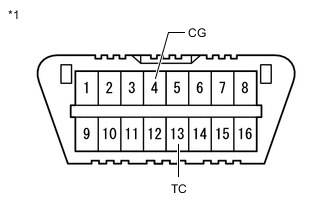
*1 DLC3 Using SST, connect terminals 13 (TC) and 4 (CG) of the DLC3.
- SST
- 09843-18040
Note
Do not connect the wrong terminals, as this may damage electrical components.
-
Turn the power switch on (IG), and read the DTCs from the number of blinks of the parking brake indicator light (red).
Tech Tips
-
When normal, the light blinks at 0.25 second intervals.
-
If one code is detected:
The light repeats the same code after a pause of 4.5 seconds.
-
If multiple codes are detected:
The light outputs one code after another with a 2.5-second pause between each code.
When all codes have been output, there is a 4.5-second pause and then the light begins to output the codes again.
-
If more than 1 malfunction is detected at the same time, the lowest numbered code will be displayed first.
-
-
-
CLEAR DTC (USING SST CHECK WIRE)
-
Turn the power switch off.
-
*1 DLC3 Using SST, connect terminals 13 (TC) and 4 (CG) of the DLC3.
- SST
- 09843-18040
Note
Do not connect the wrong terminals, as this may damage electrical components.
-
Turn the power switch on (IG).
-
Within 5 seconds, pull the electric parking brake switch assembly to the lock side 5 times.
Note
If the electric parking brake switch (electric parking brake switch assembly) is pulled too quickly, the system may not respond. If the system does not respond, perform the operation again more slowly.
-
Check that a normal system code is output (the parking brake indicator light blinks (red) at 0.25 second intervals).
Tech Tips
If the malfunction exists, the DTC cannot be cleared.
-