DYNAMIC RADAR CRUISE CONTROL SYSTEM TERMINALS OF ECU
-
CHECK HYBRID VEHICLE CONTROL ECU
Tech Tips
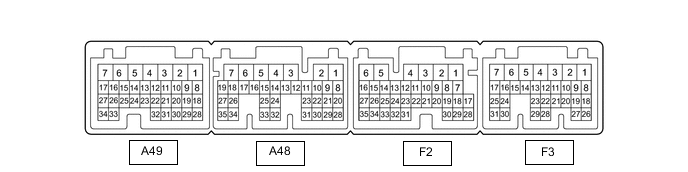
The standard voltage, resistance and waveform between each pair of the hybrid vehicle control ECU terminals is shown in the table below. The appropriate conditions for checking each pair of the terminals is also indicated. The result of checks should be compared with the standard voltage, resistance and waveform for each pair of the terminals as displayed in the Specified Condition column. The illustration above can be used as a reference to identify the hybrid vehicle control ECU terminal locations.
Terminal No. (Symbols) Wiring Color Terminal Description Condition Specified Condition A48-26 (DB1) - F3-4 (E12) W - W-B Shift lever position signal Power switch on (IG), shift lever in D or B 11 to 14 V Power switch on (IG), shift lever not in D or B Below 1 V A48-14 (DB2) - F3-4 (E12) G - W-B Shift lever position signal Power switch on (IG), shift lever in D or B 11 to 14 V Power switch on (IG), shift lever not in D or B Below 1 V A49-15 (STP) - F3-4 (E12) SB - W-B Stop light signal Brake pedal depressed 11 to 14 V Brake pedal released Below 1 V F3-3 (BATT) - F3-4 (E12) B - W-B Constant power source Power switch off 11 to 14 V F2-28 (CCS) - F3-4 (E12) R - W-B Cruise control main switch circuit Cruise control main switch off 10 MΩ or higher Cruise control main switch on Below 1.5 Ω +RES switch on 235 to 245 Ω -SET switch on 617 to 643 Ω CANCEL switch on 1509 to 1571 Ω A48-28 (ST1-) - F3-4 (E12) R - W-B Stop light signal Power switch on (IG), brake pedal depressed Below 1 V Power switch on (IG), brake pedal released 11 to 14 V F3-4 (E12) - Body ground W-B - Body ground Ground Always Below 1 Ω -
CHECK FORWARD RECOGNITION CAMERA

Note
Do not apply excessive force to the connector. If a force of 10 kg or more is applied, the connector may be broken.
Terminal No. (Symbol) Wiring Color Terminal Description Condition Specified Condition R5-8 (BZ) - R5-10 (GND) B - W-B Pre-collision city buzzer output Power switch on (IG) buzzer not sounding 11 to 14 V Power switch on (IG) buzzer sounding Below 1 V R5-7 (IGB) - R5-10 (GND) B - W-B Power source Power switch on (IG) 11 to 14 V Power switch off Below 1 V R5-5 (CA1P) - R5-10 (GND) R - W-B CAN communication signal Power switch on (IG) Pulse generation
(See waveform 1)
R5-11 (CA1N) - R5-10 (GND) GR - W-B CAN communication signal Power switch on (IG) Pulse generation
(See waveform 2)
R5-6 (CANH) - R5-10 (GND) G - W-B CAN communication signal Power switch on (IG) Pulse generation
(See waveform 1)
R5-12 (CANL) - R5-10 (GND) R - W-B CAN communication signal Power switch on (IG) Pulse generation
(See waveform 2)
R5-3 (LKSW) - R5-10 (GND) R - W-B Steering pad switch assembly signal (distance control signal) Power switch on (IG) steering pad switch assembly (distance control switch) off 4.75 to 5.25 V Power switch on (IG) steering pad switch assembly (distance control switch) on Below 1 V R5-10 (GND) - Body ground W-B - Body ground Ground Always Below 1 Ω
-
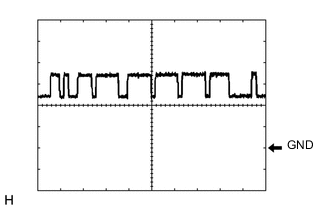
Waveform 1
-
CAN communication signal
Item Content Tester Connection
-
Between R5-5 (CA1P) and R5-10 (GND)
-
Between R5-6 (CANH) and R5-10 (GND)
Tool Setting 1 V/DIV., 10 μsec./DIV. Condition Power switch on (IG) Tech Tips
The waveform varies depending on the CAN communication signal.
-
-
-
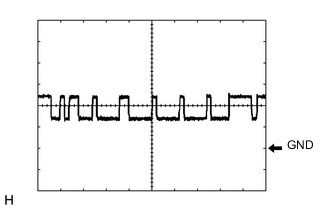
Waveform 2
-
CAN communication signal
Item Content Tester Connection
-
Between R5-11 (CA1N) and R5-10 (GND)
-
Between R5-12 (CANL) and R5-10 (GND)
Tool Setting 1 V/DIV., 10 μsec./DIV. Condition Power switch on (IG) Tech Tips
The waveform varies depending on the CAN communication signal.
-
-
-
-
CHECK MILLIMETER WAVE RADAR SENSOR

Terminal No. (Symbol) Wiring Color Terminal Description Condition Specified Condition A2-1 (SGND) - Body ground W-B - Body ground Ground Always Below 1 Ω A2-2 (CA2L) - A2-1 (SGND) GR - W-B CAN communication signal Power switch on (IG) Pulse generation
(See waveform 2)
A2-3 (CA2H) - A2-1 (SGND) G - W-B CAN communication signal Power switch on (IG) Pulse generation
(See waveform 1)
A2-5 (CA1P) - A2-1 (SGND) G - W-B CAN communication signal Power switch on (IG) Pulse generation
(See waveform 1)
A2-6 (CA1N) - A2-1 (SGND) R - W-B CAN communication signal Power switch on (IG) Pulse generation
(See waveform 2)
A2-8 (IGB) - A2-1 (SGND) B - W-B Power source Power switch on (IG) 11 to 14 V
-
Waveform 1
-
CAN communication signal
Item Content Tester Connection
-
Between A2-3 (CA2H) and A2-1 (SGND)
-
Between A2-5 (CA1P) and A2-1 (SGND)
Tool Setting 1 V/DIV., 10 μsec./DIV. Condition Power switch on (IG) Tech Tips
The waveform varies depending on the CAN communication signal.
-
-
-
Waveform 2
-
CAN communication signal
Item Content Tester Connection
-
Between A2-2 (CA2L) and A2-1 (SGND)
-
Between A2-6 (CA1N) and A2-1 (SGND)
Tool Setting 1 V/DIV., 10 μsec./DIV. Condition Power switch on (IG) Tech Tips
The waveform varies depending on the CAN communication signal.
-
-
-