BATTERY VOLTAGE SENSOR REMOVAL
Info Added 2017-10-06 
CAUTION / NOTICE / HINT
The necessary procedures (adjustment, calibration, initialization, or registration) that must be performed after parts are removed and installed, or replaced during battery voltage sensor removal/installation are shown below.
| Replaced Part or Performed Procedure | Necessary Procedures | Effect/Inoperative Function when Necessary Procedure not Performed | Link |
|---|---|---|---|
| Disconnect cable from negative auxiliary battery terminal | Memorize steering angle neutral point | Lane departure alert system (w/ Steering Control) | |
| Simple intelligent parking assist system*1 | |||
| Toyota parking assist-sensor system*1 | |||
| Pre-collision system | |||
| Initialize back door lock | Power door lock control system |
Click here Click here
CAUTION:
-
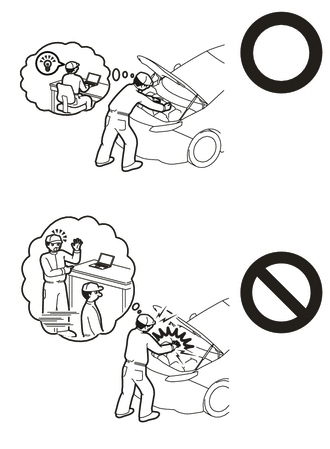
This vehicle has contains high voltage circuits standardized with orange colored wiring and connectors, so follow the instructions in this manual to perform the procedures correctly.
-
If the correct procedures are not followed according to the instructions in this manual, there is a danger of electric shock from the high voltage circuits.
-
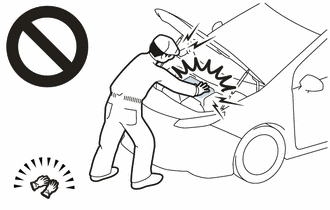
Be sure to wear insulating gloves when working on high voltage wiring or components.
-
If work is performed without wearing insulating gloves, there is a danger of electric shock.
Note
-
The type of battery voltage sensor to be used varies depending on the vehicle model.
-
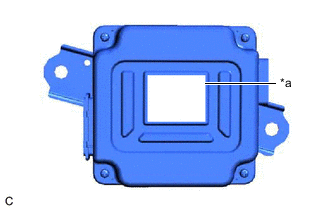
*a Black Label The type of battery voltage sensor can be confirmed by the color of the label.
-
If the wrong type of battery voltage sensor is installed, the power switch cannot be turned on (READY).
-
After installing the battery voltage sensor, perform the following to check that the power switch can be turned on (READY).
-
Turn the power switch on (READY).
-
Turn the power switch off and wait for 30 seconds or more.
-
Turn the power switch on (READY) again.
PROCEDURE
-
PRECAUTION
Note
After turning the power switch off, waiting time may be required before disconnecting the cable from the negative (-) auxiliary battery terminal. Therefore, make sure to read the disconnecting the cable from the negative (-) auxiliary battery terminal notices before proceeding with work.
-
REMOVE SERVICE PLUG GRIP
-
DISCONNECT ENGINE WIRE
-
REMOVE CONNECTOR COVER ASSEMBLY
-
CHECK TERMINAL VOLTAGE
-
INSTALL CONNECTOR COVER ASSEMBLY
-
CONNECT ENGINE WIRE
-
REMOVE BENCH TYPE REAR SEAT CUSHION ASSEMBLY
-
REMOVE REAR SEAT CUSHION LOCK HOOK
-
REMOVE REAR DOOR SCUFF PLATE LH
-
REMOVE REAR UNDER SIDE COVER LH
-
REMOVE REAR DOOR SCUFF PLATE RH
-
REMOVE REAR UNDER SIDE COVER RH
-
REMOVE REAR UNDER COVER
-
REMOVE REAR SEAT CUSHION LEG SUB-ASSEMBLY
-
REMOVE BATTERY COOLING BLOWER ASSEMBLY
-
REMOVE NO. 1 HV BATTERY COVER PANEL RH
-
DISCONNECT HV FLOOR UNDER WIRE
-
DISCONNECT FLOOR WIRE
-
REMOVE NO. 1 HYBRID BATTERY EXHAUST DUCT
-
DISCONNECT FLOOR WIRE
-
REMOVE UPPER NO. 1 HYBRID BATTERY COVER SUB-ASSEMBLY
CAUTION:
Be sure to wear insulated gloves and protective goggles.
-
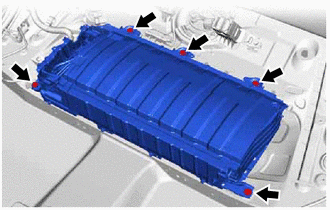
Remove the 5 bolts.
Note
-
Do not allow foreign matter, such as grease or oil, to adhere to the bolts of the HV battery.
-
To prevent the wire harness from being caught, make sure to bundle the wire harness using insulating tape or equivalent.
-
If the HV battery has been struck or dropped, replace it.
-
-
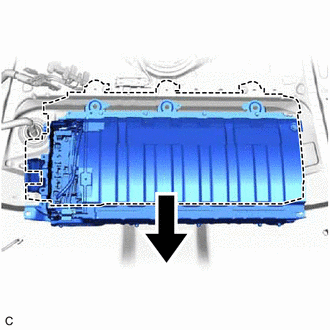
Move the HV battery toward the front of the vehicle.
-
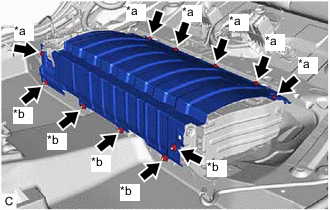
*a Bolt *b Nut Remove the 6 bolts, 5 nuts and upper No. 1 hybrid battery cover sub-assembly from the HV battery.
-
-
REMOVE NO. 1 HV BATTERY SHIELD PANEL
CAUTION:
Be sure to wear insulated gloves and protective goggles.
-
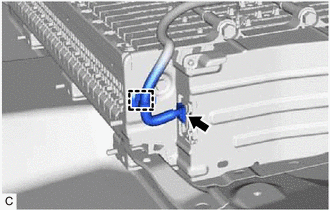
Disengage the clamp.
-
Disconnect the battery voltage sensor connector.
-
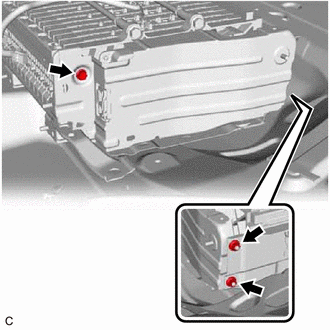
Remove the bolt and 2 nuts.
-
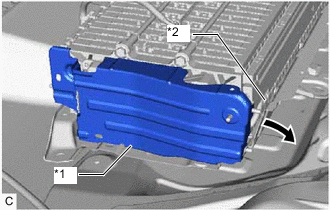
*1 No. 1 HV Battery Shield Panel *2 No. 2 Hybrid Battery Shield Sub-assembly 
Pull Back Pull back the No. 2 hybrid battery shield sub-assembly and remove the No. 1 HV battery shield panel from the HV battery.
Tech Tips
Pull back the No. 2 hybrid battery shield sub-assembly until it is separated from the 2 stud bolts of the No. 1 HV battery shield panel.
-
-
REMOVE BATTERY VOLTAGE SENSOR
CAUTION:
Be sure to wear insulated gloves and protective goggles.
-
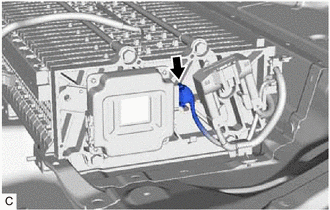
Disconnect the battery voltage sensor connector.
Note
Insulate each disconnected high-voltage connector with insulating tape. Wrap the connector from the wire harness side to the end of the connector.
-
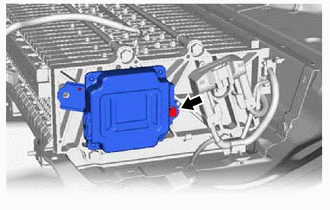
Remove the bolt and battery voltage sensor from the HV battery.
Note
If the battery voltage sensor has been struck or dropped, replace it.
-