SFI SYSTEM, Diagnostic DTC:P001100, P001200
| DTC Code | DTC Name |
|---|---|
| P001100 | Camshaft Position "A" - Timing Over-Advanced or System Performance Bank 1 |
| P001200 | Camshaft Position "A" - Timing Over-Retarded Bank 1 |
DESCRIPTION
Refer to DTC P001013.
| DTC No. | Detection Item | DTC Detection Condition | Trouble Area | MIL | Memory | Note |
|---|---|---|---|---|---|---|
| P001100 | Camshaft Position "A" - Timing Over-Advanced or System Performance Bank 1 | Intake valve timing is stuck at a certain value when in the advance range (1 trip detection logic). |
|
Comes on | DTC stored | SAE Code: P0011 |
| P001200 | Camshaft Position "A" - Timing Over-Retarded Bank 1 | Intake valve timing is stuck at a certain value when in the retard range (2 trip detection logic). |
|
Comes on | DTC stored | SAE Code: P0012 |
MONITOR DESCRIPTION
The ECM optimizes the intake valve timing using the Variable Valve Timing (VVT) system to control the intake camshaft. The VVT system includes the ECM, camshaft timing oil control valve assembly and VVT controller (camshaft timing gear assembly). The ECM sends a target duty-cycle control signal to the camshaft timing oil control valve assembly. This control signal regulates the oil pressure supplied to the VVT controller. The VVT controller can advance or retard the intake camshaft.
If the difference between the target and actual intake valve timing is large, and changes in the actual intake valve timing are small, the ECM interprets this as a VVT controller stuck malfunction and stores a DTC.
-
Example:
-
A DTC is stored when the following conditions are met:
-
It takes 5 seconds or more to change the valve timing by 5°CA.
-
After the above condition is met, the camshaft timing oil control valve assembly is forcibly activated for 9.5 seconds or more.
DTC P001100 (Advanced Camshaft Timing) is subject to 1 trip detection logic.
DTC P001200 (Retarded Camshaft Timing) is subject to 2 trip detection logic.
These DTCs indicate that the VVT controller cannot operate properly due to a camshaft timing oil control valve assembly malfunction or the presence of foreign matter in the camshaft timing oil control valve assembly.
MONITOR STRATEGY
| Required Sensors/Components (Main) | Camshaft timing oil control valve assembly Camshaft timing gear assembly |
| Required Sensors/Components (Related) | Crankshaft position sensor Camshaft position sensor Engine coolant temperature sensor |
| Frequency of Operation | Continuous |
CONFIRMATION DRIVING PATTERN
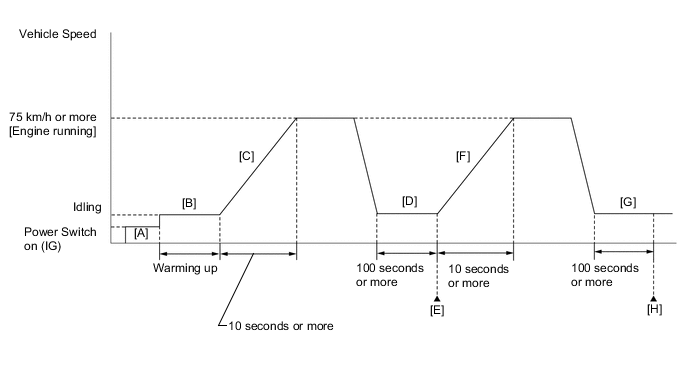
-
Connect the GTS to the DLC3.
-
Turn the power switch on (IG).
-
Turn the GTS on.
-
Clear the DTCs (even if no DTCs are stored, perform the clear DTC procedure).
Tech Tips
-
If P001100 was output:
Clear the DTC without using the GTS.
-
If P001200 was output:
Clear the DTC using the GTS.
-
-
Turn the power switch off and wait for at least 30 seconds.
-
Turn the power switch on (IG) [A].
-
Turn the GTS on.
-
Put the engine in Inspection Mode (Maintenance Mode).
-
Start the engine and warm it up until the engine coolant temperature is 75°C (167°F) or higher [B].
-
With the engine running, accelerate the vehicle to 75 km/h (46 mph) or more by depressing the accelerator pedal for 10 seconds or more [C].
CAUTION:
When performing the confirmation driving pattern, obey all speed limits and traffic laws.
Tech Tips
If the engine stops, further depress the accelerator pedal to restart the engine.
-
Idle the engine for 100 seconds or more [D].
-
Enter the following menus: Powertrain / Engine / Trouble Codes [E].
-
Read the pending DTCs.
Tech Tips
-
If a pending DTC is output, the system is malfunctioning.
-
If a pending DTC is not output, perform the following procedure.
-
-
Enter the following menus: Powertrain / Engine / Utility / All Readiness.
-
Input the DTC: P001100 or P001200.
-
Check the DTC judgment result.
GTS Display Description NORMAL
-
DTC judgment completed
-
System normal
ABNORMAL
-
DTC judgment completed
-
System abnormal
INCOMPLETE
-
DTC judgment not completed
-
Perform driving pattern after confirming DTC enabling conditions
N/A
-
Unable to perform DTC judgment
-
Number of DTCs which do not fulfill DTC preconditions has reached ECU memory limit
Tech Tips
-
If the judgment result is NORMAL, the system is normal.
-
If the judgment result is ABNORMAL, the system is malfunctioning.
-
If the judgment result is INCOMPLETE or N/A, perform steps [F] through [H].
-
-
With the engine running, accelerate the vehicle to 75 km/h (46 mph) or more by depressing the accelerator pedal for 10 seconds or more [F].
CAUTION:
When performing the confirmation driving pattern, obey all speed limits and traffic laws.
Tech Tips
If the engine stops, further depress the accelerator pedal to restart the engine.
-
Idle the engine for 100 seconds or more [G].
-
Enter the following menus: Powertrain / Engine / Trouble Codes [H].
-
Read the pending DTCs.
Tech Tips
-
If a pending DTC is output, the system is malfunctioning.
-
If a pending DTCs are not output, perform the following procedure.
-
-
Check the DTC judgment result again.
Tech Tips
-
If the judgment result is NORMAL, the system is normal.
-
If the judgment result is ABNORMAL, the system is malfunctioning.
-
CAUTION / NOTICE / HINT
Tech Tips
-
DTC P001100 or P001200 may be stored when foreign matter in the engine oil is caught in parts of the system. The DTC will remain stored even if the system returns to normal after a short time. The foreign matter may then be captured by the oil filter.
-
Read freeze frame data using the GTS. The ECM records vehicle and driving condition information as freeze frame data the moment a DTC is stored. When troubleshooting, freeze frame data can help determine if the vehicle was moving or stationary, if the engine was warmed up or not, if the air fuel ratio was lean or rich, and other data from the time the malfunction occurred.
PROCEDURE
-
CHECK ANY OTHER DTCS OUTPUT (IN ADDITION TO DTC P001100 OR P001200)
-
Connect the GTS to the DLC3.
-
Turn the power switch on (IG).
-
Turn the GTS on.
-
Enter the following menus: Powertrain / Engine / Trouble Codes.
-
Read the DTCs.
Powertrain > Engine > Trouble CodesResult Result Proceed to DTC P001100 or P001200 is output A DTC P001100 or P001200 and other DTCs are output B Tech Tips
If any DTCs other than P001100 or P001200 are output, troubleshoot those DTCs first.
B 
GO TO DTC CHART Click here
A 
-
-
PERFORM ACTIVE TEST USING GTS (CONTROL THE INTAKE VVT OCV DUTY RATIO BANK 1)
-
Connect the GTS to the DLC3.
-
Turn the power switch on (IG).
-
Turn the GTS on.
-
Put the engine in Inspection Mode (Maintenance Mode).
Powertrain > Hybrid Control > UtilityTester Display Inspection Mode -
Start the engine.
-
Enter the following menus: Powertrain / Engine / Active Test / Control the Intake VVT OCV Duty Ratio Bank 1 / Data List / Intake VVT Change Angle Bank 1.
Powertrain > Engine > Active TestActive Test Display Control the Intake VVT OCV Duty Ratio Bank 1 Data List Display Intake VVT Change Angle Bank 1 -
Read the Data List while performing the Active Test with the engine idling.
OK GTS Operation Data List (Intake VVT Change Angle Bank 1) -100% to 100% Varies by 70 DegFR or more Tech Tips
-
Test not possible with park (P) selected during charge control. Select neutral (N) to perform test.
-
If DTCs are stored after the Active Test, clear the DTCs.
Result Proceed to OK NG -
NG 
INSPECT CAMSHAFT TIMING OIL CONTROL VALVE ASSEMBLY Click here
OK
-
-
CLEAR DTC
-
Connect the GTS to the DLC3.
-
Turn the power switch on (IG).
-
Turn the GTS on.
-
Clear the DTCs.
Powertrain > Engine > Clear DTCsTech Tips
-
If P001100 was output:
Clear the DTC without using the GTS.
-
If P001200 was output:
Clear the DTC using the GTS.
-
-
Turn the power switch off and wait for at least 30 seconds.
Result Proceed to NEXT
NEXT
-
-
CHECK WHETHER DTC OUTPUT RECURS (DTC P001100 OR P001200)
-
Drive the vehicle in accordance with the driving pattern described in Confirmation Driving Pattern.
-
Enter the following menus: Powertrain / Engine / Trouble Codes.
-
Read the DTCs.
Powertrain > Engine > Trouble CodesResult Result Proceed to DTCs are not output A DTC P001100 or P001200 is output B Tech Tips
DTC P001100 or P001200 may be stored when foreign matter in the engine oil is caught in parts of the system. The DTC will remain stored even if the system returns to normal after a short time. The foreign matter may then be captured by the oil filter.
A
CHECK FOR INTERMITTENT PROBLEMS Click here
B
-
-
INSPECT CAMSHAFT TIMING OIL CONTROL VALVE ASSEMBLY
-
Inspect the camshaft timing oil control valve assembly.
Result Proceed to OK NG
NG
REPLACE CAMSHAFT TIMING OIL CONTROL VALVE ASSEMBLY Click here
OK
-
-
CHECK VALVE TIMING (CHECK FOR LOOSE TIMING CHAIN AND JUMPED TEETH)
-
Remove the cylinder head cover sub-assembly.
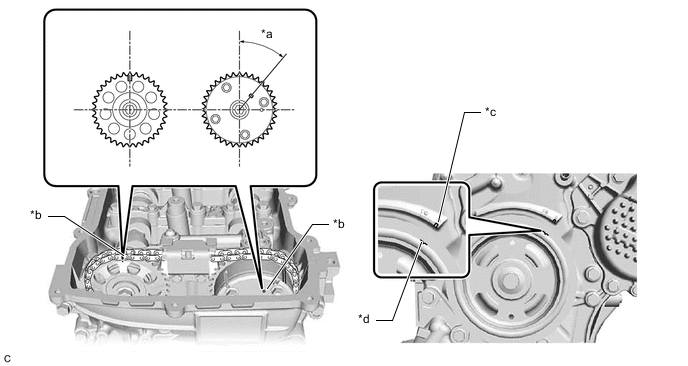
*a 39.5° *b Timing Mark *c "0" Timing Mark *d Groove -
Turn the crankshaft pulley and align its groove with the "0" timing mark of the timing chain or belt cover sub-assembly.
-
Check that the timing marks of the camshaft timing gear assembly and camshaft timing sprocket are at the positions shown in the illustration.
Tech Tips
If the timing marks are not as shown, turn the crankshaft one revolution clockwise.
OK Timing marks on camshaft timing gear assembly and camshaft timing sprocket are at the positions shown in the illustration. Tech Tips
If the result is not as specified, check for mechanical malfunctions that may have affected the valve timing, such as a jumped tooth or stretching of the timing chain.
Result Proceed to OK NG
NG
CHECK ENGINE MECHANICAL SYSTEM Click here
OK
-
-
INSPECT CAMSHAFT TIMING GEAR ASSEMBLY
-
Inspect the camshaft timing gear assembly.
Tech Tips
Perform "Inspection After Repair" after replacing the camshaft timing gear assembly.
Result Proceed to OK NG
NG
REPLACE CAMSHAFT TIMING GEAR ASSEMBLY Click here
OK
-
-
INSPECT OIL CONTROL VALVE FILTER
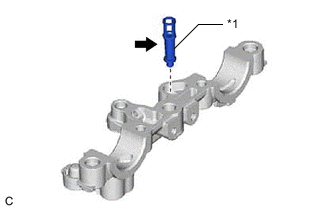
*1 Oil Control Valve Filter
-
Remove the oil control valve filter.
-
Check that the filter is not clogged.
OK Filter is not clogged. Result Proceed to OK NG
OK
GO TO STEP 10 Click here
NG
REPLACE OIL CONTROL VALVE FILTER Click here
-
-
CHECK ENGINE MECHANICAL SYSTEM
-
Check for mechanical malfunctions that affect the valve timing, such as a jumped tooth or stretching of the timing chain.
Tech Tips
Perform "Inspection After Repair" after repairing or replacing the engine mechanical system.
Result Proceed to OK NG
NG
REPAIR OR REPLACE MALFUNCTIONING PARTS, COMPONENT AND AREA
OK
-
-
CLEAR DTC
-
Connect the GTS to the DLC3.
-
Turn the power switch on (IG).
-
Turn the GTS on.
-
Clear the DTCs.
Powertrain > Engine > Clear DTCsTech Tips
-
If P001100 was output:
Clear the DTC without using the GTS.
-
If P001200 was output:
Clear the DTC using the GTS.
-
-
Turn the power switch off and wait for at least 30 seconds.
Result Proceed to NEXT
NEXT
-
-
CHECK WHETHER DTC OUTPUT RECURS (DTC P001100 OR P001200)
-
Drive the vehicle in accordance with the driving pattern described in Confirmation Driving Pattern.
-
Enter the following menus: Powertrain / Engine / Trouble Codes.
-
Read the DTCs.
Powertrain > Engine > Trouble CodesResult Result Proceed to DTCs are not output A DTC P001100 or P001200 is output B
A
CHECK FOR INTERMITTENT PROBLEMS Click here
B
REPLACE ECM Click here
-