REAR DISC BRAKE PAD REMOVAL
Info Added 2017-10-06 
CAUTION / NOTICE / HINT
The necessary procedures (adjustment, calibration, initialization, or registration) that must be performed after parts are removed and installed, or replaced during rear disc brake pad removal/installation are shown below.
| Replaced Part or Performed Procedure | Necessary Procedure | Effect/Inoperative Function when Necessary Procedure not Performed | Link |
|---|---|---|---|
| Auxiliary battery terminal is disconnected/reconnected | Memorize steering angle neutral point | Lane departure alert system (w/ Steering Control) | |
| Simple intelligent parking assist system*1 | |||
| Toyota parking assist-sensor system*1 | |||
| Pre-collision system | |||
| Initialize back door lock | Power door lock control system |
*1: When performing learning using the GTS.
Note
-
Immediately after installing the brake pads, the braking performance may be reduced. Always perform a road test in a safe place while paying attention to the surroundings.
-
After replacing the front disc brake pads, the brake pedal may feel soft due to clearance between the front disc brake pads and front disc. Depress the brake pedal several times until the brake pedal feels firm.
-
When the brake pedal is first depressed after replacing the brake pads or pushing back the disc brake piston, DTC C1214 may be stored. As there is no malfunction, clear the DTC.
-
While the auxiliary battery is connected, even if the power switch is off, the brake control system activates when the brake pedal is depressed or any door courtesy switch turns on. Therefore, when servicing the brake system components, do not operate the brake pedal or open/close the doors while the auxiliary battery is connected.
-
After replacing the front disc brake pads, always perform a road test to check the braking performance and check for vibrations.
Tech Tips
-
Use the same procedure for the RH side and LH side.
-
The following procedure is for the LH side.
PROCEDURE
-
PERFORM REAR BRAKE PAD REPLACEMENT MODE
-
DISABLE BRAKE CONTROL
-
Wait at least 2 minutes after turning the power switch off.
Note
When the brake pedal is depressed or the door courtesy switch is turned on even if the power switch is off, the brake control system activates. Therefore do not depress the brake pedal or open/close the doors until the reservoir level switch connector is disconnected.
-
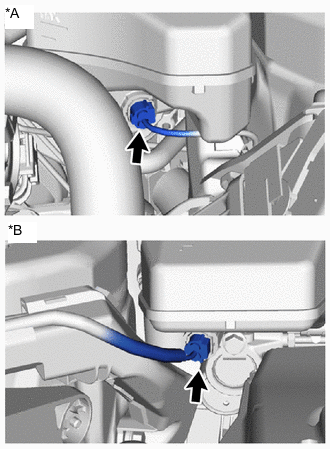
*A for LHD *B for RHD Disconnect the reservoir level switch connector.
-
Disconnect the cable from the negative (-) auxiliary battery terminal.
-
Depress the brake pedal 40 times or more to return all the fluid in the accumulator back to the reservoir.
-
Check that the brake pedal cannot be further depressed.
-
-
REMOVE REAR WHEEL
-
DRAIN BRAKE FLUID
Note
If brake fluid leaks onto any painted surface, immediately wash it off.
-
REMOVE REAR DISC BRAKE PAD
CAUTION:
-
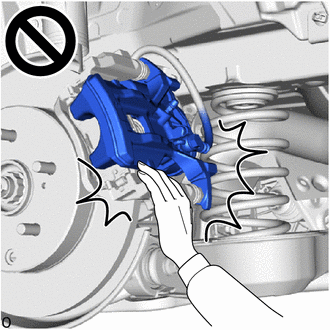
After lifting up the rear disc brake cylinder assembly, secure it in place before performing any work on it.
-
The rear disc brake cylinder assembly could fall, pinching hands or fingers and causing injury.
-
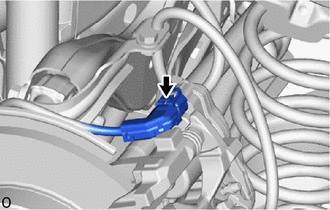
Disconnect the No. 2 parking brake wire assembly connector from the parking brake actuator assembly.
-
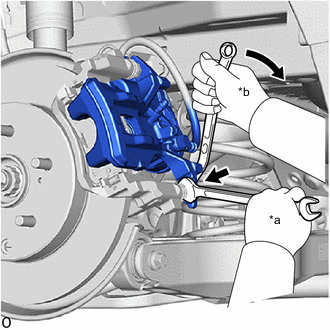
*a Hold *b Turn Hold the rear disc brake cylinder slide pin, and remove the bolt.
-
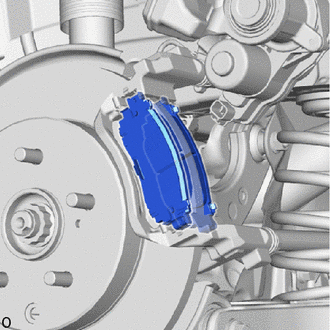
Pull the rear disc brake cylinder assembly upward.
-
Remove the 2 rear disc brake pads from the rear disc brake cylinder mounting.
-
-
REMOVE REAR DISC BRAKE ANTI-SQUEAL SHIM KIT
-
Remove the rear No. 1 disc brake anti-squeal shim and rear No. 2 disc brake anti-squeal shim from each rear disc brake pad.
-
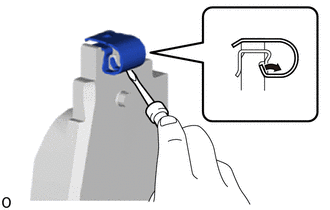
Using a screwdriver, remove the rear disc brake pad wear indicator plate from each rear disc brake pad.
-