LANE DEPARTURE ALERT SYSTEM, Diagnostic DTC:C1AA0
| DTC Code | DTC Name |
|---|---|
| C1AA0 | Front Camera Module Circuit |
DESCRIPTION
DTC C1AA0 is stored when the pre-collision city sensor detects an internal circuit malfunction.
DTC No. |
Detection Item |
DTC Detection Condition |
Trouble Area |
|---|---|---|---|
C1AA0 |
Front Camera Module Circuit |
When the ignition switch is ON and the pre-collision system is enabled, the pre-collision city sensor detects an internal circuit malfunction for 5 seconds or more. |
|
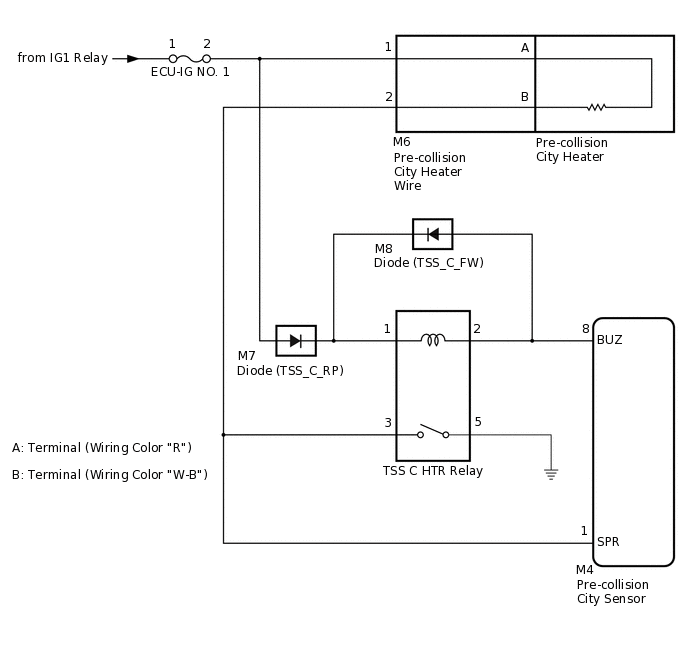
WIRING DIAGRAM
CAUTION / NOTICE / HINT
Inspect the fuses for circuits related to this system before performing the following procedure.
When replacing the pre-collision city sensor, replace it with a new one and be sure to initialize the settings. If a pre-collision city sensor which was installed to another vehicle is used, the information stored in the pre-collision city sensor will not match the information from the vehicle and, as a result, a DTC may be stored.
If the pre-collision city sensor has been replaced, or the windshield glass has been replaced or removed/installed, be sure to perform Pre-collision City Sensor Optical Axis Learning.
Tip:Pre-collision City Sensor Optical Axis Learning can be performed by using either One Time Recognition or Sequential Recognition.
One Time Recognition:Click here
Sequential Recognition:Click here
PROCEDURE
CHECK FOR DTCS
Check for DTCs.
Chassis > PCS/LDA/RSA/LVN > Trouble Codes
Result
Result
Proceed to
DTC C1AA0 is not output
A
DTC C1AA0 is output
B
CHECK HARNESS AND CONNECTOR (TSS C HTR RELAY COIL CIRCUIT)
Remove the ECU-IG NO. 1 fuse from the driver side junction block assembly.
Remove the TSS C HTR relay.
Measure the resistance according to the value(s) in the table below.
Standard Resistance
Tester Connection
Condition
Specified Condition
ECU-IG NO. 1 fuse holder terminal 2 - TSS C HTR relay holder terminal 1
Positive (+) tester probe → ECU-IG NO. 1 fuse holder terminal 2
Negative (-) tester probe → TSS C HTR relay holder terminal 1
Always
Below 1 Ω
Negative (-) tester probe → ECU-IG NO. 1 fuse holder terminal 2
Positive (+) tester probe → TSS C HTR relay holder terminal 1
Always
10 kΩ or higher
Disconnect the M4 pre-collision city sensor connector.
Measure the resistance according to the value(s) in the table below.
Standard Resistance
Tester Connection
Condition
Specified Condition
M4-8 (BUZ) - TSS C HTR relay holder terminal 1
Positive (+) tester probe → M4-8 (BUZ)
Negative (-) tester probe → TSS C HTR relay holder terminal 1
Always
Below 1 Ω
Negative (-) tester probe → M4-8 (BUZ)
Positive (+) tester probe → TSS C HTR relay holder terminal 1
Always
10 kΩ or higher
Connect the M4 pre-collision city sensor connector.
Install the TSS C HTR relay.
Install the ECU-IG NO. 1 fuse to the driver side junction block assembly.
Result
Proceed to
OK
NG
NG REPAIR OR REPLACE HARNESS OR CONNECTOR (TSS C HTR RELAY COIL CIRCUIT)Click here
REPLACE PRE-COLLISION CITY SENSOR
Replace the pre-collision city sensor.
Perform Pre-collision City Sensor Optical Axis Learning.
Tip:Pre-collision City Sensor Optical Axis Learning can be performed by using either One Time Recognition or Sequential Recognition.
One Time Recognition:Click here
Sequential Recognition:Click here
Result
Proceed to
NEXT
NEXT END
REPAIR OR REPLACE HARNESS OR CONNECTOR (TSS C HTR RELAY COIL CIRCUIT)
Repair or replace the harness or connector.
Result
Proceed to
NEXT
REPLACE PRE-COLLISION CITY SENSOR
Replace the pre-collision city sensor.
Perform Pre-collision City Sensor Optical Axis Learning.
Tip:Pre-collision City Sensor Optical Axis Learning can be performed by using either One Time Recognition or Sequential Recognition.
One Time Recognition:Click here
Sequential Recognition:Click here
Result
Proceed to
NEXT
NEXT END