DRIVING SUPPORT BUZZER(for RHD) REMOVAL
CAUTION / NOTICE / HINT
The necessary procedures (adjustment, calibration, initialization or registration) that must be performed after parts are removed and installed, or replaced during the driving support buzzer (pre-collision city buzzer) removal/installation are shown below.
| Replaced Part or Performed Procedure | Necessary Procedure | Effect/Inoperative Function when Necessary Procedure not Performed | Link |
|---|---|---|---|
| Disconnect cable from negative battery terminal | Memorize steering angle neutral point |
|
|
| Initialize back door lock | Power door lock control system | ||
| Drive the vehicle until stop and start control is permitted (approximately 5 to 60 minutes)*2 | Stop and start system |
-
*1: When performing learning using the GTS.
-
*2: w/ Stop and start system
PROCEDURE
-
REMOVE INSTRUMENT PANEL CENTER REGISTER ASSEMBLY
-
REMOVE RADIO RECEIVER ASSEMBLY WITH BRACKET (for Radio Receiver Type)
-
REMOVE STEREO OPENING COVER WITH BRACKET (w/ Cover)
-
REMOVE RADIO AND DISPLAY RECEIVER ASSEMBLY WITH BRACKET (for Radio and Display Type)
-
REMOVE NO. 2 HEATER TO REGISTER DUCT SUB-ASSEMBLY
-
REMOVE DRIVING SUPPORT BUZZER (PRE-COLLISION CITY BUZZER)
-
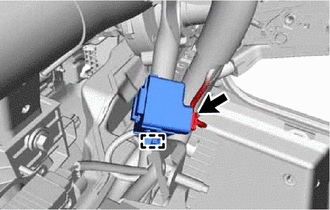
Disengage the clamp.
-
Disconnect the connector to remove the driving support buzzer (pre-collision city buzzer).
Note
If the driving support buzzer (pre-collision city buzzer) has been struck or dropped, replace it with a new one.
-