VEHICLE STABILITY CONTROL SYSTEM DTC CHECK / CLEAR

-
DTC CHECK/CLEAR (When Using GTS)
-
Check the DTC.
-
Turn the engine switch off.
-
Connect the GTS to the DLC3.
-
Turn the engine switch on (IG).
-
Turn the GTS on.
-
Read the DTCs following the prompts on the GTS screen. Enter the following menus: Chassis / ABS/VSC/TRC/EPB / Trouble Codes.
Chassis > ABS/VSC/TRC/EPB > Trouble Codes -
Check the details of the DTCs.
Note
The vehicle stability control system outputs DTCs for the following system. When DTCs other than those in Diagnostic Trouble Code Chart for the vehicle stability control system are output, refer to Diagnostic Trouble Code Chart for the relevant system.
System Proceed to Electric Parking Brake System
-
-
Clear the DTC.
-
Turn the engine switch off.
-
Connect the GTS to the DLC3.
-
Turn the engine switch on (IG).
-
Turn the GTS on.
-
Operate the GTS to clear the codes. Enter the following menus: Chassis / ABS/VSC/TRC/EPB / Trouble Codes.
Chassis > ABS/VSC/TRC/EPB > Clear DTCs -
Clear the DTCs by following the prompts on the GTS.
Tech Tips
Refer to the GTS operator's manual for further details.
-
-
-
DTC CHECK/CLEAR (When Using SST Check Wire)
-
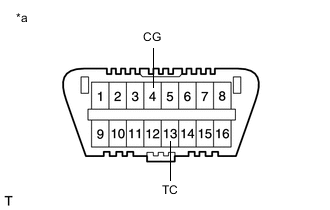
*a Front view of DLC3 Check the DTC.
-
Using SST, connect terminals 13 (TC) and 4 (CG) of the DLC3.
- SST
- 09843-18040
-
Turn the engine switch on (IG).
-
Observe the blinking pattern of the ABS warning, slip indicator and brake hold standby indicator lights in order to identify the DTC.
Tech Tips
If no code appears, inspect the TC and CG terminal circuit, and ABS warning, slip indicator and brake hold standby indicator light circuits.
Trouble Area See procedure TC and CG terminal circuit ABS warning light circuit (Remains on) ABS warning light circuit (Does not come on) Slip indicator light circuit (Remains on) Slip indicator light circuit (Does not come on) Brake hold standby indicator light circuit -
Count the number of blinks of the ABS warning, slip indicator and brake hold standby indicator lights.
Tech Tips
-
When the system is operating correctly, each light will blink continuously in a pattern of 0.25 seconds on, and then 0.25 seconds off.
-
When one DTC is output, each light will output the same code at 4 second intervals (for example, code 21 would be output as 2 blinks, a 1.5 second pause, and then 1 blink).
-
When 2 or more DTCs are output, each light will output a different code at 2.5 second intervals, and when all codes have been output, there will be a 4 second pause and the sequence will repeat.
-
When multiple codes are stored, they are output in order starting with the lowest DTC number.
-
If the brake hold operated indicator light is blinking before terminals of the DLC3 are connected, when terminals 13 (TC) and 4 (CG) of the DLC3 are connected, the brake hold operated indicator light stops blinking and turns off.
-
-
Check the details of the DTCs.
ABS DTC Warning Light Display GTS Display 11 C146E 12 C146F 13 C142B C146C 14 C146D 21 C1468 22 C1469 23 C146A 24 C146B 25 C1225 31 C1401 C1405 32 C1402 C1406 33 C1403 C1407 34 C1404 C1408 35 C1413 36 C1414 38 C1415 39 C1416 41 C120B C1241 C1417 43 C1232 C1243 44 C1419 C1420 C1442 45 C1245 46 C1421 C1422 C1423 C1424 C142A C1449 49 C1425 C1426 51 C1427 C1428 59 C1203 67 C1429 C1430 C1431 94 U0073 95 U0124 C1240 97 C1381 98 C1336 VSC DTC Warning Light Display GTS Display 31 C1432 C1433 C1434 34 C1435 C1436 C1443 36 C1210 63 U0126 64 C1380 65 C1437 U0100 66 C1290 C1439 C1445 98 C1440 Brake Hold DTC Warning Light Display GTS Display 11 C13AF -
After completing the check, disconnect terminals TC and CG of the DLC3 to turn off the display.
Tech Tips
If 2 or more DTCs are detected at the same time, the DTCs will be displayed in ascending order.
-
-
Clear the DTC.
-
*a Front view of DLC3 Using SST, connect terminals 13 (TC) and 4 (CG) of the DLC3.
- SST
- 09843-18040
-
Turn the engine switch on (IG).
-
Clear the DTCs stored in the ECU by depressing the brake pedal 8 times or more within 5 seconds.
-
Check that the warning light indicates a normal system code.
-
Remove SST from the terminals of the DLC3.
Tech Tips
w/o Stop and Start System:
The DTCs cannot be cleared by disconnecting the battery terminal or the ECU-IG1 NO. 6 fuse.
-
-
-
END OF DTC CHECK/CLEAR
-
Turn the engine switch on (IG).
-
Check that the ABS warning and slip indicator lights go off within approximately 3 seconds after turning the engine switch on (IG).
-