PRE-COLLISION SYSTEM SYSTEM DESCRIPTION
PRE-COLLISION SYSTEM DESCRIPTION
The pre-collision system determines the possibility of a collision according to information such as the position of the obstacle and its relative speed, and provides optimal control to avoid the collision and control to reduce the impact during the collision via warnings, brake assist and automatic braking.
FUNCTION OF COMPONENTS
Component
Function
Pre-collision City Sensor
Acquires information about the preceding vehicle from a monocular camera sensor and laser sensor to perform pre-collision system control.
Sends the information display, PCS warning light and PCS warning message signal to the combination meter assembly based on pre-collision control information.
Sounds the pre-collision city buzzer based on pre-collision control information.
Pre-collision System Cancel Switch Assembly
Turns the pre-collision system on/off and changes the warning timing.
Pre-collision City Buzzer
Sounds according to signals from the pre-collision city sensor.
Combination Meter Assembly
Displays the pre-collision system control status (ON/OFF) and warning timing.
During a system malfunction, warns the driver by displaying a message in the multi-information display according to the nature of the problem in the system, blinking the PCS warning light and master warning light and sounding the meter buzzer.
ECM
Detects the shift position signal and accelerator opening angle and sends that information to the pre-collision city sensor.
Performs engine output control based on information from the pre-collision city sensor.
Skid Control ECU (Brake Actuator Assembly)
Sends information such as the vehicle speed signal, stop light switch signal and brake control hydraulic pressure to the pre-collision city sensor.
Performs brake hydraulic pressure and emergency brake signal control based on information from the pre-collision city sensor.
Steering Angle Sensor (Spiral with Sensor Cable Sub-assembly)
Detects the steering angle and steering direction.
Yaw Rate Sensor
Detects the yaw rate and acceleration of the vehicle and transmits signals to the pre-collision city sensor.
Main Body ECU (Instrument Panel Junction Block Assembly)
Sends destination information to the pre-collision city sensor.
VSC OFF Switch
Disables the pre-collision brake and pre-collision brake assist operation when the switch is turned on.
OUTLINE OF PRE-COLLISION DETECTION
Collision detection
The system determines in advance the possibility of a collision and whether the collision can be avoided based on road surface conditions and the position and speed of the preceding vehicle according to information about the preceding vehicle from the pre-collision city sensor.
Tip:For details about the system, see "Outline of Pre-collision System Control" and the function descriptions.
Component
Component
Detection Content
Pre-collision city sensor
Obstacle in front (vehicle)
OUTLINE OF PRE-COLLISION SYSTEM CONTROL
Control Condition
Start of Control
Sender ECU
Receiver ECU
Operated Parts
Pre-collision warning
Collision is possible
Pre-collision city sensor
Combination meter assembly
Combination meter assembly (warning display)
Pre-collision city buzzer (warning sound)
Pre-collision brake assist
Collision is highly possible
Pre-collision city sensor
Combination meter assembly
Skid control ECU (brake actuator assembly)
Combination meter assembly (warning display)
Pre-collision city buzzer (warning sound)
Brake actuator assembly
Pre-collision brake
Possibility of a collision is very high
Pre-collision city sensor
Combination meter assembly
Skid control ECU (brake actuator assembly)
ECM
Combination meter assembly (warning display)
Pre-collision city buzzer (warning sound)
Brake actuator assembly
PRE-COLLISION ALARM CONTROL
When the system determines that the possibility of a frontal collision with a vehicle is high, a buzzer will sound and warning message will be displayed on the multi-information display to urge the driver to take evasive action.
PRE-COLLISION BRAKE ASSIST CONTROL
When the system determines that the possibility of a frontal collision with a vehicle is high, the system applies greater braking force in relation to how strongly the brake pedal is depressed.
PRE-COLLISION BRAKE CONTROL
When the system determines that the possibility of a frontal collision with a vehicle is high, the system warns the driver. If the system determines that the possibility of a collision is extremely high, the brakes are automatically applied to help avoid the collision or reduce the collision speed.
Note:When the system detects that the driver is attempting to cancel operation of the system by performing operations such as the following, pre-collision brake control will be canceled.
The accelerator pedal is depressed strongly.
The steering wheel is operated quickly.
VSC OFF SWITCH
Turning the VSC OFF switch on disables pre-collision brake assist control and pre-collision brake control.
Tip:When the VSC OFF switch is held for 3 seconds or more, the mode changes to VSC OFF mode, the PCS warning light illuminates and "VSC TURNED OFF PRE-COLLISION BRAKE SYSTEM UNAVAILABLE" is displayed on the multi-information display.
PRE-COLLISION SYSTEM (PCS) OPERATION CONDITIONS
Shared conditions:
Pre-collision system is ON
Shift lever is not in R
PCS warning light in combination meter assembly does not blink
Pre-collision warning operation conditions:
Vehicle speed is approximately 15 km/h (10 mph) or more and approximately 140 km/h (87 mph) or less
Relative speed of vehicle ahead is approximately 15 km/h (10 mph) or more
Pre-collision brake assist control operation conditions:
Vehicle speed is approximately 30 km/h (19 mph) or more and approximately 80 km/h (50 mph) or less
Relative speed of vehicle ahead is approximately 30 km/h (19 mph) or more
VSC system is not disabled
Pre-collision brake control operation conditions:
Vehicle speed is approximately 10 km/h (6 mph) or more and approximately 80 km/h (50 mph) or less
Relative speed of vehicle ahead is approximately 10 km/h (6 mph) or more
VSC system is not disabled
PRECAUTION FOR PRE-COLLISION CITY SENSOR
Conditions under which the system may operate even if there is no possibility of a collision.
In the following situations the sensor may detect an object, causing the system to determine that there is a possibility of a frontal collision and operate.
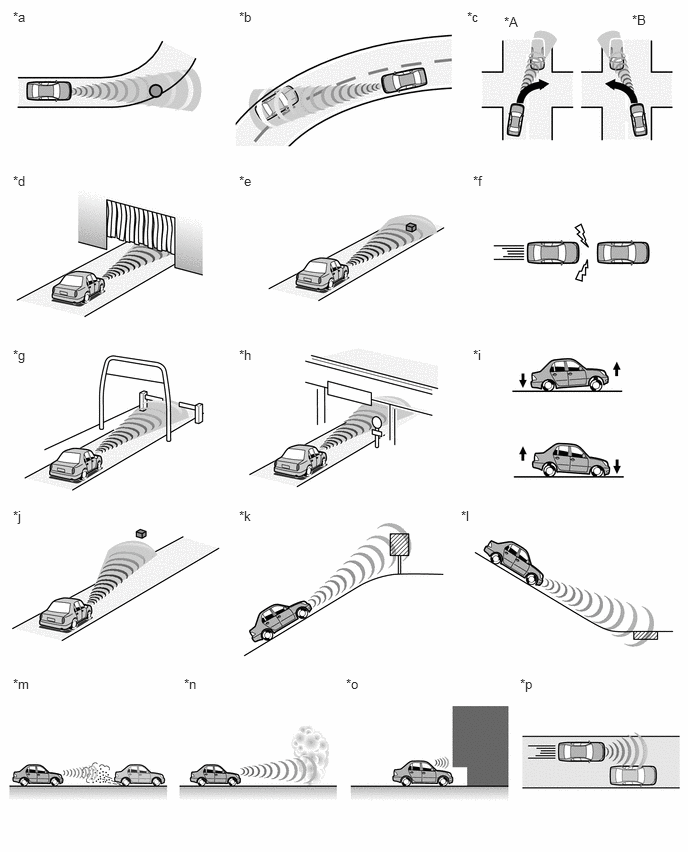
Table 1. Text in Illustration *A
for RHD
*B
for LHD
*a
There are objects on the side of the road at the beginning of a curve (a guardrail, street light, billboard, etc.).
*b
Passing an oncoming vehicle on a curve.
*c
When passing an oncoming vehicle while making a left turn (for LHD) or right turn (for RHD).
*d
Passing through an area which contains an obstacle that covers the vehicle (such as a hanging curtain).
*e
There are metal objects, bumps and protrusions on the road (a metal plate covering road construction, a mesh drain cover, a manhole, etc.).
*f
Suddenly approaching a preceding vehicle.
*g
Approaching an electrical toll collection gate (reacts to bar).
*h
Crossing an overpass, traffic sign, signboard.
*i
The vehicle height drastically changes (nose-up, nose-down).
*j
When the sensor is misaligned due to a strong impact being applied to the sensor, etc.
*k
There is a billboard or sign at the top of an incline.
*l
There are metal objects at the bottom of a decline (a metal plate covering road construction, a mesh drain cover, a manhole, etc.).
*m
Snow, water, etc., is kicked up by the preceding vehicle.
*n
Passing through an area which contains heavy fog or smoke.
*o
When the vehicle is being parked in a place where there is a low hanging object at the height of the pre-collision city sensor
*p
Passing extremely close to the side of an obstacle (stopped vehicle, guardrail, etc.).
Situations in which the pre-collision system may not function properly.
The system may not function properly in the following situations:
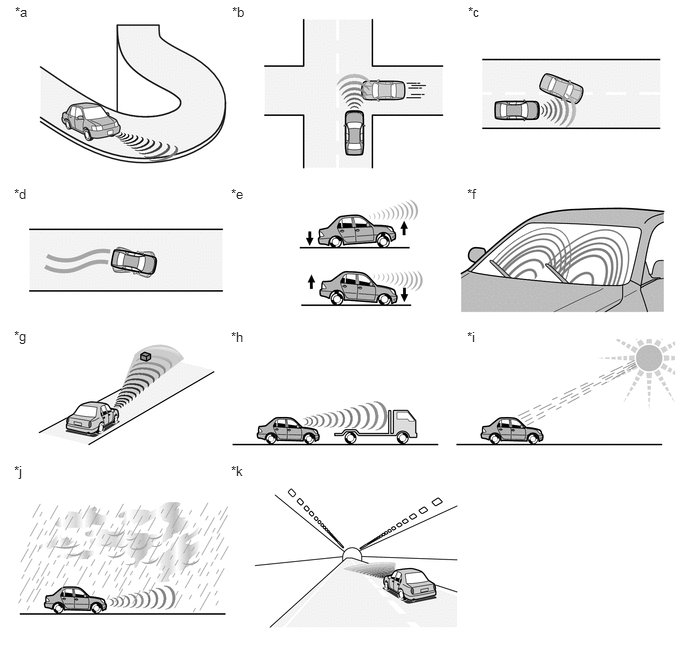
Table 2. Text in Illustration *a
When driving on roads with sharp bends or uneven surfaces
*b
If a vehicle suddenly moves in front of the vehicle, such as at an intersection
*c
If a vehicle suddenly cuts in front of the vehicle
*d
If the vehicle is skidding
*e
When the front part of the vehicle is raised or lowered
*f
When the windshield is dirty or covered with raindrops, condensation, ice, snow, etc.
*g
When the sensor is misaligned due to a strong impact being applied to the sensor, etc.
*h
When a preceding vehicle is a poor reflector of laser (the rear part of the vehicle lowered, very dirty, etc.)
*i
When a very bright light, such as the sun or the headlights of oncoming traffic, shines directly into the pre-collision city sensor
*j
When driving in inclement weather such as heavy rain, fog, snow or a sand storm
*k
When the surrounding area is dark, such as while in a tunnel or during nighttime
-
-
PRE-COLLISION SYSTEM AUTOMATIC CANCELLATION
When a system malfunction is detected and the sensor cannot detect vehicles, system operation cancels automatically.
Tip:When the system malfunctions or is temporarily disabled, the PCS warning light blinks.