NAVIGATION SYSTEM / MULTI INFORMATION SYSTEM
-
OUTLINE
-
The navigation system is composed of the following main components.
Figure 1. Main Components of Navigation System
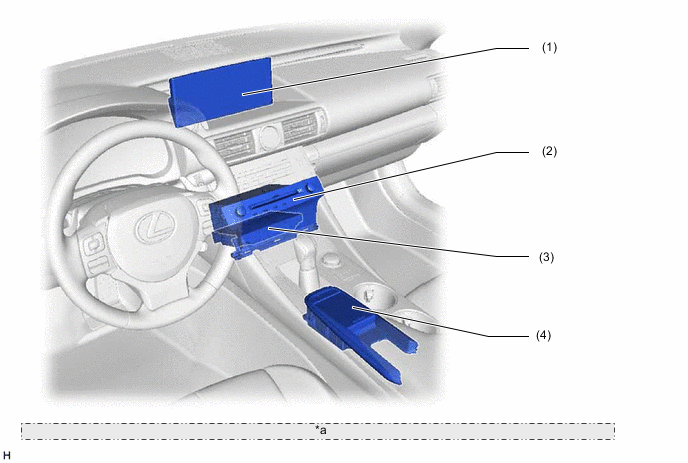
*a The illustrations shown are examples only. The actual vehicle and component locations may vary. Component Outline (1) Multi-display Assembly Utilizes a 10.3-inch liquid crystal display (LCD). (2) Radio Receiver Assembly Operates the navigation system in cooperation with the navigation ECU and primarily controls the audio function, multi-display, feedback force to the remote touch, etc. (3) Navigation ECU Controls the navigation system in cooperation with the radio receiver assembly and is equipped with map data, IT-related functions and programs necessary for navigation, etc. (4) Remote Touch (Remote Operation Controller Assembly) A touch operation based user interface with the navigation system that allows blind operation due to tactile feedback using the touchpad. -
A split display function is provided. Due to this function, the map screen and the audio screen or vehicle information screen can be displayed on the single screen simultaneously.
-
Destinations, etc. can be searched for by entering characters via the Touchpad using the hand-writing input method. (Models for Europe)
-
The navigation system can be operated using the voice recognition system which recognizes spoken commands from the user. The availability of commands differs depending on the destination of the model. (Models for Europe)
-
When the name of the destination is unknown, the user can search for the destination using keywords. (Models for Europe)
-
Displays the route information and traffic information such as the distance to the destination, travel/arrival time etc. in the route information bar of the map screen when performing route guidance. (Except models for Europe)
-
For high altitude areas, the real terrain map, which enhances the map quality using gradient data in predetermined scales, is displayed. (Except models for Europe)
-
When the fuel level is low, a warning message is displayed and a list of nearby gas stations can be displayed on the multi-display. User can select a nearby gas station from the list and set it as the destination. (Except models for Europe)
-
When an alternative route is traveled during route guidance, the alternative route is memorized. When a route other than the route guidance is traveled several times, the navigation system learns that route and displays it as an adaptive route in the route search results. (Except models for Europe)
-
Displays the route information and traffic information such as distance to destination, travel/arrival time etc. on the map screen when performing route guidance. (Models for Europe)
-
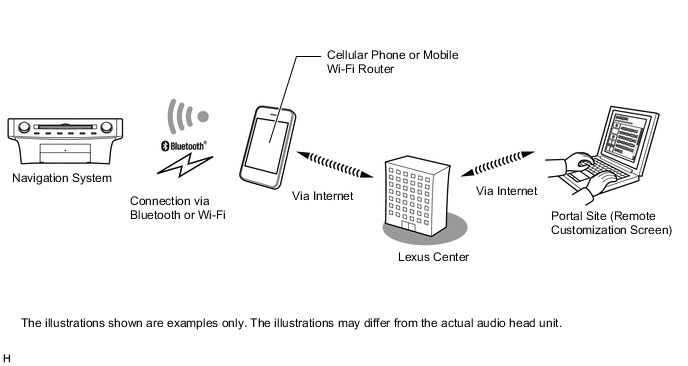
Connected Services is supported. This allows the user to search for new establishments or establishments that are not registered to the map and set them as a destination. In addition, it is possible to download Point of Interest (POI) and route information that was searched for on the Lexus portal site and set it as a destination or register it to the map. Also, functions such as browsing street view, acquisition of information (weather, fuel price, parking), and remote customization of the vehicle etc. are available. To use this function it is necessary to access the internet from a wireless clients (User's tethering-compatible cellular phone or mobile Wi-Fi router), which is connected to the radio receiver assembly via Bluetooth or Wi-Fi communication. (Models for Europe)
-
The display of the map can be changed among 5 colors depending on the users preference. (Destination package for Taiwan)
-
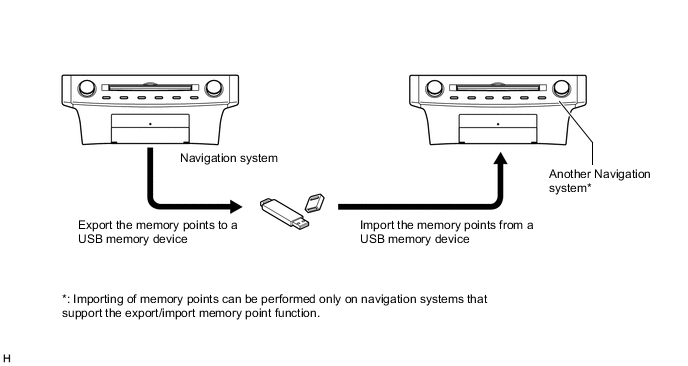
The navigation system supports a function used for the export/import of memory points. This function enables memory point data stored on the radio receiver assembly to be transferred to another navigation system (such as another radio receiver assembly) via a USB memory device.
-
The navigation system sends navigation information to the combination meter assembly. The user can view a compass display and turn-by-turn directions to the destination on the multi-information display.
-
-
SPECIFICATION
Component Destination Europe Taiwan Multi-display 10.3-inch Wide LCD Navigation Computer Harman/Becker Automotive Systems Pioneer Gyro Sensor Piezoelectric Ceramic Element Map Database Stored Internally within Navigation ECU Language Supported Voice Guidance English, Spanish, Portuguese, Czech, Danish, Dutch, Finnish, Flemish, French, German, Greek, Italian, Norwegian, Polish, Russian, Swedish, Turkish, Hebrew, Hungarian, Romanian, Slovak, Ukrainian Taiwanese Mandarin Voice Recognition English, Spanish, Portuguese, Czech, Danish, Dutch, Finnish, Flemish, French, German, Greek, Italian, Norwegian, Polish, Russian, Swedish, Turkish - -
MAIN FEATURES
-
10.3-inch Display
-
Light Emitting Diodes (LEDs) are used to provide mercury-free backlighting for the multi-display. This reduces the burden on the environment and ensures brightness.
-
With the wide viewing angle high contrast 10.3-inch display, a wide range map can be displayed.
-
The 10.3-inch display has a full screen mode in which the map screen or menu screen, etc. is displayed in full size, and a split screen display mode in which the main screen and side screen are displayed simultaneously.
-
The menu screen top is displayed when in full screen mode. Some menus display their contents as shortcut switches above the menu item when the cursor is moved over the menu item. By using on cursor shortcut switches, direct access to frequently used functions is realized.
Figure 2. An Example of Displayed On Cursor Shortcut Switches
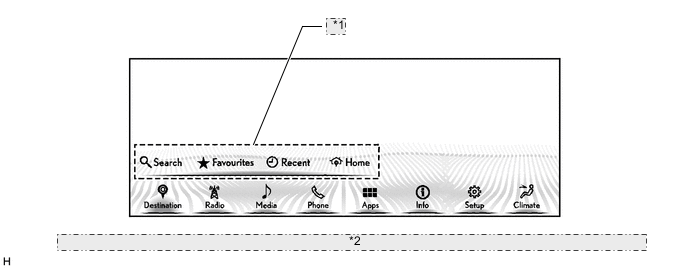
*1 On Cursor Shortcut Switches *2 The illustration shown is an example only. The illustration may differ from the actual vehicle screen. -
The screen mode can be switched between full screen mode and split screen display mode using the side screen menu bar. Using the split screen display mode, different information can be displayed on main screen and side screen.
-
In full screen mode, the main screen is displayed at 1920 x 720. In split-screen display mode, the main screen is displayed at 1200 x 720 and the side screen is displayed at 720 x 720.
Figure 3. 10.3-inch Display Screen Size
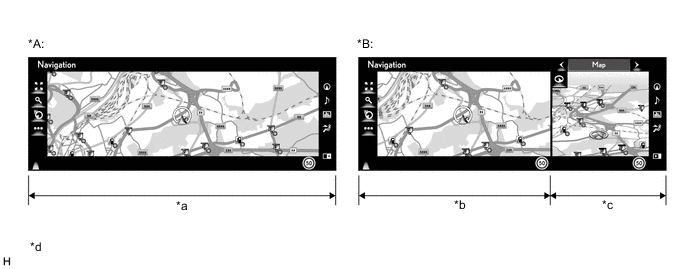
*A Full Screen Mode *B Split-screen Display Mode *a Full Screen (1920 x 720) *b Main Screen (1920 x 720) *c Side Screen (720 x 720) *d The illustrations shown are examples only. The illustrations may differ from the actual vehicle screens. -
The side screen menu bar is located on the right side of the screen. Using the side screen menu bar, the user can operate the side screen, such as selecting which screen is displayed.
Figure 4. Side Screen Display Mode
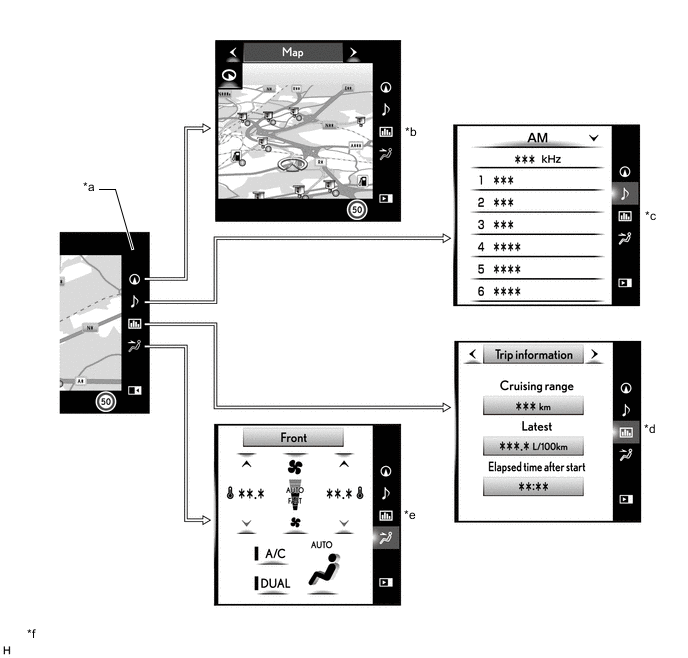
*a Side Screen Menu Bar *b Map Screen Mode *c Audio Screen Mode *d Vehicle Information Screen Mode *e Air Conditioning Control Screen Mode *f The illustrations shown are examples only. The illustrations may differ from the actual vehicle screens. Functions of Side Screen Menu Bar Switch Side Screen Menu Bar Screen Side Screen Display Mode Outline 
Map Screen Mode
-
By selecting this icon, the user can display the map screen on the side screen.
-
In map screen mode, the user can perform operations regarding the map, such as displaying or zooming in on a map.

Audio Screen Mode
-
By selecting this icon, the user can display the audio screen on the side screen.
-
In audio screen mode, the user can perform operations regarding the audio, such as displaying audio status information, selecting the audio source or selecting a music or radio station.

Vehicle Information Screen Mode
-
By selecting this icon, the user can display the vehicle information screen on the side screen.
-
In vehicle information screen mode, the user can display vehicle information such as trip information, past records and energy monitor on the side screen.

Air Conditioning Control Screen Mode
-
By selecting this icon, the user can display the air conditioning control screen on the side screen.
-
In air conditioning control screen mode, the user can perform operations regarding the air conditioning system, such as turning on or off the air conditioning system, setting the desired temperature and selecting air outlets.

Side Screen Open By selecting this icon, the user can open the side screen. 
Side Screen Close By selecting this icon, the user can close the side screen. -
-
Cut-in screens can be displayed on the side screen, when route guidance is being performed or other screens such as the hands-free system dial screen*, call receive screen* or drive mode screen are being displayed.
Tech Tips
*: The user can select the dial screen and call receive screen to cut in on either the main screen or side screen.
-
-
Keyword Search (Models for Europe)
-
When the name of the desired destination is unknown, the user can search the desired destination by setting the search target country and entering multiple free words in the keyword search box. The user can choose the desired destination from the search result list.
-
When Connected Services is available, more search results can be displayed by searching the internet in addition to the data stored on the in-vehicle device. In addition, when additional information and detailed information related to the searched destination is available, POI information can be displayed from the search result list.
-
-
Hand-writing Input Function (Models for Europe)
-
The destination search supports the hand-writing input method in addition to the keyboard input method. Characters input into the system by hand using the touchpad of the remote touch (remote operation controller assembly) can be displayed in the input zone of the multi-display. Furthermore, when the beginnings of a character is displayed in the input zone, the character prediction function provides potential matches.
Figure 5. Hand-writing Input Screen
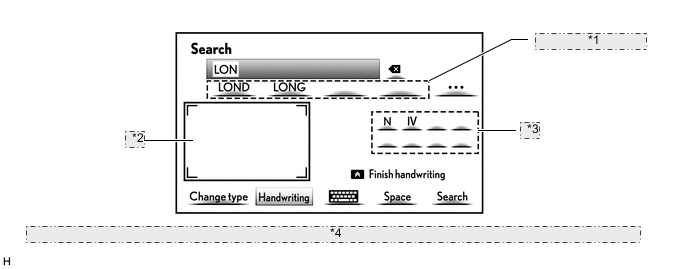
*1 Potential matches for next character *2 Input Zone *3 Potential matches *4 The illustration shown is an example only. The illustration may differ from the actual vehicle screen.
-
-
Voice Recognition System (Models for Europe)
-
When the vehicle is being driven, the user can operate the navigation system such as searching for an address or POI using the voice recognition system.
-
Voice recognition operation sample commands are displayed to assist users who are not familiar with the voice recognition system. Also, an icon which displays a voice recognition status such as when to speak is provided.
-
By selecting "More commands" located at the bottom of the menu screen, categories of functions that can be operated using voice commands are displayed.
Tech Tips
The system operates as commanded by the user even when a command not shown on the current screen is spoken.
Figure 6. Voice Recognition Screen
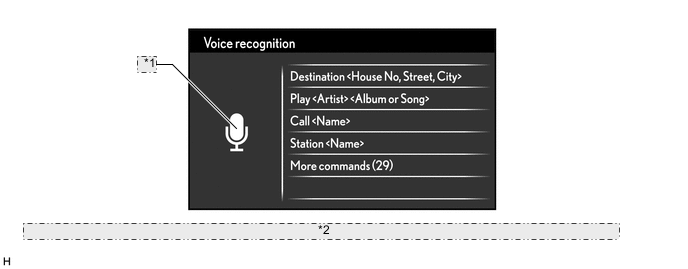
*1 Voice Recognition Status Icon *2 The illustration shown is an example only. The illustration may differ from the actual vehicle screen.
-
-
Connected Services (Models for Europe)
-
The following services are available by accessing the Lexus portal site from a wireless clients (User's tethering-compatible cellular phone or mobile Wi-Fi router), which is connected to the radio receiver assembly via Bluetooth or Wi-Fi communication.
-
To use these connected services, a Bluetooth or Wi-Fi connection and a portal account are required.
-
To get a portal account, access the Lexus portal site (www.my.lexus.eu).
-
Available connected services are listed in the following table:
Tech Tips
-
The Wi-Fi communication function is a best-effort type function.
-
Wi-Fi is a registered trademark of Wi-Fi Alliance.
Contents Outline Online search New establishments, such as restaurants and bars, that are not registered in the navigation system can be set as a destination. Importing memory points and routes Downloading via a cellular phone or mobile Wi-Fi router Memory points and routes that were searched for using a personal computer can be set as a destination and can be registered as memory points. Downloading from a USB memory device Information search Street View Street view, which shows panoramic images along streets. By selecting a location on the map while the street view icon is displayed on the multi-display, up to 6 street view images of the location can be displayed. Weather Weather information for the selected areas, such as present vehicle position, destination or a searched areas, for the next 5 days can be displayed on the multi-display. In addition, up to 20 selected areas can be registered as favorites. Fuel price Fuel price information for an area around a selected point, such as the present vehicle position, destination or a searched area, can be displayed on the multi-display. Parking Parking information for an area around a selected point, such as the present vehicle position, destination or a searched area, can be displayed on the multi-display. Remote customization The vehicle equipment operation settings can be partially changed by remote operation via the Lexus portal site. Figure 7. Online Search Image
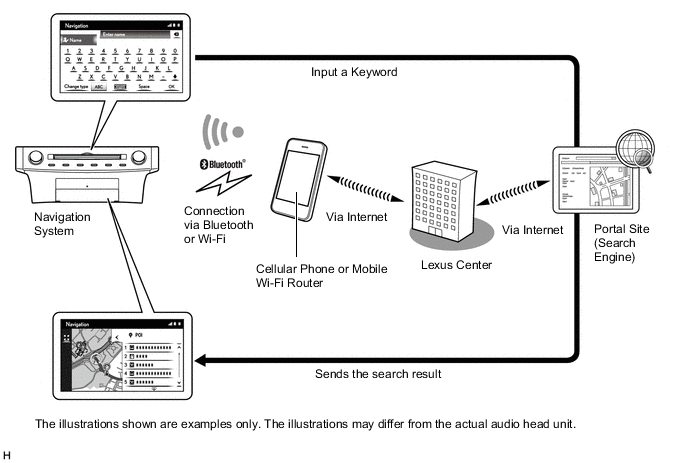
Figure 8. Importing Memory Points Image
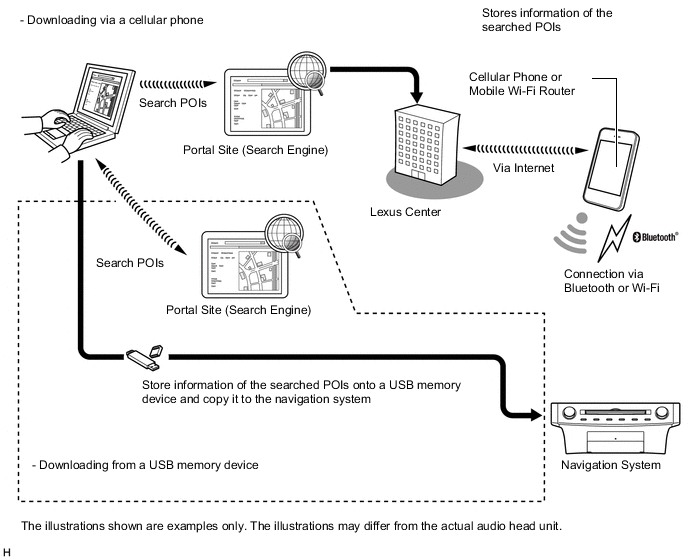
Figure 9. Information Search Image
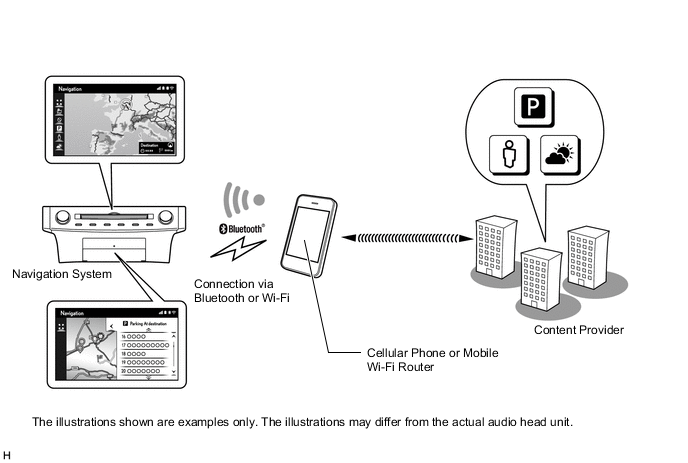
Figure 10. Vehicle Customization Image
-
-
-
Export/Import Memory Point Function
-
Memory point data stored in the radio receiver assembly can be transferred to another navigation system, enabling information sharing.
Figure 11. Export/Import Procedure for Memory Points
-
-
The main functions of the multi-display are listed below.
Function Outline Navigation System Through the use of the Global Positioning System (GPS) and map data which is stored on a navigation ECU, the navigation system analyzes the position of the vehicle and indicates the position on the map that is displayed on the screen.
In addition, it is possible to use the system to register memory points and navigate to a destination.
Audio/Video System Serves as the display and controls for the following:
-
Radio operation
-
CD/DVD player operation
-
Bluetooth-compatible portable player operation
-
iPod/iPhone operation
-
USB memory device operation
-
Portable audio player operation (AUX type)
Air Conditioning System Operation and control of the air conditioning system can be performed through the use of the automatic air conditioning switches displayed on the multi-display. Hands-free System When a Bluetooth-compatible cellular phone is registered to the navigation system, the driver can make and receive calls or talk hands-free on the cellular phone by operating the switches on the screen/steering pad. Speech Command System (Models for Europe) Operates the navigation, audio, and hands-free systems based on voice commands. Parking Assist Monitor System Displays a view of the area behind the vehicle that is captured by the rear television camera mounted on the luggage compartment door when the shift lever is moved to R. LEXUS Parking Assist-sensor System Detects obstacles and displays information on the multi-display to inform the driver. Others Fuel Consumption Screen In addition to the display of fuel consumption information such as the average fuel consumption per minute, current fuel consumption per minute and past fuel consumption record, the vehicle drive status, hybrid system operation status, and energy monitor status which enable the confirmation of energy regeneration are displayed. Remote Touch Setting The following settings of each function of the remote touch can be changed:
-
Selection sound
-
Pointer sound volume
-
Error sound
-
Pointer sound volume
-
Feedback force
-
Cursor speed
-
Multi-touch command
Maintenance Information
(Destination Package for Taiwan)
The maintenance information function can be used to inform the driver of the inspection or replacement timing of the following items based on the calendar function and distance driven.
-
Engine oil: Replace engine oil
-
Oil filter: Replace engine oil filter
-
Rotation: Rotate tires
-
Tires: Replace tyres
-
Battery: Replace battery
-
Brake pad: Replace brake pads
-
Wipers: Replace wiper blades
-
Coolant: Replace engine coolant
-
Brake oil: Replace brake fluid
-
Trans. fluid: Replace ATF
-
Service: Scheduled maintenance
-
Air filter: Replace air filter
-
Personal: New information items can be created separately from the provided items
Language Select
(Models for Europe)
The language of the screen buttons, pop-up messages and the voice guidance can be changed. Screen Color Theme Setting The screen color theme can be changed. Screen Setting This enables automatic return to the navigation screen from the audio screen. Delete Personal Data Deletes or returns registered or changed personal settings to their default conditions.
-
General settings
-
Navigation settings
-
Audio settings
-
Telephone settings
-
Connected services settings (Models for Europe)
For example:
Screen Adjustment The brightness or contrast of the screen can be adjusted to suit the brightness of the surroundings. Map Database Update The map database in the navigation ECU can be completely updated. Diagnosis This menu contains the following items:
-
Failure Diagnosis
-
System Check
-
Storage Check
-
Diagnosis Recorder
-
MEU Check
-
Function Check / Setting
-
Panel & Steering Switch
-
Microphone Check
-
Vehicle Signal
-
HF Voice Quality Setting
-
Camera Setting
-
MEU Inspection
-
Service Information
-
MEU Information
-
Repro info
-
Version Information
-
Product Information
-
-