ECD SYSTEM, Diagnostic DTC:P0724
| DTC Code | DTC Name |
|---|---|
| P0724 | Brake Switch "B" Circuit High |
DESCRIPTION
This DTC indicates that the stop light switch remains on. When the stop light switch remains on during GO and STOP driving, the ECM interprets this as a fault in the stop light switch. Then the MIL illuminates and the ECM stores the DTC.
| DTC No. | Detection Item | DTC Detection Condition | Trouble Area | MIL | Memory |
|---|---|---|---|---|---|
| P0724 | Brake Switch "B" Circuit High | Stop light switch remains on even when vehicle is driven in GO (30 km/h (19 mph) or more) and STOP (less than 3 km/h (1.8 mph)) pattern 5 times (2 trip detection logic). |
|
Comes on | DTC stored |
| DTC No. | Data List |
|---|---|
| P0724 | Stop Light Switch |
CONFIRMATION DRIVING PATTERN
| DTC Detection Drive Pattern | Accelerate the vehicle to 30 km/h (19 mph) or more, depress the brake pedal and decelerate the vehicle to 3 km/h (1.8 mph) or less 5 times. |
WIRING DIAGRAM
Refer to DTC P0504 Click here.
CAUTION / NOTICE / HINT
Note
-
Inspect the fuses of circuits related to this system before performing the following inspection procedure.
-
After replacing the ECM, the new ECM needs registration (See page ) and initialization Click here.
-
After replacing the fuel supply pump assembly, the ECM needs initialization Click here.
-
After replacing an injector assembly, the ECM needs registration Click here.
Tech Tips
Read freeze frame data using the intelligent tester. Freeze frame data records the engine condition when malfunctions are detected. When troubleshooting, freeze frame data can help determine if the vehicle was moving or stationary, if the engine was warmed up or not, and other data from the time the malfunction occurred.
PROCEDURE
-
READ VALUE USING INTELLIGENT TESTER (STOP LIGHT SWITCH)
-
Connect the intelligent tester to the DLC3.
-
Turn the ignition switch to ON.
-
Enter the following menus: Powertrain / Engine / Data List / Stop Light Switch.
Powertrain > Engine > Data ListTester Display Stop Light Switch -
Read the value displayed on the tester when the brake pedal is depressed and released.
OK Brake Pedal Display Released OFF Depressed ON Result Proceed to OK NG
OK 
GO TO STEP 7 Click here
NG 
-
-
INSPECT STOP LIGHT SWITCH ASSEMBLY
-
Inspect the stop light switch assembly.
Result Proceed to OK NG
NG
REPLACE STOP LIGHT SWITCH ASSEMBLY Click here
OK
-
-
CHECK ECM (STP VOLTAGE)
-
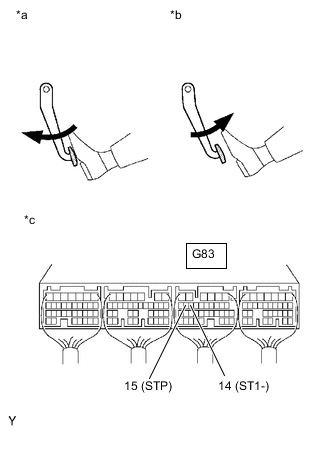
*a Brake Pedal Depressed *b Brake Pedal Released *c Component with harness connected
(ECM)
Turn the ignition switch to ON.
-
Measure the voltage according to the value(s) in the table below.
Standard Voltage Tester Connection Brake Pedal Condition Specified Condition G83-15 (STP) - Body ground Released 0 to 3 V Depressed 11 to 14 V Result Proceed to OK NG
NG
REPAIR OR REPLACE HARNESS OR CONNECTOR Click here
OK
-
-
REPLACE ECM
-
Replace the ECM.
Result Proceed to NEXT
NEXT
GO TO STEP 7 Click here
-
-
REPLACE STOP LIGHT SWITCH ASSEMBLY
-
Replace the stop light switch assembly.
Result Proceed to NEXT
NEXT
GO TO STEP 7 Click here
-
-
REPAIR OR REPLACE HARNESS OR CONNECTOR
-
Repair or replace the harness or connector.
Result Proceed to NEXT
NEXT
-
-
CONFIRM WHETHER MALFUNCTION HAS BEEN SUCCESSFULLY REPAIRED
-
Connect the intelligent tester to the DLC3.
-
Clear the DTCs.
Powertrain > Engine > Clear DTCs -
Turn the ignition switch off for 30 seconds or more.
-
Turn the ignition switch to ON and turn the tester on.
-
Start the engine.
-
Accelerate the vehicle to 30 km/h (19 mph) or more, depress the brake pedal and decelerate the vehicle to 3 km/h (1.8 mph) or less 5 times or more.
-
Confirm that the DTC is not output again.
Tech Tips
Perform the following procedure using the tester to determine whether or not the DTC judgment has been carried out.
-
Enter the following menus: Powertrain / Engine / Utility / All Readiness.
Powertrain > Engine > UtilityTester Display All Readiness -
Input DTC P0724.
-
Check that STATUS is NORMAL.
Tech Tips
-
If STATUS is NORMAL, DTC judgment is complete and it can be determined that the system is normal.
-
If STATUS is INCOMPLETE or N/A, DTC judgment is incomplete. Perform the following procedure again 5 times: accelerate the vehicle to 30 km/h (19 mph) or more, depress the brake pedal and decelerate the vehicle to 3 km/h (1.8 mph) or less.
-
Result Proceed to NEXT -
NEXT 
END
-