REAR SEAT ENTERTAINMENT ECU INSTALLATION
PROCEDURE
INSTALL NO. 3 MULTI-DISPLAY CONTROLLER BRACKET
-
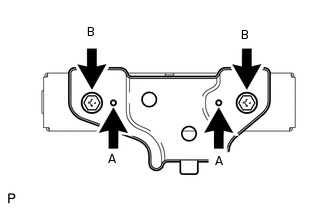
Set the aligning protrusions of the bracket, labeled A, into the holes of the controller.
Install the No. 3 multi-display controller bracket with the 2 screws labeled B.
-
INSTALL NO. 1 MULTI-DISPLAY CONTROLLER BRACKET
-
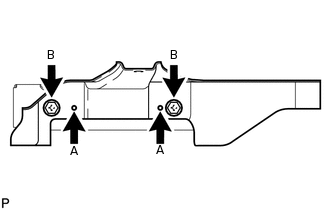
Set the aligning protrusions of the bracket, labeled A, into the holes of the controller.
Install the No. 1 multi-display controller bracket with the 2 screws labeled B.
-
INSTALL MULTI-DISPLAY CONTROLLER SUB-ASSEMBLY WITH BRACKET
-
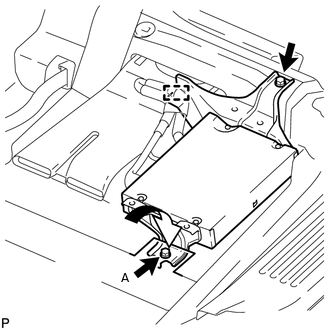
Install the multi-display controller sub-assembly with bracket with the bolt and screw.
for bolt A
8.0 N*m
82 kgf*cm
71 in.*lbf
Return the floor carpet to its original position as shown in the illustration.
Attach the clamp and connect the 4 connectors.
-
INSTALL MULTI-MEDIA MODULE COVER
Install the amplifier cover with the 3 clips.
-
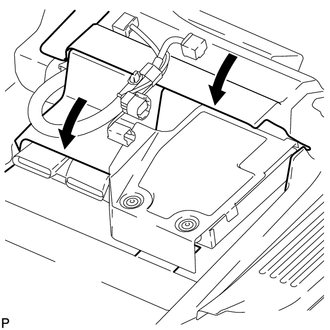
Return the floor carpets to their original positions as shown in the illustration.
INSTALL FRONT SEAT ASSEMBLY RH
Install the front seat assembly RH (Click here).
CONNECT CABLE TO NEGATIVE BATTERY TERMINAL
Note:When disconnecting the cable, some systems need to be initialized after the cable is reconnected (Click here).
CHECK SRS WARNING LIGHT
Check the SRS warning light (Click here).