ELECTRONIC CONTROLLED AUTOMATIC TRANSMISSION SYSTEM (for 1GR-FE) DTC CHECK / CLEAR
Note
Intelligent tester only:
When the diagnosis system is changed from normal mode to check mode, or vice versa, all the DTCs and freeze frame data recorded in normal mode will be erased. Before changing modes, always check and make a note of any DTCs and freeze frame data.
-
CHECK DTC (USING INTELLIGENT TESTER)
-
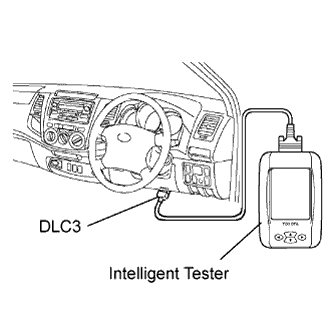
Connect the intelligent tester to the DLC3.
-
Turn the ignition switch ON and turn the intelligent tester ON.
-
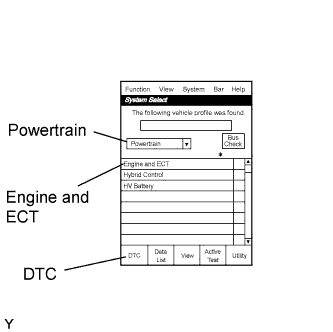
Enter the following menus: Powertrain / Engine and ECT / DTC.
-
Check and make a note of DTCs and freeze frame data.
Tech Tips
Refer to the intelligent tester's instruction manual for further details.
-
Confirm the details of the DTCs Click here.
-
-
CLEAR DTCS AND FREEZE FRAME DATA (USING INTELLIGENT TESTER)
-
Connect the intelligent tester to the DLC3.
-
Turn the ignition switch ON (do not start the engine) and turn the intelligent tester ON.
-
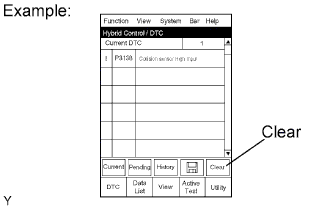
Enter the following menus: Powertrain / Engine and ECT / DTC / Clear.
-
Erase DTCs and freeze frame data by pressing YES on the tester.
-
Turn the ignition switch OFF and then turn it ON again. Check that the monitor is not displaying any DTCs.
Tech Tips
If any DTCs are displayed, repeat the above procedures starting from "Enter the following menus".
-
-
CLEAR DTCS AND FREEZE FRAME DATA (NOT USING INTELLIGENT TESTER)
-
Perform either one of the following operations.
-
Disconnect the cable from the negative (-) battery terminal for more than 1 minute.
Note
If the cable is disconnected from the negative (-) battery terminal, perform the ''INITIALIZATION'' procedures.
-
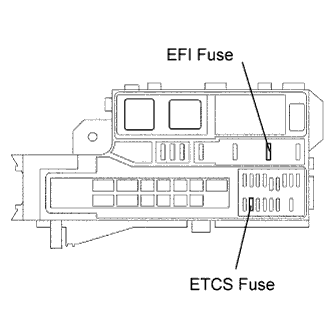
Remove the EFI and ETCS fuses from the engine room junction block and relay block.
-
-