LOWER INSTRUMENT PANEL REMOVAL
PROCEDURE
-
PRECAUTION
-
REMOVE UPPER INSTRUMENT PANEL ASSEMBLY
-
REMOVE FRONT DOOR SCUFF PLATE RH
Tech Tips
Use the same procedure as for the LH side Click here.
-
REMOVE COWL SIDE TRIM SUB-ASSEMBLY RH
Tech Tips
Use the same procedure as for the LH side Click here.
-
REMOVE NO. 2 INSTRUMENT PANEL UNDER COVER SUB-ASSEMBLY
-

Disengage the 3 claws and guide.
-
Disconnect the connector to remove the No. 2 instrument panel under cover sub-assembly.
-
-
REMOVE GLOVE COMPARTMENT DOOR ASSEMBLY
-
Open the glove compartment door.
-

Text in Illustration *1 Glove Compartment Door Stopper Sub-assembly *2 Stopper Disengage the claw and release the glove compartment door stopper sub-assembly.
-
Slightly bend stoppers (A) and (B) in the directions indicated by the arrows in the illustration and pull the glove compartment door assembly until the stoppers are released.
-
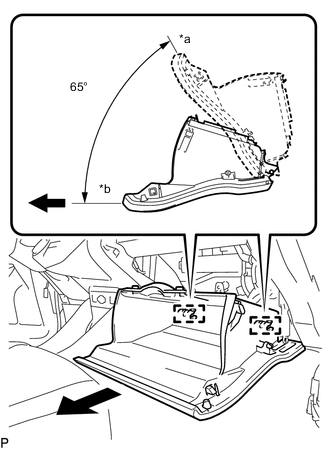
Text in Illustration *a Closed *b Opened Approximately 65° Open the glove compartment door assembly to approximately 65° from its closed position. Pull it horizontally in the direction indicated by the arrow to disengage the 2 hinges and remove the glove compartment door assembly.
Note
Pulling the glove compartment door assembly upward to remove it causes the hinges to deform. Be sure to pull out the glove compartment door assembly horizontally.
-
-
REMOVE GLOVE COMPARTMENT DOOR STOPPER SUB-ASSEMBLY
-
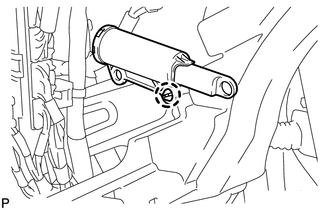
Disengage the claw to remove the glove compartment door stopper sub-assembly.
-
-
REMOVE CENTER FLOOR CARPET COVER RH
-
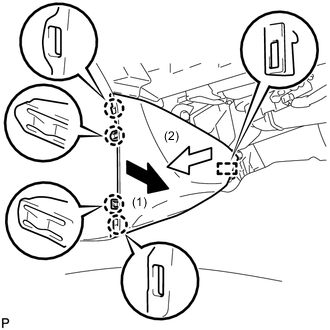
Pull the front center floor carpet cover RH in the direction indicated by the arrow to disengage the 4 claws and guide, and remove the center floor carpet cover RH.
-
-
REMOVE CENTER FLOOR CARPET COVER LH
-

Pull the front center floor carpet cover LH in the direction indicated by the arrow to disengage the 4 claws and guide, and remove the center floor carpet cover LH.
-
-
REMOVE UPPER CONSOLE PANEL
-
REMOVE UPPER CONSOLE PANEL SUB-ASSEMBLY
-
REMOVE FRONT NO. 2 CONSOLE BOX INSERT
-
REMOVE CONSOLE BOX ASSEMBLY
-
REMOVE COMBINATION METER ASSEMBLY
-
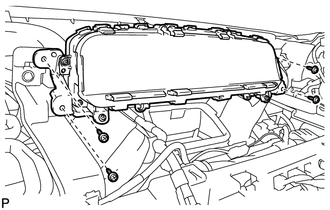
Remove the 4 screws <E>.
-
Disengage the clamp.
-
Disconnect each connector to remove the combination meter assembly.
-
-
REMOVE CENTER INSTRUMENT CLUSTER FINISH PANEL SUB-ASSEMBLY (w/o Radio Receiver)
-
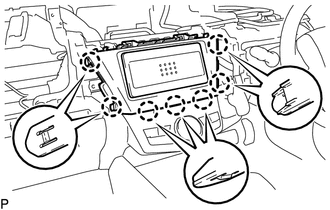
Disengage the 7 claws and remove the center instrument cluster finish panel sub-assembly.
-
-
REMOVE RADIO TUNER OPENING COVER WITH BRACKET (w/o Radio Receiver)
-
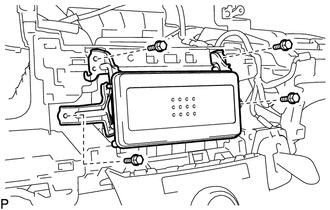
Remove the 4 bolts <A> and radio tuner opening cover with bracket.
-
-
REMOVE RADIO AND DISPLAY RECEIVER ASSEMBLY WITH BRACKET (for Radio Receiver Type)
-
REMOVE NAVIGATION RECEIVER ASSEMBLY WITH BRACKET (for Navigation Receiver Type)
-
REMOVE LOWER INSTRUMENT PANEL FINISH PANEL SUB-ASSEMBLY
-
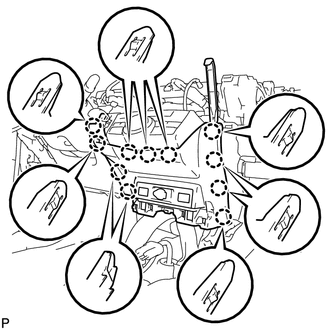
Using a moulding remover, disengage the 11 claws.
-
Disengage the clamp.
-
Disconnect each connector to remove the lower instrument panel finish panel sub-assembly.
-
-
REMOVE AIR CONDITIONING CONTROL ASSEMBLY
-
REMOVE SHIFT LOCK CONTROL UNIT ASSEMBLY
-
REMOVE FRONT DOOR SCUFF PLATE LH
-
REMOVE COWL SIDE TRIM SUB-ASSEMBLY LH
-
REMOVE NO. 1 INSTRUMENT PANEL UNDER COVER SUB-ASSEMBLY
-
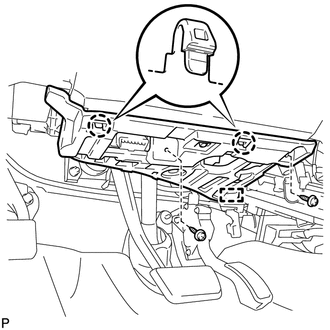
Remove the 2 screws <E>.
-
Disengage the 2 claws and guide.
-
Disconnect each connector.
-
Disengage the clamp to remove the No. 1 instrument panel under cover sub-assembly.
-
-
REMOVE LOWER NO. 1 INSTRUMENT PANEL AIRBAG ASSEMBLY
-
REMOVE GLOVE BOX LIGHT ASSEMBLY
-
DISCONNECT HOOD LOCK CONTROL LEVER SUB-ASSEMBLY
-

Disengage the claw and 2 guides to disconnect the hood lock control lever sub-assembly.
-
-
REMOVE ANTENNA CORD SUB-ASSEMBLY (for LHD)
-
REMOVE ANTENNA CORD SUB-ASSEMBLY (for RHD)
-
REMOVE LOWER INSTRUMENT PANEL SUB-ASSEMBLY (for LHD)
-

Disconnect the connector.
-
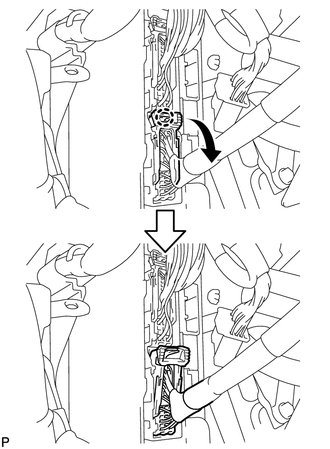
Disengage the claw and disconnect the connector as shown in the illustration.
-
Disengage each clamp.
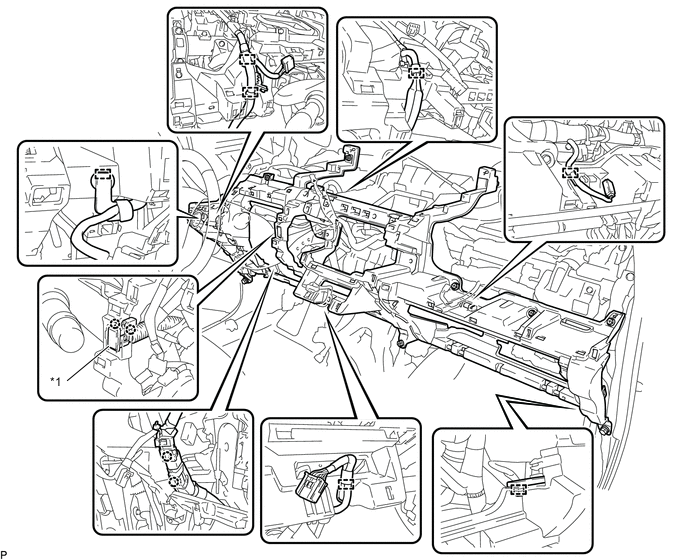
Text in Illustration *1 Room Temperature Sensor - - -
Disengage the 2 claws to disconnect the room temperature sensor from the lower instrument panel sub-assembly.
-
Disengage the 2 claws.
-
Remove the 2 bolts <A>, 10 screws <C> and screw <D> and lower instrument panel sub-assembly.

Text in Illustration *1 Bolt <A> *2 Screw <C> *3 Screw <D> - -
-
-
REMOVE LOWER INSTRUMENT PANEL SUB-ASSEMBLY (for RHD)
-
Disengage the 2 claws to disconnect the DLC3.
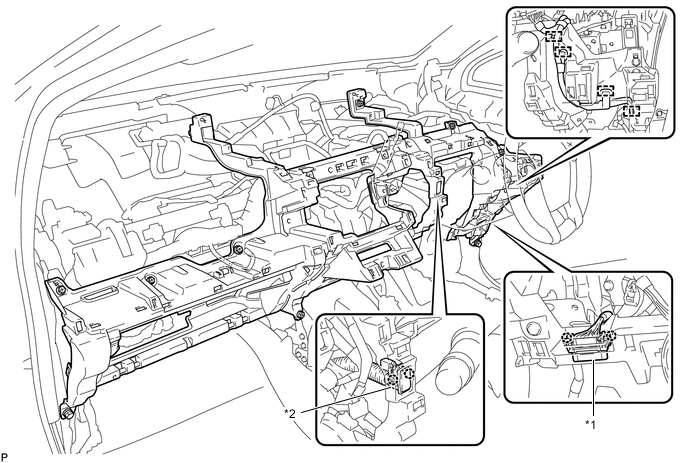
Text in Illustration *1 DLC3 *2 Room Temperature Sensor -
Disengage each clamp.
-
Disengage the 2 claws to disconnect the room temperature sensor from the lower instrument panel sub-assembly.
-
Remove the 2 bolts <A>, 10 screws <C> and screw <D> and lower instrument panel sub-assembly.
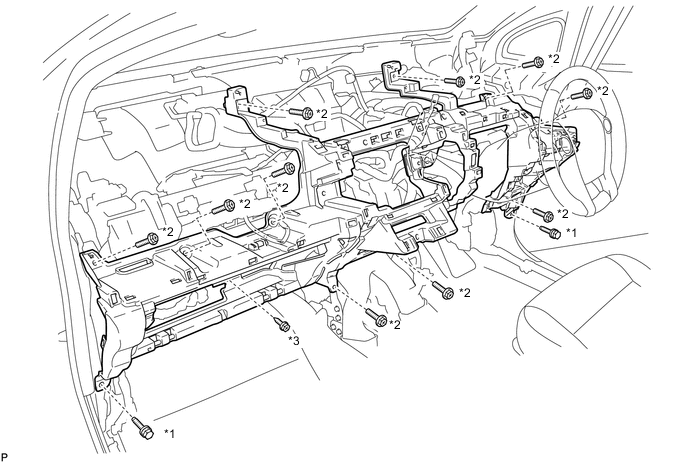
Text in Illustration *1 Bolt <A> *2 Screw <C> *3 Screw <D> - -
-