DYNAMIC RADAR CRUISE CONTROL SYSTEM
-
OUTLINE
-
The dynamic radar cruise control system has 2 cruise control modes: constant speed control mode and vehicle-to-vehicle distance control mode.
-
The cruise control main switch is used for switching between the 2 modes. The cruise control system starts in vehicle-to-vehicle distance control mode.
Mode Outline Constant Speed Control Mode In constant speed control mode, the system compares the actual vehicle speed with the set speed and controls the motive forces.
-
If the vehicle speed is higher than the set speed, the system decelerates the vehicle by adjusting the respective motive forces.
-
If the vehicle speed is lower than the set speed, the system accelerates the vehicle by adjusting the respective motive forces.
Vehicle-to-vehicle Distance Control Mode In vehicle-to-vehicle distance control mode, the system detects and recognizes a preceding vehicle. Thus, the system is able to maintain the proper vehicle-to-vehicle distance in accordance with the vehicle speed, and allows the vehicle to be driven under follow-up control.
-
The driver can operate the distance control switch on the steering wheel to select the vehicle-to-vehicle distance in 3 levels: long, middle, and short.
-
This mode consists mainly of 4 controls: constant speed control, deceleration control, follow-up control, and acceleration control.
-
-
In vehicle-to-vehicle distance control mode, the illustrations below show control examples while the driver's own vehicle is operating at 100 km/h (62 mph), and the vehicle ahead is operating at 80 km/h (50 mph).
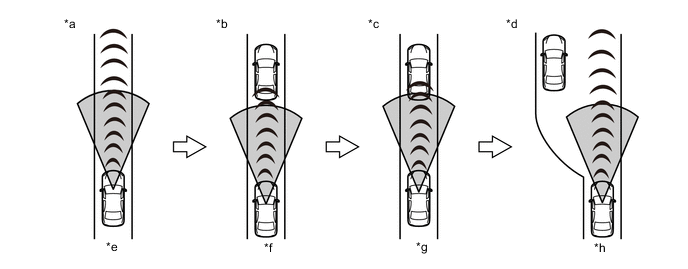
*a Constant Speed Control *b Deceleration Control *c Follow-up Control *d Acceleration Control *e 100 km/h (62 mph) *f From 100 km/h (62 mph) to 80 km/h (50 mph) *g 80 km/h (50 mph) *h From 80 km/h (50 mph) to 100 km/h (62 mph)
-
-
PRECAUTION
-
For the constant speed control usage precautions, please see the cruise control system precautions.
-
Observe the following precautions when using the vehicle-to-vehicle distance control:
-
The vehicle-to-vehicle distance control is a vehicle speed control device intended for use on motor ways or roads where the traffic is light or moderate.
-
Do not overly rely on the vehicle-to-vehicle distance control. There is a limit to the amount of control it can exert over vehicle distance. Always drive carefully and safely, being attentive of the surrounding environment and the distance between vehicles in front, and using the accelerator and brake pedals as appropriate to maintain the proper distance between other vehicles.
-
The vehicle-to-vehicle distance control is not designed to bring the vehicle to a complete stop. Although the control will automatically apply the brakes, there are limits to the amount of brake control it can exert. In certain situations, such as the vehicle in front slowing drastically or another vehicle suddenly cutting in, automatic deceleration will be insufficient to maintain a safe distance. In these situations, a buzzer and display will warn the driver to apply the brakes manually.
-
The vehicle-to-vehicle distance control is not a collision avoidance system and does not provide an excuse for inattentive and careless driving.
-
-
To avoid serious injury or death, do not use the vehicle-to-vehicle distance control under the following road conditions. The vehicle-to-vehicle distance control may automatically cancel when it detects poor weather.
-
In poor weather (such as rain, fog, snow, sandstorms and so on), vehicle-to-vehicle distance may not be measured accurately.
-
The emblem in front of the millimeter wave radar sensor assembly is coated with raindrops or snowflakes, the vehicle-to-vehicle distance may not be measured accurately.
-
When the windshield glass is coated with raindrops or snowflakes, the vehicle-to-vehicle distance may not be measured accurately.
-
On roads with heavy traffic or sharp bends, an appropriate speed may not be maintained, resulting in death or serious injury.
-
On slippery road surfaces (icy or snow-covered roads), the tires may spin, causing a loss of control.
-
On steep downhill slopes, if no vehicles are detected ahead, insufficient engine braking may cause the preset speed to be exceeded, possibly resulting in death or serious injury. Even if a vehicle is detected ahead, the delay in deceleration timing could result in death or serious injury.
-
The vehicle is being repeatedly accelerated and decelerated in traffic.
-
When exiting the main lanes of a motor way to enter an interchange, service area, parking area and so on while using the vehicle-to-vehicle distance control, and after having followed a slower vehicle, the sensor may not be able to detect the vehicle ahead and vehicle speed may be accelerated to the set speed. This may result in serious injuries and death.
-
On road with steep, short inclines and declines, the sensor may not be able to detect the vehicle ahead and may reduce the vehicle-to-vehicle distance by too much. This may result in serious injuries and death.
-
Trailer towing may lead to performance decline.
-
When the buzzer sounds frequently, do not use the vehicle-to-vehicle distance control.
-
-
Certain conditions make vehicle detection difficult or impossible. As the vehicle-to-vehicle distance control operates primarily by detecting the reflectors of the vehicle ahead, the distance may not be accurately detected in the following cases, resulting in improper vehicle-to-vehicle distance judgment.
-
Water or snow is kicked up by a vehicle ahead or a vehicle in an adjacent lane.
-
The rear of the vehicle ahead is small, such as an empty trailer or motorcycle.
-
Heavy luggage loaded in the luggage compartment or on top of the rear seats is causing the nose of the vehicle to rise.
-
The vehicle ahead has extremely high ground clearance.
-
Depending on the curves of the road and the manner in which the vehicle is being maneuvered, nearby vehicles and objects may be temporarily detected, resulting in activation of the approach warning or a reduction in vehicle-to-vehicle distance caused by a failure to detect vehicles directly ahead.
-
The millimeter wave radar sensor assembly automatically detects dirt sticking to the emblem in front of the millimeter wave radar sensor assembly of the vehicle, and if detected, a warning code is shown on the multi-information display. However, if the emblem in front of the millimeter wave radar sensor assembly is obscured by a transparent or translucent vinyl bag, ice, etc., dirt may not be detected, resulting in improper vehicle-to-vehicle distance judgment. Continue driving with due care. If dirt is detected, the vehicle-to-vehicle distance control is automatically canceled. Always keep the emblem in front of the millimeter wave radar sensor assembly clean.
-
The deceleration control and the approach warning will not operate if the vehicle ahead is at a stop or is driving very slowly. Take appropriate care at tollgates, delays, etc. and be aware of stopped or slow-moving vehicles.
-
Owing to the limited detection area of the millimeter wave radar assembly, detection of vehicles suddenly cutting in front at close range may be delayed, and detection of motorcycles traveling on the outside of a lane may fail. Thus, the system may be unable to maintain proper vehicle-to-vehicle distance.
-
To avoid accidental vehicle-to-vehicle distance control engagement, keep the main switch off when not using the vehicle-to-vehicle distance control.
-
When vehicle-to-vehicle distance control is on (in follow-up control), vehicle speed is regulated in proportion to the speed of the vehicle ahead, and increasing the set speed using the cruise control main switch will not cause the vehicle to accelerate. However, when the set speed has been increased, the vehicle speed may increase unexpectedly if the vehicle ahead leaves the lane. Confirm the setting on the multi-information display.
-
-
Select the vehicle-to-vehicle distance taking traffic conditions into consideration. The approximate distances for each vehicle-to-vehicle distance setting when driving at 80 km/h (50 mph) are applied as follows:
-
Long: approximately 50 m (160 ft.)
-
Middle: approximately 40 m (130 ft.)
-
Short: approximately 30 m (100 ft.)
-
If the vehicle speed is below 80 km/h (50 mph), the distance will be shorter than the above.
-
-
During downhill driving, the vehicle-to-vehicle distance may be shorter than the selected distance.
-
In the following situations, the approach warning may not activate even if the vehicle is close to the vehicle ahead:
-
The vehicle ahead is cruising at almost the same speed.
-
The vehicle ahead is cruising at a faster speed.
-
Immediately after the speed has been set.
-
The accelerator pedal is depressed.
-
Immediately following the release of the accelerator pedal.
-
-
If the master warning light comes on, the buzzer sounds, and a warning code, warning message, appears on the display while cruising in vehicle-to-vehicle distance control mode, there may be a malfunction in the system. Although it is safe to continue driving, contact a Toyota dealer for an inspection.
-
To ensure that the vehicle-to-vehicle distance control functions properly while driving, observe the following precautions:
-
Always keep the emblem in front of the millimeter wave radar sensor assembly clean. When cleaning, use a soft cloth and be careful not to damage the emblem.
-
Do not disassemble the sensor or subject the sensor or its surrounding area to strong impacts. Doing so will cause the sensor to malfunction.
-
Do not affix stickers (including transparent stickers) or attach accessories around the millimeter wave radar sensor assembly. This will cause the millimeter wave radar sensor assembly to malfunction.
-
Keep the windshield glass clean around the area where the forward recognition camera is mounted. The performance of forward recognition camera may be affected if dirt, raindrops, condensation, or snow is on the windshield glass.
-
Do not subject the forward recognition camera to strong impacts.
-
Do not attach stickers or labels, nor affix any ornaments to the windshield glass.
-
Do not remove the forward recognition camera. Since the angle of the forward recognition camera is precisely adjusted, angle adjustment must be performed after the forward recognition camera is reinstalled, otherwise the forward recognition camera may not recognize lane markers properly.
-
If the windshield is fogged up, use the windshield defogger to remove fog from the windshield. When it is cold, using the heater with air blowing to the feet may cause the upper part of the windshield to fog up. This will have a negative effect on the images.
-
Do not touch the lens of the forward recognition camera. Fingerprints left on the lens may cause inaccurate detection or non-detection and lane markers may not be detected accurately.
-
Do not place reflective objects on top of the instrument panel.
-
-
In the constant speed control, the buzzer does not sound to warn the driver if the vehicle is too close to the vehicle ahead, as neither the presence of the vehicle ahead nor the vehicle-to-vehicle distance is detected. Stay a safe distance away from the vehicle ahead.
-
The vehicle-to-vehicle distance control mode and the constant speed control mode both control the vehicle in different ways. When using vehicle-to-vehicle distance control, always confirm the selected mode on the display of the combination meter assembly.
-
If the front bumper or grill had an impact, the vehicle-to-vehicle distance control may not operate accurately.
-