REAR SEAT ENTERTAINMENT SYSTEM Sound from Wireless Headphones is Difficult to Hear, cannot be Heard, or Quality is Poor
| DTC Code | DTC Name |
|---|---|
| Sound from Wireless Headphones is Difficult to Hear, cannot be Heard, or Quality is Poor |
PROCEDURE
CHECK WIRELESS HEADPHONE OPERATION
Check whether only one of the wireless headphones does not operate, or whether both wireless headphones do not operate.
Result
Result
Proceed to
Sound is abnormal from the wireless headphones of either the television display assembly RH or LH
A
Sound is abnormal from the wireless headphones of both the television display assembly RH and LH
B
CHECK WIRELESS HEADPHONES (BATTERY)
Check that the dry-cell battery of the wireless headphones is not depleted.
OK
Battery is not depleted.
Result
Result
OK
NG
NG REPLACE WIRELESS HEADPHONE BATTERY
CHECK WIRELESS HEADPHONE SETTING
Check the wireless headphone settings.
Check that the volume is not set to "0".
Check that "MUTE" is off.
OK
The volume is not set to "0" and "MUTE" is off.
Result
Result
OK
NG
NG SET VOLUME TO HIGH AND TURN MUTE OFF
CLEAN INFRARED RAY RECEIVING PORTION
-
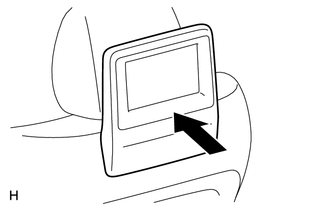
Clean the infrared ray receiving portion on the television display assembly.
Check whether the same malfunction occurs.
OK
The function returns to normal.
Result
Result
OK
NG
OK END
-
REPLACE WIRELESS HEADPHONES
Replace the wireless headphones with a new or normally functioning pair of headphones and check if the same problem occurs again.
OK
Same problem does not occur.
Result
Result
OK
NG
OK END (WIRELESS HEADPHONES ARE DEFECTIVE)