ENTRY AND START SYSTEM(for Start Function), Diagnostic DTC:B2274
| DTC Code | DTC Name |
|---|---|
| B2274 | ACC Monitor Malfunction |
DESCRIPTION
This DTC is stored when there is a problem in the ACC output circuit. The ACC circuit is the circuit that goes from inside the certification ECU (smart key ECU assembly) to the ACC relay.
Tech Tips
-
When the certification ECU (smart key ECU assembly) is replaced with a new one and the cable is connected to the negative (-) auxiliary battery terminal, the power source mode changes to on (IG).
-
When the auxiliary battery cable is disconnected and reconnected, the power source returns to the mode it was in before the auxiliary battery cable was disconnected.
This DTC is stored when a malfunction in the ACC output circuit between the ACC output terminal of the certification ECU (smart key ECU assembly) and the ACC relay is detected.
| DTC Code | DTC Detection Condition | Trouble Area | DTC Output Confirmation Operation |
|---|---|---|---|
| B2274 | Malfunction in the ACC relay activation circuit in the certification ECU (smart key ECU assembly) or the external circuit (1-trip detection logic*). Tech Tips When the voltage at terminal ACCD is not at the standard, the system is determined to be malfunctioning. |
|
Wait 10 seconds after turning the power switch on (ACC) or on (IG), and then wait another 10 seconds after turning the power switch off. Tech Tips To turn the power switch on (ACC), carry the key and press the power switch with park (P) selected and the brake pedal released. |
-
*: Only output while a malfunction is present and the power switch is on (IG)
| Vehicle Condition when Malfunction Detected | Fail-safe Function when Malfunction Detected |
|---|---|
Tech Tips The power source can change to on (IG) and the hybrid control system can be started. |
- |
WIRING DIAGRAM
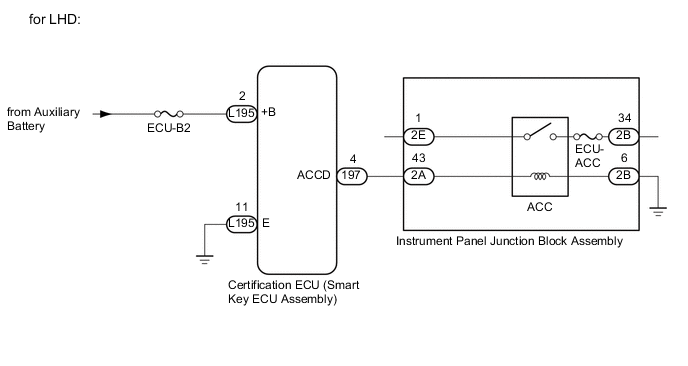
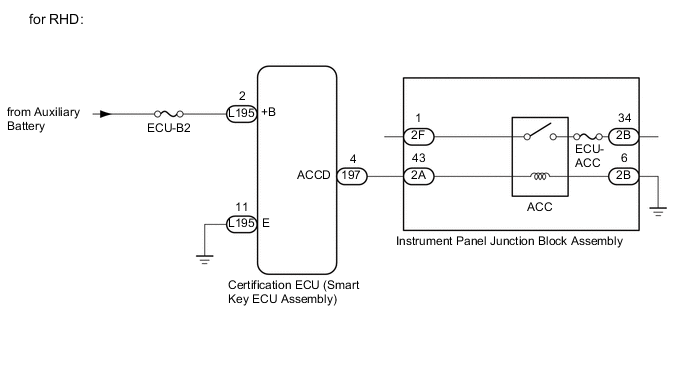
CAUTION / NOTICE / HINT
Note
-
The entry and start system uses multiplex communication. First perform the inspections in "How to Proceed with Troubleshooting" to confirm that there are no communication malfunctions before proceeding with troubleshooting Click here.
-
Inspect the fuses for circuits related to this system before performing the following inspection procedure.
-
When the power source mode cannot change to on (ACC), the audio and navigation systems do not operate.
-
After performing repairs, perform the operation that fulfills the DTC output confirmation operation, and then confirm that no DTCs are output again.
Tech Tips
| DTC | Data List Item | Active Test Item |
|---|---|---|
| B2274 |
Power Source Control |
- |
PROCEDURE
-
CHECK HARNESS AND CONNECTOR (POWER SOURCE)
-
Disconnect the L195 certification ECU (smart key ECU assembly) connector.
-
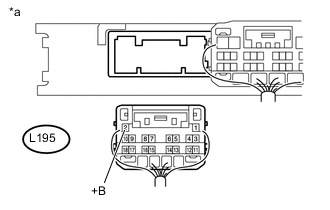
Text in Illustration *a Rear view of wire harness connector
(to Certification ECU (Smart Key ECU Assembly))
Measure the voltage according to the value(s) in the table below.
Standard Voltage Tester Connection Condition Specified Condition L195-2 (+B) - Body ground Power switch off 11 to 14 V
NG 
REPAIR OR REPLACE HARNESS OR CONNECTOR
OK 
-
-
CHECK HARNESS AND CONNECTOR (GROUND)
-
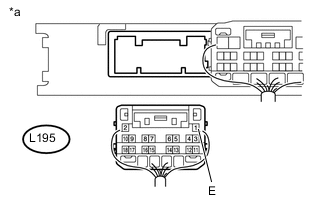
Text in Illustration *a Rear view of wire harness connector
(to Certification ECU (Smart Key ECU Assembly))
Measure the resistance according to the value(s) in the table below.
Standard Resistance Tester Connection Condition Specified Condition L195-11 (E) - Body ground Always Below 1 Ω
NG
REPAIR OR REPLACE HARNESS OR CONNECTOR
OK
-
-
CHECK HARNESS AND CONNECTOR (CERTIFICATION ECU (SMART KEY ECU ASSEMBLY) - INSTRUMENT PANEL JUNCTION BLOCK ASSEMBLY)
-
Disconnect the L197 certification ECU (smart key ECU assembly) connector.
-
Disconnect the 2A and 2B instrument panel junction block assembly connectors.
-
Measure the resistance according to the value(s) in the table below.
Standard Resistance Tester Connection Condition Specified Condition L197-4 (ACCD) - 2A-25 Always Below 1 Ω 2B-9 - Body ground Always Below 1 Ω L197-4 (ACCD) or 2A-25 - Body ground Always 10 kΩ or higher
NG
REPAIR OR REPLACE HARNESS OR CONNECTOR
OK
-
-
CHECK INSTRUMENT PANEL JUNCTION BLOCK ASSEMBLY (INSTRUMENT PANEL JUNCTION BLOCK ASSEMBLY - ACC RELAY)
-
Remove the instrument panel junction block assembly.
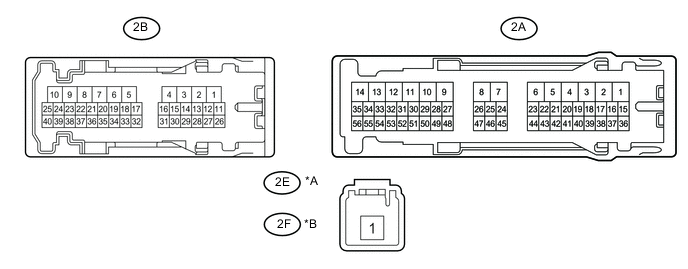
Text in Illustration *A for LHD *B for RHD *a Component without harness connected
(Instrument Panel Junction Block Assembly)
- - -
Remove the main body ECU (multiplex network body ECU) from the instrument panel junction block assembly
-
Measure the resistance according to the value(s) the table below.
Standard Resistance Tester Connection Condition Specified Condition 2E-1 - 2B-13*1
2F-1 - 2B-13*2
Auxiliary battery voltage not applied between terminals 2A-25 and 2B-9 10 kΩ or higher Auxiliary battery voltage applied between terminals 2A-25 and 2B-9 Below 1 Ω
-
*1: for LHD
-
*2: for RHD
-
NG
REPLACE INSTRUMENT PANEL JUNCTION BLOCK ASSEMBLY Click here
OK
-
-
INSPECT CERTIFICATION ECU (SMART KEY ECU ASSEMBLY)
-
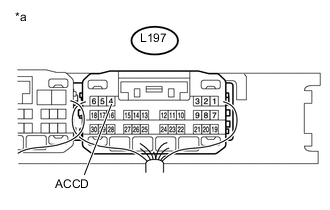
Text in Illustration *a Component with harness connected
(Certification ECU (Smart Key ECU Assembly))
Reconnect the L197 certification ECU (smart key ECU assembly) connector.
-
Measure the voltage according to the value(s) in the table below.
Standard Voltage Tester Connection Condition Specified Condition L197-4 (ACCD) - Body ground Power switch off → Power switch on (ACC)) 1 V or less → 8.5 V or higher
OK
USE SIMULATION METHOD TO CHECK Click here
NG
REPLACE CERTIFICATION ECU (SMART KEY ECU ASSEMBLY)
-