SFI SYSTEM(w/ Canister Pump Module), Diagnostic DTC:P017100, P017200, P017400, P017500, P117000, P117B00
| DTC Code | DTC Name |
|---|---|
| P017100 | System Too Lean Bank 1 |
| P017200 | System Too Rich Bank 1 |
| P017400 | System Too Lean Bank 2 |
| P017500 | System Too Rich Bank 2 |
| P117000 | Fuel Performance/Port Injector |
| P117B00 | Fuel Performance/Direct Injector |
DESCRIPTION
The fuel trim is related to the feedback compensation value, not to the basic injection duration. The fuel trim consists of both the short-term and long-term fuel trims.
The short-term fuel trim is fuel compensation that is used to constantly maintain the air fuel ratio at stoichiometric levels. The signal from the air fuel ratio sensor (sensor 1) indicates whether the air fuel ratio is rich or lean compared to the stoichiometric ratio. This triggers a reduction in the fuel injection volume if the air fuel ratio is rich and an increase in the fuel injection volume if lean.
Factors such as individual engine differences, wear over time and changes in operating environment cause short-term fuel trim to vary from the central value. The long-term fuel trim, which controls overall fuel compensation, compensates for long-term deviations in the fuel trim from the central value caused by the short-term fuel trim compensation.
| DTC No. | Detection Item | DTC Detection Condition | Trouble Area | MIL | Memory | Note |
|---|---|---|---|---|---|---|
| P017100 | System Too Lean Bank 1 | With a warm engine and stable air fuel ratio feedback, the fuel trim is considerably in error to the lean side (2 trip detection logic). |
|
Comes on | DTC stored | SAE: P0171 |
| P017200 | System Too Rich Bank 1 | With a warm engine and stable air fuel ratio feedback, the fuel trim is considerably in error to the rich side (2 trip detection logic). |
|
Comes on | DTC stored | SAE: P0172 |
| P017400 | System Too Lean Bank 2 | With a warm engine and stable air fuel ratio feedback, the fuel trim is considerably in error to the lean side (2 trip detection logic). |
|
Comes on | DTC stored | SAE: P0174 |
| P017500 | System Too Rich Bank 2 | With a warm engine and stable air fuel ratio feedback, the fuel trim is considerably in error to the rich side (2 trip detection logic). |
|
Comes on | DTC stored | SAE: P0175 |
| P117000 | Fuel Performance/Port Injector | Although a DTC is stored for a rich or lean condition, the amount of fuel trim during direct injection is normal (1 trip detection logic) |
|
- | DTC stored | SAE: P1170 |
| P117B00 | Fuel Performance/Direct Injector | Although a DTC is stored for a rich or lean condition, the amount of fuel trim during port injection is normal (1 trip detection logic) |
|
- | DTC stored | SAE: P117B |
Tech Tips
-
When DTC P017100 or P017400 is stored, the actual air fuel ratio is on the lean side. When DTC P017200 or P017500 is stored, the actual air fuel ratio is on the rich side.
-
If the vehicle runs out of fuel, the air fuel ratio is lean and DTC P017100 or P017400 may be stored. The MIL is then illuminated.
-
When DTC P117000 or P117B00 is output, it may not be possible to precisely determine whether the port injection or the direct injection is malfunctioning, depending on the conditions. In this case, perform an Active Test (Control the Injection Mode) to determine which injection system is malfunctioning.
MONITOR DESCRIPTION
Under closed loop fuel control, fuel injection volumes that deviate from those estimated by the ECM cause changes in the long-term fuel trim compensation value. The long-term fuel trim is adjusted when there are persistent deviations in the short-term fuel trim values. Deviations from the fuel injection volumes estimated by the ECM also affect the average fuel trim learned value, which is a combination of the average short-term fuel trim (fuel feedback compensation value) and the average long-term fuel trim (learned value of the air fuel ratio). If the average fuel trim learned value exceeds the malfunction thresholds, the ECM interprets this as a malfunction of the fuel system and stores a DTC.
Example:
The average fuel trim learned value is +35% or higher, or -35% or less, the ECM interprets this as a fuel system malfunction.
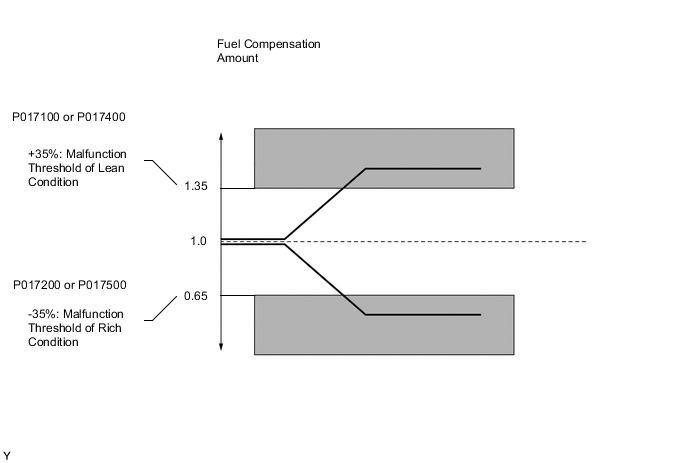
MONITOR STRATEGY
| Required Sensors/Components (Main) | Fuel system |
| Required Sensors/Components (Related) | Air fuel ratio sensor (sensor 1) Mass air flow meter sub-assembly Crankshaft position sensor |
| Frequency of Operation | Continuous |
TYPICAL ENABLING CONDITIONS
| Fuel system status | Closed loop |
| Battery voltage | 11 V or higher |
| Either of the following conditions is met | 1 or 2 |
| 1. Engine speed | Less than 1100 rpm |
| 2. Engine load | 10% or higher |
| Catalyst monitor | Not executed |
TYPICAL MALFUNCTION THRESHOLDS
| EVAP purge-cut | Executing |
| Either of the following conditions is met | 1 or 2 |
| 1. Average between short-term fuel trim and long-term fuel trim | 35% or higher (varies with engine coolant temperature) |
| 2. Average between short-term fuel trim and long-term fuel trim | -35% or less (varies with engine coolant temperature) |
| DTCs of fuel system have already been set | - |
| EVAP purge-cut | Executing |
| Direct injection | 100% |
| Both of the following conditions are met | 1 and 2 |
| 1. Average between short-term fuel trim and long-term fuel trim | Less than 35% (varies with engine coolant temperature) |
| 2. Average between short-term fuel trim and long-term fuel trim | Higher than -35% (varies with engine coolant temperature) |
| DTCs of fuel system have already been set | - |
| EVAP purge-cut | Executing |
| Port injection | 100% |
| Both of the following conditions are met | 1 and 2 |
| 1. Average between short-term fuel trim and long-term fuel trim | Less than 35% (varies with engine coolant temperature) |
| 2. Average between short-term fuel trim and long-term fuel trim | Higher than -35% (varies with engine coolant temperature) |
CONFIRMATION DRIVING PATTERN
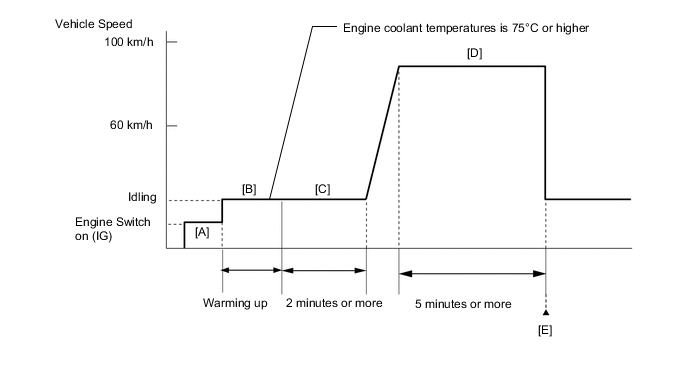
-
Connect the GTS to the DLC3.
-
Turn the engine switch on (IG).
-
Turn the GTS on.
-
Clear the DTCs (even if no DTCs are stored, perform the clear DTC procedure).
-
Turn the engine switch off and wait for at least 30 seconds.
-
Turn the engine switch on (IG) [A].
-
Turn the GTS on.
-
Start the engine and warm it up until the engine coolant temperature is 75°C (167°F) or higher with all the accessories switched off [B].
-
With the engine warmed up, idle the engine for 2 minutes or more [C].
-
Drive the vehicle at a speed between 60 and 100 km/h (37 and 62 mph) for 5 minutes or more [D].
CAUTION:
When performing the confirmation driving pattern, obey all speed limits and traffic laws.
-
Enter the following menus: Powertrain / Engine / Trouble Codes [E].
-
Read the pending DTCs.
Tech Tips
If a pending DTC is output, the system is malfunctioning.
WIRING DIAGRAM
-
Refer to DTC P010012 for the mass air flow meter sub-assembly circuit.
-
Refer to DTC P003012 for the air fuel ratio sensor (sensor 1) circuit.
-
Refer to DTC P045011 for purge VSV circuit.
CAUTION / NOTICE / HINT
Note
Inspect the fuses for circuits related to this system before performing the following procedure.
Tech Tips
-
A low air fuel ratio sensor (sensor 1) voltage could be caused by a rich air fuel mixture. Check for conditions that would cause the engine to run rich.
-
A high air fuel ratio sensor (sensor 1) voltage could be caused by a lean air fuel mixture. Check for conditions that would cause the engine to run lean.
-
Read Freeze Frame Data using the GTS. The ECM records vehicle and driving condition information as Freeze Frame Data the moment a DTC is stored. When troubleshooting, Freeze Frame Data can help determine if the vehicle was moving or stationary, if the engine was warmed up or not, if the air fuel ratio was lean or rich, and other data from the time the malfunction occurred.
-
Sensor 1 refers to the sensor closest to the engine assembly.
-
Sensor 2 refers to the sensor farthest away from the engine assembly.
-
Bank 1 refers to the bank that includes the No. 1 cylinder*.
*: The No. 1 cylinder is the cylinder which is farthest from the transmission.
-
Bank 2 refers to the bank that does not include the No. 1 cylinder.
DTC Suspected Area P017100, P017200 Bank 1 P017400, P017500 Bank 2
PROCEDURE
-
CHECK ANY OTHER DTCS OUTPUT (IN ADDITION TO DTC P017100, P017200, P017400, P017500, P117000 OR P117B00)
-
Connect the GTS to the DLC3.
-
Turn the engine switch on (IG)
-
Turn the GTS on.
-
Enter the following menus: Powertrain / Engine / Trouble Codes.
-
Read the DTCs.
Powertrain > Engine > Trouble CodesResult Result Proceed to DTC P017100, P017200, P017400, P017500, P117000 and/or P117B00 is output A DTC P017100, P017200, P017400, P017500, P117000 and/or P117B00 and other DTCs are output B Tech Tips
If any DTCs other than P017100, P017200, P017400, P017500, P117000 and/or P117B00 are output, troubleshoot those DTCs first.
B 
GO TO DTC CHART Click here
A 
-
-
PERFORM ACTIVE TEST USING GTS (CONTROL THE INJECTION MODE)
-
Connect the GTS to the DLC3.
-
Turn the engine switch on (IG).
-
Turn the GTS on.
-
Start the engine and warm it up until the engine coolant temperature is 75°C (167°F) or higher with all the accessories switched off.
-
Enter the following menus: Powertrain / Engine / Active Test / Control the Injection Mode / Data List / Injection Mode, Short FT B1S1 and Long FT B1S1 and/or Short FT B2S1 and Long FT B2S1.
Powertrain > Engine > Active TestActive Test Display Control the Injection Mode Data List Display Injection Mode Short FT B1S1 Short FT B2S1 Long FT B1S1 Long FT B2S1 -
According to the display on the GTS, read the Data List with the Active Test "Control the Injection Mode" set to Port.
OK GTS Display Specified Condition Total of Short FT B1S1 and Long FT B1S1 Between -20 and 20% Total of Short FT B2S1 and Long FT B2S1 -
According to the display on the GTS, read the Data List with the Active Test "Control the Injection Mode" set to Direct.
OK GTS Display Specified Condition Total of Short FT B1S1 and Long FT B1S1 Between -20 and 20% Total of Short FT B2S1 and Long FT B2S1 Result Item Proceed to Port Direct OK OK A OK NG B NG OK C NG NG D
B 
READ VALUE USING GTS (FUEL PRESSURE (HIGH)) Click here
C
INSPECT PORT FUEL INJECTOR ASSEMBLY Click here
D
INSPECT PURGE VSV Click here
A
-
-
CHECK IF VEHICLE HAS RUN OUT OF FUEL IN PAST
-
Has the vehicle run out of fuel in the past?
Result Proceed to YES NO
YES
DTC CAUSED BY RUNNING OUT OF FUEL
NO
CHECK FOR INTERMITTENT PROBLEMS Click here
-
-
READ VALUE USING GTS (FUEL PRESSURE (HIGH))
-
Connect the GTS to the DLC3.
-
Turn the engine switch on (IG)
-
Turn the GTS on.
-
Enter the following menus: Powertrain / Engine / Data List / Engine Speed, Fuel Pressure (High) and Injection Mode.
Powertrain > Engine > Data ListTester Display Engine Speed Fuel Pressure (High) Injection Mode -
Start the engine and warm it up until the engine coolant temperature is 75°C (167°F) or higher with all the accessories switched off.
-
According to the display on the GTS, read the Data List.
Standard GTS Display Condition Specified Condition Fuel Pressure (High)
-
Park (P) selected
-
A/C: Off
-
Engine warmed up
-
Engine Speed: 3000 rpm
-
Injection Mode: Direct
2400 to 20000 kPag Result Proceed to OK NG -
NG
CHECK MISFIRE COUNT OF DIRECT INJECTION Click here
OK
-
-
PERFORM ACTIVE TEST USING GTS (CONTROL THE INJECTION MODE (DIRECT))
-
Connect the GTS to the DLC3.
-
Turn the engine switch on (IG).
-
Turn the GTS on.
-
Start the engine and warm it up until the engine coolant temperature is 75°C (167°F) or higher.
-
Enter the following menus: Powertrain / Engine / Active Test / Control the Injection Mode / Data List / High Pressure Fuel Pump Duty Ratio (D4), High Pressure Fuel Pump2 Duty Ratio (D4), Injection Mode, Short FT B1S1, Long FT B1S1, Short FT B2S1 and Long FT B2S1.
Powertrain > Engine > Active TestActive Test Display Control the Injection Mode Data List Display High Pressure Fuel Pump Duty Ratio (D4) High Pressure Fuel Pump2 Duty Ratio (D4) Injection Mode Short FT B1S1 Short FT B2S1 Long FT B1S1 Long FT B2S1 -
According to the display on the GTS, read the Data List with the Active Test "Control the Injection Mode" set to Direct.
Result Item Proceed to Injection Mode High Pressure Fuel Pump Duty Ratio (D4) High Pressure Fuel Pump2 Duty Ratio (D4) Total of Short FT B1S1 and Long FT B1S1 Total of Short FT B2S1 and Long FT B2S1 Direct 10% to 40% 10% to 40% - - A 40% or higher 40% or higher -20% or less -20% or less B 10% or less 10% or less +20% or higher +20% or higher 40% or higher 40% or higher +20% or higher +20% or higher C 10% or less 10% or less -20% or less -20% or less D Tech Tips
Perform "Inspection After Repair" after replacing the fuel pressure sensor (for high pressure side).
B
REPLACE FUEL PRESSURE SENSOR (FOR HIGH PRESSURE SIDE) Click here
C
GO TO STEP 8 Click here
D
REPLACE ECM Click here
A
-
-
PERFORM ACTIVE TEST USING GTS (CONTROL THE INJECTION MODE (DIRECT))
-
Connect the GTS to the DLC3.
-
Turn the engine switch on (IG).
-
Turn the GTS on.
-
Start the engine and warm it up until the engine coolant temperature is 75°C (167°F) or higher.
-
Enter the following menus: Powertrain / Engine / Active Test / Control the Injection Mode / Data List / High Pressure Fuel Pump Duty Ratio (D4), High Pressure Fuel Pump2 Duty Ratio (D4), Injection Mode, Short FT B1S1, Long FT B1S1, Short FT B2S1 and Long FT B2S1.
Powertrain > Engine > Active TestActive Test Display Control the Injection Mode Data List Display High Pressure Fuel Pump Duty Ratio (D4) High Pressure Fuel Pump2 Duty Ratio (D4) Injection Mode Short FT B1S1 Short FT B2S1 Long FT B1S1 Long FT B2S1 -
According to the display on the GTS, read the Data List with the Active Test "Control the Injection Mode" set to Direct.
Result Item Proceed to Injection Mode High Pressure Fuel Pump Duty Ratio (D4) High Pressure Fuel Pump2 Duty Ratio (D4) Total of Short FT B1S1 and Long FT B1S1 Total of Short FT B2S1 and Long FT B2S1 Direct 10 to 40% 10 to 40% -25% or less -25% or less A 10 to 40% 10 to 40% +30% or higher +30% or higher 10 to 40% 10 to 40% +25% or higher -25 to +25% B 10 to 40% 10 to 40% +25% or higher -25 to +25% 10 to 40% 10 to 40% -25 to +25% -25% or less C 10 to 40% 10 to 40% -25 to +25% +25% or higher 10 to 40% 10 to 40% -25 to +25% -25 to +25% D Tech Tips
Perform "Inspection After Repair" after replacing the direct fuel injector assembly.
A
REPLACE DIRECT FUEL INJECTOR ASSEMBLY (ALL CYLINDERS) Click here
B
REPLACE DIRECT FUEL INJECTOR ASSEMBLY (BANK 1) Click here
C
REPLACE DIRECT FUEL INJECTOR ASSEMBLY (BANK 2) Click here
D
CHECK FOR INTERMITTENT PROBLEMS Click here
-
-
CHECK MISFIRE COUNT OF DIRECT INJECTION
-
Connect the GTS to the DLC3.
-
Turn the engine switch on (IG).
-
Turn the GTS on.
-
Start the engine and warm it up until the engine coolant temperature is 75°C (167°F) or higher.
-
Enter the following menus: Powertrain / Engine / Active Test / Control the Injection Mode / Data List / Injection Mode and Misfire Count Cylinder #1 to Misfire Count Cylinder #6.
Powertrain > Engine > Active TestActive Test Display Control the Injection Mode Data List Display Injection Mode Misfire Count Cylinder #1 Misfire Count Cylinder #2 Misfire Count Cylinder #3 Misfire Count Cylinder #4 Misfire Count Cylinder #5 Misfire Count Cylinder #6 -
According to the display on the GTS, read the Data List with the Active Test "Control the Injection Mode" set to Direct.
Result Injection Mode Misfire Count Proceed to Direct No misfire counts, or misfire counts occur randomly in all cylinders A Misfire counts occur in particular cylinder B Tech Tips
Perform "Inspection After Repair" after replacing the direct fuel injector assembly.
B
REPLACE DIRECT FUEL INJECTOR ASSEMBLY Click here
A
-
-
REPLACE FUEL PUMP ASSEMBLY (FOR HIGH PRESSURE SIDE)
-
Replace the fuel pump assembly (for high pressure side).
Tech Tips
Perform "Inspection After Repair" after replacing the fuel pump assembly (for high pressure side).
Result Proceed to NEXT
NEXT
-
-
CLEAR DTC
-
Connect the GTS to the DLC3.
-
Turn the engine switch on (IG).
-
Turn the GTS on.
-
Clear the DTCs.
Powertrain > Engine > Clear DTCs -
Turn the engine switch off and wait for at least 30 seconds.
Result Proceed to NEXT
NEXT
-
-
CONFIRM WHETHER MALFUNCTION HAS BEEN SUCCESSFULLY REPAIRED
-
Drive the vehicle in accordance with the driving pattern described in Confirmation Driving Pattern.
-
Enter the following menus: Powertrain / Engine / Trouble Codes.
-
Read the DTCs.
Powertrain > Engine > Trouble CodesResult Result Proceed to DTCs are not output A DTC P017100, P017200, P017400, P017500, P117000 and/or P117B00 is output B
A
END
B
REPLACE ECM Click here
-
-
INSPECT PORT FUEL INJECTOR ASSEMBLY
-
Check the injection volume (whether fuel volume is high or low, and whether injection pattern is poor).
Tech Tips
Perform "Inspection After Repair" after replacing the port fuel injector assembly.
Result Proceed to OK NG
OK
REPLACE ECM Click here
NG
REPLACE PORT FUEL INJECTOR ASSEMBLY Click here
-
-
INSPECT PURGE VSV
-
Inspect the purge VSV.
Result Proceed to OK NG
NG
REPLACE PURGE VSV Click here
OK
-
-
CHECK HARNESS AND CONNECTOR (PURGE VSV - ECM)
-
Disconnect the purge VSV connector.
-
Disconnect the ECM connector.
-
Measure the resistance according to the value(s) in the table below.
Standard Resistance Tester Connection Condition Specified Condition D10-2 (PRG) - D1-40 (PRG) Always Below 1 Ω D10-2 (PRG) or D1-40 (PRG) - Body ground and other terminals Always 10 kΩ or higher Result Proceed to OK NG
NG
REPAIR OR REPLACE HARNESS OR CONNECTOR
OK
-
-
CHECK PCV VALVE AND HOSE CONNECTIONS
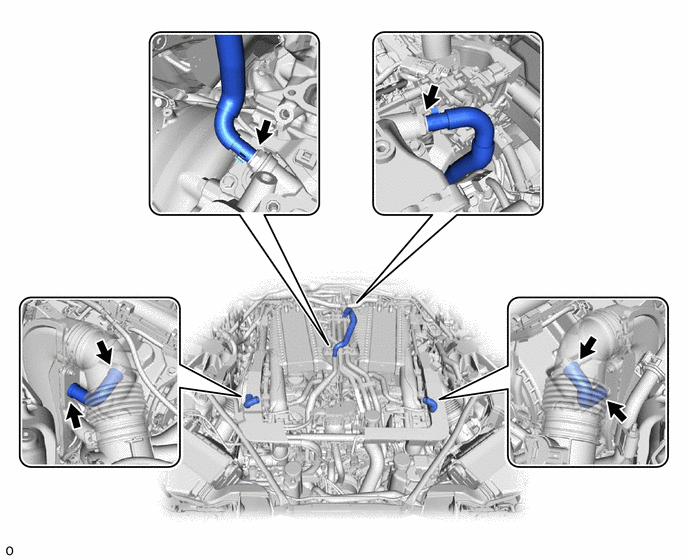
-
Check the PCV hose connections.
-
Check the PCV valve.
OK PCV hose and PCV valve are connected correctly and are not damaged. Result Proceed to OK NG
NG
REPAIR OR REPLACE PCV VALVE OR HOSE
OK
-
-
CHECK INTAKE SYSTEM
-
Check the intake system for vacuum leaks.
OK No leaks in intake system. Tech Tips
Perform "Inspection After Repair" after repairing or replacing the intake system.
Result Proceed to OK NG
NG
REPAIR OR REPLACE INTAKE SYSTEM
OK
-
-
PERFORM ACTIVE TEST USING GTS (CONTROL THE INJECTION VOLUME FOR A/F SENSOR)
-
Connect the GTS to the DLC3.
-
Turn the engine switch on (IG).
-
Turn the GTS on.
-
Start the engine and warm it up until the engine coolant temperature reaches 75°C (167°F) or higher.
-
Warm up the air fuel ratio sensors at an engine speed of 2500 rpm for 90 seconds.
-
Enter the following menus: Powertrain / Engine / Active Test / Control the Injection Volume for A/F Sensor / Data List / A/F (O2) Sensor Current B1S1 and A/F (O2) Sensor Current B1S2 or A/F (O2) Sensor Current B2S1 and A/F (O2) Sensor Current B2S2.
Powertrain > Engine > Active TestActive Test Display Control the Injection Volume for A/F Sensor Data List Display A/F (O2) Sensor Current B1S1 A/F (O2) Sensor Current B2S1 A/F (O2) Sensor Current B1S2 A/F (O2) Sensor Current B2S2 -
Perform the Control the Injection Volume for A/F Sensor operation with the engine idling.
-
Monitor the output values of the air fuel ratio sensor (sensor 1) and air fuel ratio sensor (sensor 2) (A/F (O2) Sensor Current B1S1 and A/F (O2) Sensor Current B1S2 or A/F (O2) Sensor Current B2S1 and A/F (O2) Sensor Current B2S2) displayed on the GTS.
Tech Tips
-
The Control the Injection Volume for A/F Sensor operation lowers the fuel injection volume by 12.5% or increases the injection volume by 12.5%.
-
The air fuel ratio sensor (sensor 1) has an output delay of a few seconds and the air fuel ratio sensor (sensor 2) has a maximum output delay of approximately 20 seconds.
-
If the sensor output value does not change (almost no reaction) while performing the Active Test, the sensor may be malfunctioning.
Standard GTS Display (Sensor) Injection Volume Status Voltage A/F (O2) Sensor Current B1S1
A/F (O2) Sensor Current B2S1
(Air fuel ratio [sensor 1])
12.5% Rich Below -0.075 mA -12.5% Lean More than 0.037 mA A/F (O2) Sensor Current B1S2
A/F (O2) Sensor Current B2S2
(Air fuel ratio [sensor 2])
12.5% Rich Below -0.86 mA -12.5% Lean More than 0.33 mA Result Status of A/F (O2) Sensor Current B1S1 or A/F (O2) Sensor Current B2S1 Status of A/F (O2) Sensor Current B1S2 or A/F (O2) Sensor Current B2S2 Air Fuel Ratio Condition and Air Fuel Ratio Sensor Condition Suspected Trouble Area Proceed to Lean/Rich Lean/Rich Normal - A Lean Lean Actual air fuel ratio lean
-
PCV valve and hose
-
PCV hose connections
-
Gas leak from exhaust system
-
Intake system
-
Fuel pressure
-
Mass air flow meter sub-assembly
-
Engine coolant temperature sensor
Rich Rich Actual air fuel ratio rich
-
Gas leak from exhaust system
-
Ignition system
-
Fuel pressure
-
Mass air flow meter sub-assembly
-
Engine coolant temperature sensor
Lean Lean/Rich Air fuel ratio sensor (sensor 1) malfunction
-
Air fuel ratio sensor (sensor 1)
B Rich Lean/Rich Air fuel ratio sensor (sensor 1) malfunction
-
Air fuel ratio sensor (sensor 1)
-
Lean: During the Control the Injection Volume for A/F Sensor Active Test, the air fuel ratio sensor (sensor 1) output current (A/F (O2) Sensor Current B1S1 or A/F (O2) Sensor Current B2S1) is consistently more than 0.037 mA, and the air fuel ratio sensor (sensor 2) output current (A/F (O2) Sensor Current B1S2 or A/F (O2) Sensor Current B2S2) is consistently more than 0.33 mA.
-
Rich: During the Control the Injection Volume for A/F Sensor Active Test, the air fuel ratio sensor (sensor 1) output current (A/F (O2) Sensor Current B1S1 or A/F (O2) Sensor Current B2S1) is consistently below -0.075 mA, and the air fuel ratio sensor (sensor 2) output current (A/F (O2) Sensor Current B1S2 or A/F (O2) Sensor Current B2S2) is consistently below -0.86 mA.
-
Lean/Rich: During the Control the Injection Volume for A/F Sensor Active Test, the output current of the air fuel ratio sensor (sensor 1) or air fuel ratio sensor (sensor 2) alternate correctly.
Tech Tips
Refer to "Data List / Active Test" [A/F (O2) Sensor Current B1S1, A/F (O2) Sensor Current B1S2, A/F (O2) Sensor Current B2S1 and A/F (O2) Sensor Current B2S2].
-
B
INSPECT AIR FUEL RATIO SENSOR (SENSOR 1) (HEATER RESISTANCE) Click here
A
-
-
READ VALUE USING GTS (COOLANT TEMPERATURE SENSOR1, COOLANT TEMPERATURE SENSOR2)
-
Connect the GTS to the DLC3.
-
Turn the engine switch on (IG).
-
Turn the GTS on.
-
Enter the following menus: Powertrain / Engine / Data List / Coolant Temperature Sensor1 and Coolant Temperature Sensor2.
Powertrain > Engine > Data ListTester Display Coolant Temperature Sensor1 Coolant Temperature Sensor2 -
Read the Data List twice, when the engine is both cold and warmed up.
Standard GTS Display Condition Specified Condition Coolant Temperature Sensor1 Cold engine Same as ambient air temperature After fully warming up Between 75 and 105°C (167 and 221°F) Coolant Temperature Sensor2 Cold engine Same as ambient air temperature After fully warming up Between 75 and 105°C (167 and 221°F) Tech Tips
-
The engine can be judged as fully warmed up after warming up the engine with the air conditioning off until the electric cooling fan starts to operate.
-
Leaving the vehicle overnight allows the engine temperature to be the same as the ambient temperature.
-
"Coolant Temperature Controlling Value" that is used for engine control is determined from the values of the 3 engine coolant temperature sensors.
-
During water stop in the warm-up process, control is based on the value of "Coolant Temperature Sensor2" at the cylinder head because "Coolant Temperature Sensor1" at the engine outlet does not perform temperature detection.
-
While the ball valve of the water control valve opens as warm-up progresses, the value of "Coolant Temperature Sensor1" at the engine outlet rises and control is performed using the higher of the "Coolant Temperature Sensor2" and "Coolant Temperature Sensor1" values.
-
"Coolant Temperature Sensor3" at the engine inlet is used to improve responsiveness after warm-up.
-
When the values of the Freeze Frame Data "Coolant Temperature Sensor1" and "Coolant Temperature Sensor2" at the time of malfunction occurrence are compared, it can be presumed that the value closest to "Coolant Temperature Controlling Value" is the value of the sensor that was being used when the malfunction occurred.
-
Perform "Inspection After Repair" after replacing the engine coolant temperature sensor (for outlet side) or engine coolant temperature sensor (for cylinder head side).
Result Result Proceed to OK A NG (Coolant Temperature Sensor1) B NG (Coolant Temperature Sensor2) C -
B
REPLACE ENGINE COOLANT TEMPERATURE SENSOR (FOR OUTLET SIDE) Click here
C
REPLACE ENGINE COOLANT TEMPERATURE SENSOR (FOR CYLINDER HEAD SIDE) Click here
A
-
-
READ VALUE USING GTS (MAF SENSOR)
-
Connect the GTS to the DLC3.
-
Start the engine.
-
Allow the engine to idle until Coolant Temperature reaches 75°C (167°F) or higher.
-
Turn the GTS on.
-
Enter the following menus: Powertrain / Engine / Data List / Engine Speed, MAF Sensor Bank1 and MAF Sensor Bank2.
Powertrain > Engine > Data ListTester Display Engine Speed MAF Sensor Bank1 MAF Sensor Bank2 -
Read Mass Air Flow Sensor while maintaining an engine speed of 3000 rpm.
Standard GTS Display Condition Specified Condition MAF Sensor Bank1 Engine warmed up
Park (P) selected
A/C: Off
Engine Speed: 3000 rpm
Between 6.5 and 30.0 gm/sec MAF Sensor Bank2 Between 6.5 and 30.0 gm/sec Result Proceed to OK NG
NG
GO TO STEP 31 Click here
OK
-
-
CHECK FUEL PRESSURE (FOR LOW PRESSURE SIDE)
-
Check the fuel pressure (for low pressure side).
Result Proceed to OK NG
NG
CHECK FUEL LINE Click here
OK
-
-
CHECK FOR EXHAUST GAS LEAK
-
Check for exhaust gas leaks.
OK No gas leaks. Tech Tips
Perform "Inspection After Repair" after repairing or replacing the exhaust system.
Result Proceed to OK NG
NG
REPAIR OR REPLACE EXHAUST SYSTEM
OK
-
-
INSPECT SPARK PLUG
-
Inspect the spark plug.
Result Proceed to OK NG
NG
REPLACE SPARK PLUG Click here
OK
-
-
CHECK FOR SPARK (SPARK TEST)
-
Perform a spark test.
Tech Tips
-
If the result of the spark test is normal, proceed to the next step.
-
Perform "Inspection After Repair" after replacing the spark plug or ignition coil assembly.
Result Proceed to NEXT -
NEXT
GO TO STEP 31 Click here
-
-
CHECK FUEL LINE
-
Check the fuel lines for leaks or blockage.
Result Proceed to OK NG
OK
GO TO FUEL PUMP CONTROL CIRCUIT Click here
NG
REPAIR OR REPLACE FUEL SYSTEM
-
-
INSPECT AIR FUEL RATIO SENSOR (SENSOR 1) (HEATER RESISTANCE)
-
Inspect the air fuel ratio sensor (sensor 1).
Tech Tips
Perform "Inspection After Repair" after replacing the air fuel ratio sensor (sensor 1).
Result Proceed to OK NG
NG
REPLACE AIR FUEL RATIO SENSOR (SENSOR 1) Click here
OK
-
-
CHECK TERMINAL VOLTAGE (POWER SOURCE OF AIR FUEL RATIO SENSOR (SENSOR 1))
-
Disconnect the air fuel ratio sensor (sensor 1) connector.
-
Turn the engine switch on (IG).
-
Measure the voltage according to the value(s) in the table below.
Standard Voltage Tester Connection Condition Specified Condition D18-2 (+B) - Body ground Engine switch on (IG) 11 to 14 V D19-2 (+B) - Body ground Engine switch on (IG) 11 to 14 V Result Proceed to OK NG
NG
REPAIR OR REPLACE AIR FUEL RATIO SENSOR (SENSOR 1) POWER SOURCE CIRCUIT Click here
OK
-
-
CHECK HARNESS AND CONNECTOR (AIR FUEL RATIO SENSOR (SENSOR 1) - ECM)
-
Disconnect the air fuel ratio sensor (sensor 1) connector.
-
Disconnect the ECM connector.
-
Measure the resistance according to the value(s) in the table below.
Standard Resistance Tester Connection Condition Specified Condition D18-1 (HA1A) - D2-8 (HA1A) Always Below 1 Ω D18-3 (A1A+) - D1-111 (A1A+) Always Below 1 Ω D18-4 (A1A-) - D1-110 (A1A-) Always Below 1 Ω D19-1 (HA2A) - D2-7 (HA2A) Always Below 1 Ω D19-3 (A2A+) - D1-109 (A2A+) Always Below 1 Ω D19-4 (A2A-) - D1-108 (A2A-) Always Below 1 Ω D18-1 (HA1A) or D2-8 (HA1A) - Body ground and other terminals Always 10 kΩ or higher D18-3 (A1A+) or D1-111 (A1A+) - Body ground and other terminals Always 10 kΩ or higher D18-4 (A1A-) or D1-110 (A1A-) - Body ground and other terminals Always 10 kΩ or higher D19-1 (HA2A) or D2-7 (HA2A) - Body ground and other terminals Always 10 kΩ or higher D19-3 (A2A+) or D1-109 (A2A+) - Body ground and other terminals Always 10 kΩ or higher D19-4 (A2A-) or D1-108 (A2A-) - Body ground and other terminals Always 10 kΩ or higher Result Proceed to OK NG
NG
REPAIR OR REPLACE HARNESS OR CONNECTOR
OK
-
-
REPLACE AIR FUEL RATIO SENSOR (SENSOR 1)
-
Replace the air fuel ratio sensor (sensor 1).
Tech Tips
Perform "Inspection After Repair" after replacing the air fuel ratio sensor (sensor 1).
Result Proceed to NEXT
NEXT
-
-
CLEAR DTC
-
Connect the GTS to the DLC3.
-
Turn the engine switch on (IG).
-
Turn the GTS on.
-
Clear the DTCs.
Powertrain > Engine > Clear DTCs -
Turn the engine switch off and wait for at least 30 seconds.
Result Proceed to NEXT
NEXT
-
-
CONFIRM WHETHER MALFUNCTION HAS BEEN SUCCESSFULLY REPAIRED
-
Drive the vehicle in accordance with the driving pattern described in Confirmation Driving Pattern.
-
Enter the following menus: Powertrain / Engine / Trouble Codes.
-
Read the DTCs.
Powertrain > Engine > Trouble CodesResult Result Proceed to DTCs are not output A DTC P017100, P017200, P017400, P017500, P117000 and/or P117B00 is output B
A
END
B
-
-
READ VALUE USING GTS (MAF SENSOR)
-
Connect the GTS to the DLC3.
-
Start the engine.
-
Allow the engine to idle until Coolant Temperature reaches 75°C (167°F) or higher.
-
Turn the GTS on.
-
Enter the following menus: Powertrain / Engine / Data List / Engine Speed, MAF Sensor Bank1, MAF Sensor Bank2.
Powertrain > Engine > Data ListTester Display Engine Speed MAF Sensor Bank1 MAF Sensor Bank2 -
Read Mass Air Flow Sensor while maintaining an engine speed of 3000 rpm.
Standard GTS Display Condition Specified Condition MAF Sensor Bank1 Engine warmed up
Park (P) selected
A/C: Off
Engine Speed: 3000 rpm
Between 6.5 and 30.0 gm/sec MAF Sensor Bank2 Between 6.5 and 30.0 gm/sec Result Proceed to NEXT
NEXT
-
-
CHECK HARNESS AND CONNECTOR (MASS AIR FLOW METER SUB-ASSEMBLY CONNECTOR CONNECTION)
-
Check the connection and terminal contact pressure of connectors and wire harnesses between the mass air flow meter sub-assembly and ECM.
Tech Tips
Repair any problems.
Result Proceed to NEXT
NEXT
-
-
CLEAR DTC
-
Connect the GTS to the DLC3.
-
Turn the engine switch on (IG).
-
Turn the GTS on.
-
Clear the DTCs.
Powertrain > Engine > Clear DTCs -
Turn the engine switch off and wait for at least 30 seconds.
Result Proceed to NEXT
NEXT
-
-
CHECK WHETHER DTC OUTPUT RECURS (DTC P017100, P017200, P017400, P017500, P117000 OR P117B00)
-
Drive the vehicle in accordance with the driving pattern described in Confirmation Driving Pattern.
-
Enter the following menus: Powertrain / Engine / Trouble Codes.
-
Read the DTCs.
Powertrain > Engine > Trouble CodesResult Result Proceed to DTCs are not output A DTC P017100, P017200, P017400, P017500, P117000 and/or P117B00 is output B
A
END
B
-
-
CHECK HARNESS AND CONNECTOR (MASS AIR FLOW METER SUB-ASSEMBLY - ECM)
-
Disconnect the mass air flow meter sub-assembly connector.
-
Disconnect the ECM connector.
-
Measure the resistance according to the value(s) in the table below.
Standard Resistance Tester Connection Condition Specified Condition D17-3 (VCCR) - D1-107 (VCVG) Always Below 1 Ω D17-1 (FGR) - D1-82 (VG) Always Below 1 Ω D17-2 (E2GR) - D1-84 (E2G) Always Below 1 Ω D16-3 (VCC) - D1-107 (VCVG) Always Below 1 Ω D16-1 (FG) - D1-80 (VG2) Always Below 1 Ω D16-2 (E2G) - D1-84 (E2G) Always Below 1 Ω D17-3 (VCCR) or D1-107 (VCVG) - Body ground and other terminals Always 10 kΩ or higher D17-1 (FGR) or D1-82 (VG) - Body ground and other terminals Always 10 kΩ or higher D16-3 (VCC) or D1-107 (VCVG) - Body ground and other terminals Always 10 kΩ or higher D16-1 (FG) or D1-80 (VG2) - Body ground and other terminals Always 10 kΩ or higher Result Proceed to OK NG
NG
REPAIR OR REPLACE HARNESS OR CONNECTOR
OK
-
-
REPLACE MASS AIR FLOW METER SUB-ASSEMBLY
-
Replace the mass air flow meter sub-assembly.
Tech Tips
-
If the result of the inspection performed in steps 18 and 30 (READ VALUE USING GTS (MASS AIR FLOW SENSOR)) indicated no problem, proceed to the next step without replacing the mass air flow meter sub-assembly.
-
Perform "Inspection After Repair" after replacing the mass air flow meter sub-assembly.
Result Proceed to NEXT -
NEXT
-
-
CLEAR DTC
-
Connect the GTS to the DLC3.
-
Turn the engine switch on (IG).
-
Turn the GTS on.
-
Clear the DTCs.
Powertrain > Engine > Clear DTCs -
Turn the engine switch off and wait for at least 30 seconds.
Result Proceed to NEXT
NEXT
-
-
CONFIRM WHETHER MALFUNCTION HAS BEEN SUCCESSFULLY REPAIRED
-
Drive the vehicle in accordance with the driving pattern described in Confirmation Driving Pattern.
-
Enter the following menus: Powertrain / Engine / Trouble Codes.
-
Read the DTCs.
Powertrain > Engine > Trouble CodesResult Result Proceed to DTCs are not output A DTC P017100, P017200, P017400, P017500, P117000 and/or P117B00 is output B
A
END
B
REPLACE ECM Click here
-