PANORAMIC VIEW MONITOR SYSTEM "CHK" message(s) are displayed on the SIGNAL CHECK screen.
DESCRIPTION
On the SIGNAL CHECK screen, it is possible to check if the signals sent to the parking assist ECU are normal.
Tech Tips
-
On the SIGNAL CHECK screen, "OK" (blue) is displayed for items with a normal inspection result or input state.
-
On the SIGNAL CHECK screen, "CHK" (red) is displayed for items with an abnormal inspection result or input state.
-
Displayed items may differ depending on vehicle specifications.
| Item | Signal Input Method | Detail | DTC Output when Abnormal Result is Displayed | Signal Receiver |
|---|---|---|---|---|
| CAN | CAN communication | CAN communication signal | DTC is output | Related ECUs |
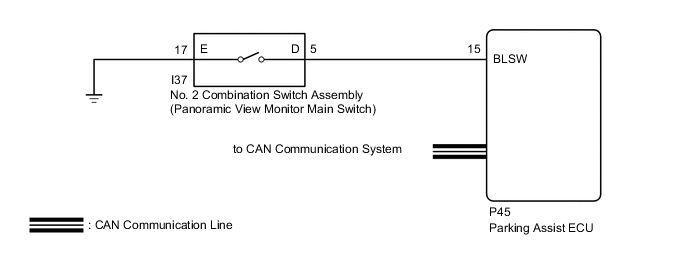
| CAMERA SW | Vehicle wire harness | No. 2 combination switch assembly (panoramic view monitor main switch) signal input state | DTC is not output | No. 2 Combination Switch Assembly (Panoramic View Monitor Main Switch) |
WIRING DIAGRAM
CAUTION / NOTICE / HINT
Note
-
When "!" maek is displayed on the multi-display assembly after the battery cable is disconnected, correct the steering angle neutral point.
-
Depending on the parts that are replaced or operations that are performed during vehicle inspection or maintenance, calibration of other systems as well as the panoramic view monitor system may be needed.
PROCEDURE
-
CHECK DISPLAY CHECK MODE
-
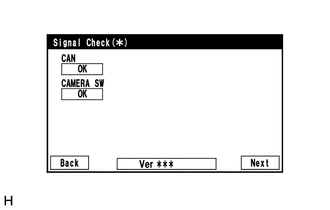
Check which items display on the signal check screen.
Result Result Proceed to "CAMERA SW" displays "CHK" (red) A "CAN" displays "CHK" (red) B
B 
GO TO CAN COMMUNICATION SYSTEM Click here
A 
-
-
CHECK HARNESS AND CONNECTOR (NO. 2 COMBINATION SWITCH ASSEMBLY [PANORAMIC VIEW MONITOR MAIN SWITCH] - PARKING ASSIST ECU AND BODY GROUND)
-
Disconnect the I37 No. 2 combination switch assembly (panoramic view monitor main switch) connector.
-
Disconnect the P45 parking assist ECU connector.
-
Measure the resistance according to the value(s) in the table below.
Standard Resistance Tester Connection Condition Specified Condition P45-15 (BLSW) - I37-6 (D) Always Below 1 Ω I37-17 (E) - Body ground Always Below 1 Ω P45-15 (BLSW) - Body ground Always 10 kΩ or higher Result Proceed to OK NG
NG
REPAIR OR REPLACE HARNESS OR CONNECTOR
OK
-
-
INSPECT NO. 2 COMBINATION SWITCH ASSEMBLY (PANORAMIC VIEW MONITOR MAIN SWITCH)
-
Remove the No. 2 combination switch assembly (panoramic view monitor main switch).
-
Inspect the No. 2 combination switch assembly (panoramic view monitor main switch).
Result Proceed to OK NG
OK
REPLACE PARKING ASSIST ECU Click here
NG
REPLACE NO. 2 COMBINATION SWITCH ASSEMBLY Click here
-