ROOF SUNSHADE SYSTEM Door Lock Linked Close Function does not Operate
DESCRIPTION
The roof sunshade ECU (sliding roof drive gear assembly) receives a door lock linked close operation request signal from the main body ECU (multiplex network body ECU) via the LIN communication when the wireless door lock function, key-linked door lock function or entry door lock function is operated with the power switch off. Then, the roof sunshade ECU (sliding roof drive gear assembly) activates the roof sunshade motor to close until it is fully closed.
WIRING DIAGRAM
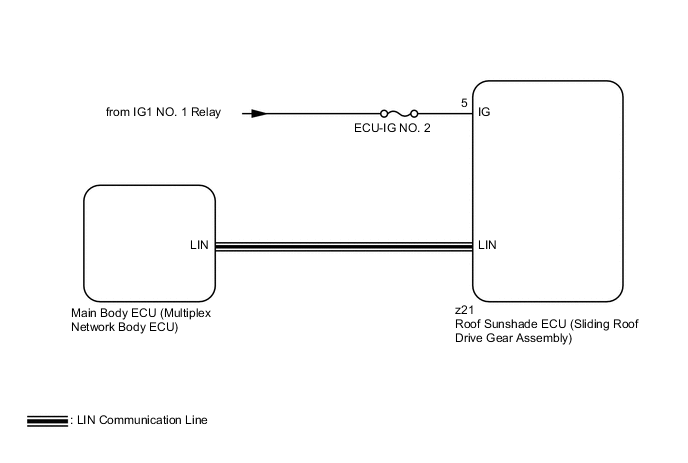
CAUTION / NOTICE / HINT
Note
-
Inspect the fuses for circuits related to this system before performing the following inspection procedure.
-
The door lock linked close function can be customized. Make sure that the setting is ON Click here.
-
When the roof sunshade ECU (sliding roof drive gear assembly) is replaced or removed and reinstalled, it requires initialization Click here.
-
Since the roof sunshade system has functions that use LIN communication, first confirm that there is no malfunction in the LIN communication functions in accordance with the How to Proceed with Troubleshooting procedure Click here.
PROCEDURE
-
CHECK ROOF SUNSHADE OPERATION (BASIC FUNCTION)
-
When the roof sunshade switch (map light assembly) is operated, check that the roof sunshade operates Click here.
OK The roof sunshade operates normally.
NG 
GO TO OTHER PROBLEM Click here
OK 
-
-
CHECK PROBLEM SYMPTOMS
-
Check the problem symptoms.
Result Result Proceed to The door lock linked close function does not operate when the wireless door lock function, key-linked door lock function and entry door lock function are operated. A The door lock linked close function does not operate when the key-linked door lock function is operated. B The door lock linked close function does not operate when the wireless door lock function is operated. C The door lock linked close function does not operate when the entry door lock function is operated. D
B 
CHECK POWER DOOR LOCK CONTROL SYSTEM Click here
C
CHECK WIRELESS DOOR LOCK CONTROL SYSTEM Click here
D
CHECK ENTRY AND START SYSTEM (for Entry Function) Click here
A
-
-
READ VALUE USING GTS
-
Connect the GTS to the DLC3.
-
Turn the power switch on (IG).
-
Turn the GTS on.
-
Enter the following menus: Body Electrical / Sliding Roof / Data List.
-
Read the Data List according to the display on the GTS.
Sliding Roof Tester Display Measurement Item/Range Normal Condition Diagnostic Note Ignition (Direct Signal) Power switch signal/ON or OFF ON: Power switch on (IG)
OFF: Power switch off
- OK The GTS display changes according to switch operation as shown in the table.
NG
CHECK HARNESS AND CONNECTOR (ROOF SUNSHADE ECU - AUXILIARY BATTERY) Click here
OK
-
-
REPLACE ROOF SUNSHADE ECU (SLIDING ROOF DRIVE GEAR ASSEMBLY)
-
Replace the roof sunshade ECU (sliding roof drive gear assembly) Click here.
NEXT
-
-
INITIALIZE ROOF SUNSHADE ECU (SLIDING ROOF DRIVE GEAR ASSEMBLY)
-
Perform the initialization Click here.
NEXT
-
-
CHECK ROOF SUNSHADE OPERATION (DOOR LOCK LINKED CLOSE FUNCTION)
-
Check that the door lock linked close function operates when the wireless door lock function, key-linked function and entry door lock function is operated Click here.
OK The door lock linked close function operates normally.
OK
END (ROOF SUNSHADE ECU WAS DEFECTIVE)
NG
REPLACE MAIN BODY ECU (MULTIPLEX NETWORK BODY ECU) Click here
-
-
CHECK HARNESS AND CONNECTOR (ROOF SUNSHADE ECU - AUXILIARY BATTERY)
-
Disconnect the z21 ECU connector.
-
Measure the voltage according to the value(s) in the table below.
Standard Voltage Tester Connection Condition Specified Condition z21-5 (IG) - Body ground Power switch off Below 1 V
OK
REPLACE ROOF SUNSHADE ECU (SLIDING ROOF DRIVE GEAR ASSEMBLY) Click here
NG
REPAIR OR REPLACE HARNESS OR CONNECTOR
-
-
CHECK POWER DOOR LOCK CONTROL SYSTEM
-
Check the power door lock control system (key-linked door lock function) Click here.
OK The key-linked door lock function operates normally.
OK
REPLACE MAIN BODY ECU (MULTIPLEX NETWORK BODY ECU) Click here
NG
GO TO POWER DOOR LOCK CONTROL SYSTEM Click here
-
-
CHECK WIRELESS DOOR LOCK CONTROL SYSTEM
-
Check the wireless door lock control system (door lock function) Click here.
OK The wireless door lock function operates normally.
OK
REPLACE MAIN BODY ECU (MULTIPLEX NETWORK BODY ECU) Click here
NG
GO TO WIRELESS DOOR LOCK CONTROL SYSTEM Click here
-
-
CHECK ENTRY AND START SYSTEM (for Entry Function)
-
Check the entry and start system (for entry function) (entry door lock function) Click here.
OK The entry door lock function operates normally.
OK
REPLACE MAIN BODY ECU (MULTIPLEX NETWORK BODY ECU) Click here
NG
GO TO ENTRY AND START SYSTEM (for Entry Function) Click here
-