METER / GAUGE SYSTEM
-
SYSTEM CONTROL
-
Operating Condition
-
Eco Driving Indicator
-
Eco Driving Indicator starts to operate when all of the following conditions are met:
Condition Ignition switch is ON. Engine is running. Shift lever is in D. Drive mode is Normal or ECO mode. Vehicle speed is 130 km/h (80.8 mph) or more -
Eco Driving Indicator stops operation when any of the following conditions is met:
Condition Ignition switch is off. Engine is stopped. Shift lever is in any position other than D. Drive mode is any other mode except Normal or ECO mode. Vehicle speed is 130 km/h (80.8 mph) or less
-
-
-
-
FUNCTION
-
Buzzer Function
-
The table below shows the warning and reminder functions of the buzzer in the combination meter assembly:
Item Driver Seat Belt Warning (Max. 5 times) Driver Seat Belt Warning (Once) Front Passenger Seat Belt Warning (Once) Front Seat Belt Warning (Level 2) Front Seat Belt Warning (Level 1) Lane Departure Alert Cancel Warning Lane Departure Alert Warning Lane Departure Alert No Hands Detect Warning Engine Oil Pressure Warning Speed Warning Speed Limiter Stop and Start System Warning EPS Warning Engine Coolant High Temperature Warning Brake System Temperature Rise Warning/Active Test Brake System Temperature High Warning Entry and Start System Warning 2 (Intermittent: Maximum 9 Times) Entry and Start System Warning (Once) Multi-information Display Warning Road Sign Assist System Warning Sway Warning Accelerator Depression Hold Warning Parking Brake Engaged Warning Key Reminder Door Open while Driving Warning Shift Reject Light Reminder Immobiliser Certification Reminder Turn Signal/Hazard Warning Operation Radar Cruise Control Cancelation due to Low Speed Warning Tech Tips
The buzzer function differs by vehicle specification.
-
-
Multi-information Display (Analog Type Combination Meter Assembly )
-
The multi-information display can be switched by operating the DISP switch located on the steering pad switch assembly.
-
The multi-information display indicates as follows:
Display Outline*1 Cruise Information In the cruise information display, 6 types of information can be displayed:
-
Current Fuel Consumption
-
Average Fuel Consumption
-
Average Vehicle Speed
-
Cruising Range
-
Outside Temperature
-
ECO Driving Indicator Zone Display*2
Water Temperature Gauge The engine coolant temperature date are displayed with bar graph. Customization*2 The Eco Driving Indicator Light can be set up from this screen. The customization display is available only while the vehicle is stopped. If vehicle movement is detected during setup, the setup will be canceled automatically. Tech Tips
*1: The items displayed differ by vehicle specification.
*2: When the ECO driving indicator zone display is selected by customization function.
-
-
Cruise Information Display
-
The cruise information display can be switched by operating the DISP switch. The counter can be reset by pressing and holding the DISP switch for 0.8 seconds or more.
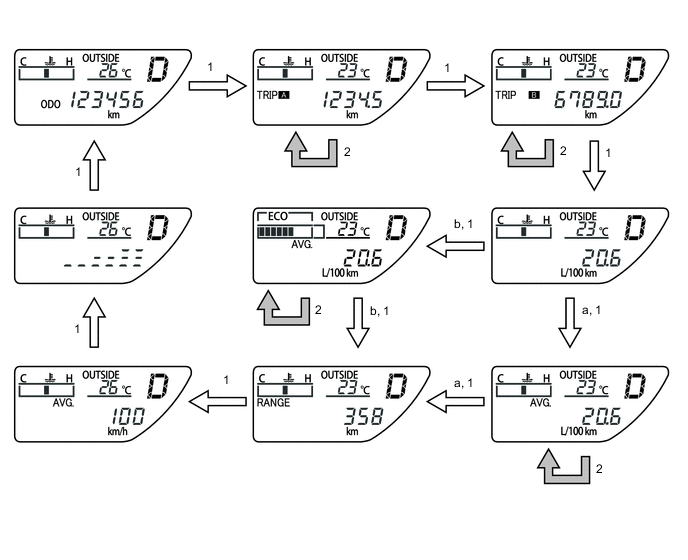
No. Condition a Standard display mode b Eco display mode 1 The DISP switch is operated for less than 0.8 seconds. 2 The DISP switch is operated for 0.8 seconds or more to reset. Display Outline Current Fuel Consumption 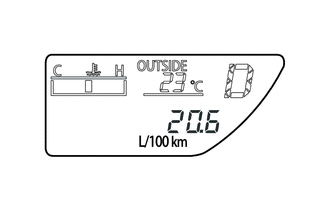
Displays the value that has been calculated by the meter ECU, which is based on the driven distance and the fuel consumption volume (fuel injection amount signal from the ECM via CAN), provided that the ignition switch is turned ON. Total Average Fuel Consumption 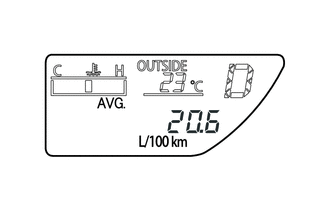
-
Displays the value that has been calculated by the meter ECU, which is based on the driven distance and the fuel consumption volume (fuel injection amount signal from the ECM via CAN) since the counter was reset.
-
The display updates every 10 seconds.
Water Temperature Gauge 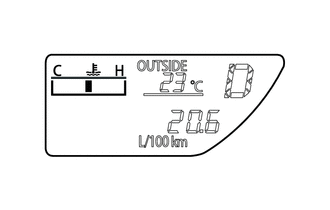
The engine coolant temperature date are displayed with bar graph. Average Vehicle Speed 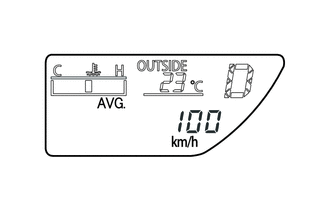
-
Displays the value that has been calculated by the meter ECU, which is based on the elapsed time and driven distance since the ignition switch was turned ON or since the counter was reset.
-
The display updates every 10 seconds.
Cruising Range 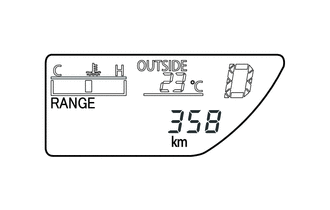
Displays the value that has been calculated by the meter ECU, which is based on the fuel consumption data that the meter ECU continuously monitors and stores in its memory, and the residual fuel volume data, provided that the ignition switch is turned ON. Outside Temperature 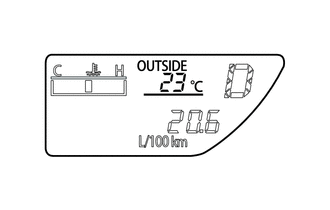
-
Displays the outside temperature.
-
The display updates every 3.84 second.
ECO Driving Indicator Zone Display 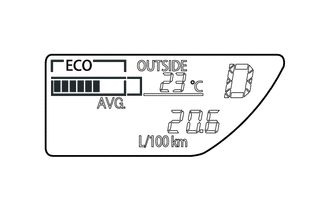
Eco driving ratio based on acceleration is shown with a bar graph. Dimming Mode Display 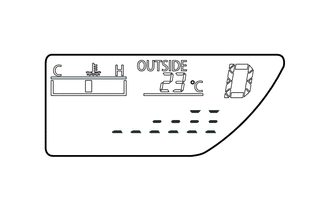
Displays the combination meter brightness. -
-
-
Multi-information Display (Models with Optitron Type Combination Meter Assembly)
-
Display Function Flow
-
The multi-information display can be switched as shown in the flowchart below:
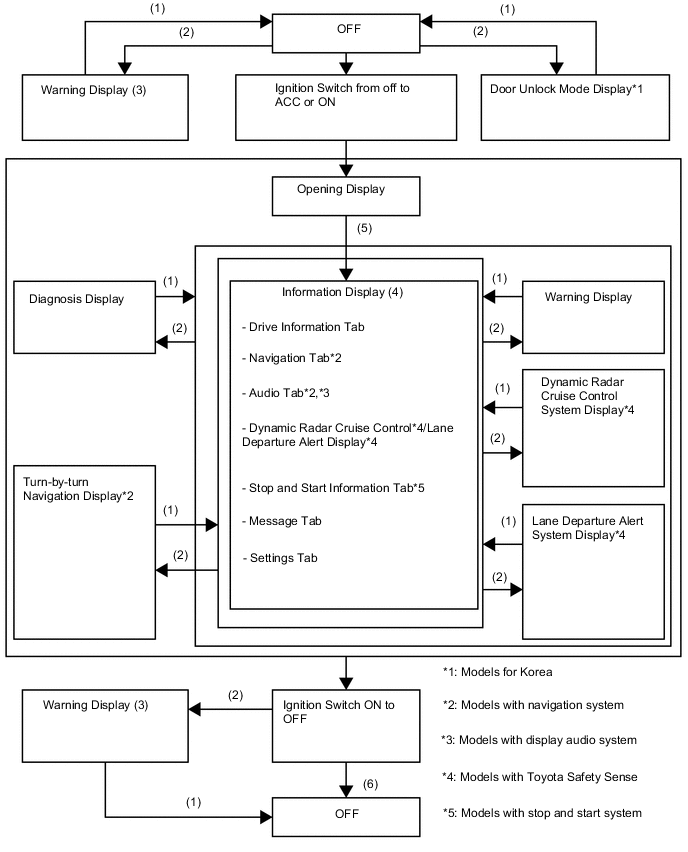
No. Condition (1) Conditions are not met. (2) Conditions are met. (3) If there are multiple display requests, items will be displayed in sequence. (4) Item or display is selected by operating the steering pad switch assembly switch. (5) After ignition switch is turned to ON. (6) ODO display is displayed for a certain period of time after the ignition switch is turned off.
-
-
Display Tab Operation
-
The information currently displayed can be switched using the LEFT/RIGHT switch on the steering pad switch assembly.
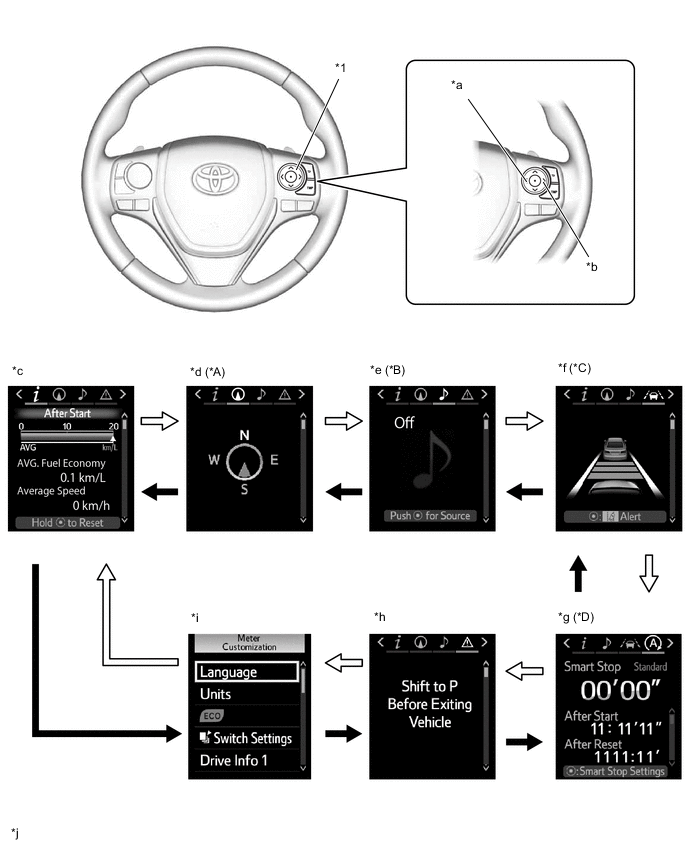
*A Models with Navigation System *B Models with Navigation System or Display Audio System *C Models with Toyota Safety Sense *D Models with Stop and Start System *1 Steering Pad Switch Assembly - - *a LEFT Switch *b RIGHT Switch *c Drive Information *d Navigation Information *e Audio Information *f Dynamic Radar Cruise Control System / Lane Departure Alert System Information *g Stop and Start System Information *h Warning Message *i Settings *j The illustrations shown are examples only. The illustrations may differ from the actual vehicle screen. 
LEFT Switch Operation 
RIGHT Switch Operation
-
-
Drive Information
-
Drive information shows vehicle information such as drivable range and fuel consumption.
-
The drive information can be switched using the UP/DOWN switch on the steering pad switch assembly.
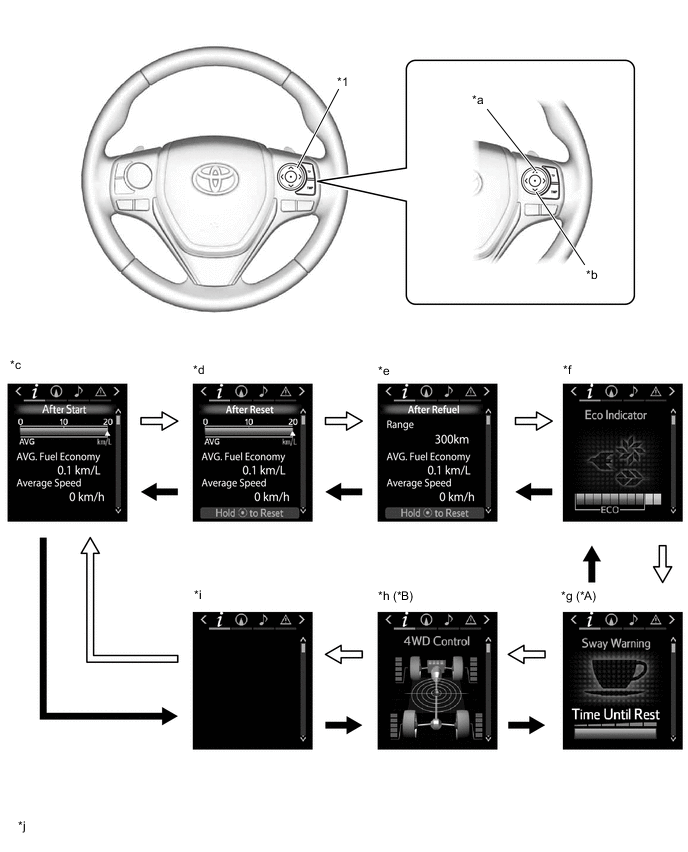
*A Models with Toyota Safety Sense *B 4WD/AWD Models *1 Steering Pad Switch Assembly - - *a UP Switch *b DOWN Switch *c After Start Display *d After Reset Display *e After Refuel Display *f Eco Indicator *g Sway Warning Display *h Dynamic Torque Control 4WD System Display *i Blank *j The illustrations shown are examples only. The illustrations may differ from the actual vehicle screen. UP Switch Operation DOWN Switch Operation
-
-
Setting Function
-
The items displayed on the multi-information display can be customized.
-
The items can be selected on the information setting screen.
Item Available Setting Language The language used on the multi-information display can be selected:
-
English
-
German
-
French
-
Spanish
-
Italian
-
Russian
-
Turkish
-
Arabic
Tech Tips
The selectable languages may differ depending on the model or region.
Unit The unit displayed on the multi-information display can be selected.
-
miles (MPG)
-
km (L/100 km)
-
km (km/L)
Tech Tips
The selectable units may differ depending on the model.
Eco Driving Indicator Light The Eco driving indicator light can be switched on or off.
-
On
-
Off
Drive information screen The drive information screen can be selected. LDA (Lane Departure Alert) The following settings can be changed for the lane departure alert system.
-
Steering Assist
-
Alert sensitivity
-
Vehicle sway warning
-
Vehicle sway warning sensitivity
PCS (Pre-Crash Safety System) The following settings can be changed for the pre-crash safety system.
-
Turning the pre-crash safety system on and off
-
Alert timing
RSA (Road Sign Assist) The following settings can be changed for the road sign assist system.
-
Excess speed notification method
-
Excess speed notification level
-
Other notifications method
PBD (Power Back Door System) The following settings can be changed for the power back door system.
-
Turning the power back door system on and off
-
Turning the touchless kick actuation function on and off
-
Opening angle
-
Operation buzzer volume
BSM (Blind Spot Monitor System) The blind spot monitor system can be turned on and off. Toyota Parking Assist-sensor System The Toyota parking assist-sensor system can be turned on and off. Interruption Display The following displays that appear as soon as the set conditions are met can be switched to on or off.
-
Turn-by-turn Navigation Display
-
Incoming Telephone Display
-
Light Control Rheostat Display
-
Stop and Start System Guidance
Accent Color The accent color can be changed:
-
Clear Blue
-
Clear Turquoise
-
Deep Orange
-
Radiant Orange
Initialization The setting items can be initialized. Tech Tips
The items displayed differ by vehicle specification.
-
-
-
Warning Mode Function
-
When a warning is necessary, the warning display interrupts the display in the multi-information display.
-
The master warning light may illuminate or blink and the buzzer in the combination meter assembly may sound depending on the item displayed on the multi-information display.
Priority Display Message*1 Master Warning Light Buzzer 1 4WD TEST MODE - - ADJUSTING LDA CAMERA - - ADJUSTING FRONT RADAR BEAM - - CHECKING PRE-CRASH BRAKE - - CHECKING CRUISE CONTROL C/D - - CHECKING CRUISE CONTROL BRAKE - - BRAKE! - -*2 2 Graphic Display (Pre-crash Safety System) - - Graphic Display (Dynamic Radar Cruise Control System) - -*2 Graphic Display (Lane Departure Alert System)*3 - Sounds Braking Power Low Stop in a Safe Place See Owner's Manual Illuminates Sounds 3 Door Open (While Driving) Blinks Sounds Door Open - - Clearance Sonar Obstruction Detection - - Parking Assist Malfunction - - Clean Parking Assist Sensor - - 4 Power Turned Off to Save Battery - - 5 Shift to P Before Exiting Vehicle Blinks Sounds 6 Release Parking Brake Blinks Sounds Key not detected Check key location Blinks Sounds 7 Shift to neutral and depress clutch. Blinks Sounds Speed Limit Exceeded - - LDA Hold Steering Wheel and Graphic Display - - LDA Steering Assist Unavailable Hold Steering Wheel Illuminates Sounds 8 SRS Airbag System Malfunction Visit Your Dealer Illuminates Sounds Antilock Brake System Malfunction Visit Your Dealer - Sounds Engine Coolant Temp High Stop in a Safe Place See Owner's Manual Illuminates - Charging System Malfunction See Owner's Manual - - Radar Cruise Control Unavailable Clean Sensor Illuminates Sounds Radar Cruise Control Unavailable Illuminates Sounds Radar Cruise Control Unavailable Depress Brake to Resume Driving - - Smart Entry & Start System malfunction See owner's manual Blinks Sounds Blind Spot Monitor Unavailable Illuminates Sounds Cruise Control Malfunction Visit Your Dealer Illuminates Sounds Cruise Control Fault Press Brake to Deactivate Visit Your Dealer Illuminates Sounds CHECK SPEED LIMITER SYSTEM Illuminates Sounds Lane Departure Alert Malfunction Visit Your Dealer Illuminates Sounds Forward Camera System Unavailable Illuminates Sounds LDA Steering Assist Deactivated Warnings Available Illuminates Sounds Lane Departure Alert Turned On Steering Assist Active - - Lane Departure Alert Turned On Steering Assist Inactive - - Forward Camera System Unavailable Clean Windshield Illuminates Sounds Pre-crash Safety Malfunction Visit Your Dealer Illuminates Sounds Blind Spot Monitor System Malfunction Visit Your Dealer Illuminates Sounds Oil Pressure Low Stop in a Safe Place See Owner's Manual Illuminates - Transmission Fluid Temp High See Owner's Manual Illuminates Sounds AWD System Malfunction 2WD Mode Engaged Visit Your Dealer Illuminates Sounds Radar Cruise Active Please Pay Attention to Other Vehicles - - Lane Departure Alert Unavailable Below Approx 50km/h - - Lane Departure Alert Unavailable Below Approx 32MPH - - Lane Departure Alert Unavailable at Current Speed - - 9 Graphic Display (Dynamic Radar Cruise Control System) - - Graphic Display (Lane Departure Alert System)*4 - - Stop & Start System Malfunction Visit Your Dealer Illuminates Sounds Turn Off Vehicle Blinks Sounds Detected Sway Pattern of vehicle Would you like to take rest? - - Detected LDA Repeatedly Please take a rest - - Key Left inside Vehicle Blinks Sounds Turn Lights Off Blinks Sounds Moon Roof Open Blinks Sounds Depress Brake and Then Touch Key to Engine Switch Blinks Sounds Depress brake and then start engine Blinks Sounds Depress clutch and the start engine. Blinks Sounds Shift to P to start. Blinks Sounds 10 STEERING LOCK ACTIVE Blinks Sounds AWD System Overheated 2WD Mode Engaged Blinks Sounds AWD System Overheated Switching to 2WD Mode Blinks Sounds 11 KEY BATTERY LOW Illuminates Sounds Headlight System Malfunction Visit Your Dealer Illuminates Sounds Water accumulation in fuel filter. Check owner's manual. Illuminates Sounds Engine Oil Level Low Add or Replace Illuminates Sounds Headlight System Malfunction Visit Your Dealer Illuminates Sounds Check RSA System Illuminates Sounds DPF FULL ENGINE SERVICE REQUIRED Illuminates - 12 Windshield Washer Fluid Low - - Fuel Low - - Roads May Be Icy Drive with Care - - Traction Control Turned Off - - Oil Maintenance Required Soon - - Maintenance Required Soon - - Oil Maintenance Required Visit Your Dealer - - Maintenance Required Visit Your Dealer - - Resetting Maintenance Data - - RESETTING OF OIL MAINTENANCE DATA INCOMPLETE - - Power on - - Graphic Display (Smart Entry and Start System) - - VSC Turned Off Pre-crash Brake System Unavailable - - Pre-crash Safety Unavailable - - High Power Consumption Partial Limit On AC/Heater Operation - - Pre-Crash Safety Unavailable Wait a Moment - - Pre-Crash Safety Unavailable Clean Radar Sensor - - Pre-Crash Safety Off - - DPF FULL SEE OWNER'S MANUAL - - DPF MANUAL REGENERATION IN PROCESS - - Theft Sensor Turned Off - - Theft Sensor Turned On - - Tech Tips
*1: The warning message differs by vehicle specification.
*2: PCS buzzer (skid control buzzer) operation is activated.
*3: When the system is warning the user that the vehicle is deviating from its lane.
*4: When the system is not warning the user that the vehicle is deviating from its lane.
-
-
-
Eco Driving Indicator
-
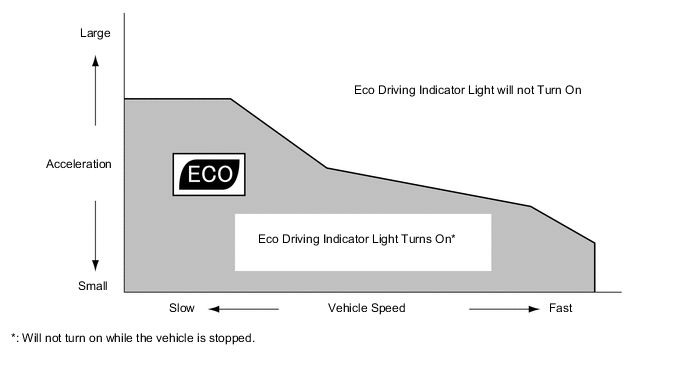
The operating diagram of Eco Driving Indicator Light is as follows:
-
When the ECM, using information (such as vehicle speed, accelerator pedal depressed volume, engine speed signal (engine r/min data), and so on), calculates that the vehicle is driven in an Eco-friendly manner, it turns on Eco Driving Indicator Light and shows the bar graph of ECO Driving Indicator Zone Display within Zone of Eco driving.
-
When the ECM calculates that the acceleration exceeds Zone of Eco driving, it turns off ECO Driving Indicator Light and blinks the right side of Eco Driving Indicator Zone Display.
-
The operation of Eco Driving Indicator is as follows:
Models with Analog Type Combination Meter Assembly Vehicle Condition ECO Driving Indicator Zone Display Eco Driving Indicator Light Stopped 
Turns off ECO Driving 
Turns on Non-ECO Driving 
Turns off Models with Optitron Type Combination Meter Assembly Vehicle Condition ECO Driving Indicator Zone Display Eco Driving Indicator Light Stopped 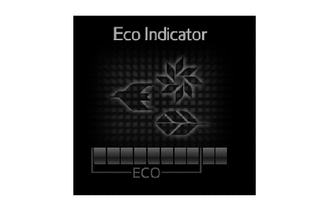
Turns off ECO Driving 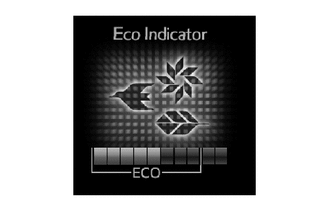
Turns on Non-ECO Driving 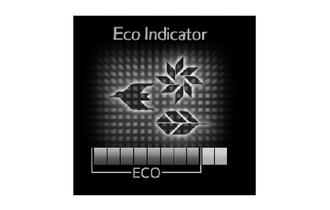
Turns off -
Eco Driving Indicator can be deactivated in the following ways: Eco Driving Indicator Light can be deactivated from Eco Driving Indicator Light customization display of the multi-information display.
-
-
Front Seat Belt Warning Function
-
When the ignition switch is ON, this system detects the condition of the seat belts based on the signals from the driver and front passenger seat belt buckle switches and the occupant detection sensor.
-
On models except models for G.C.C. countries, the buzzer sounds when the vehicle speed exceeds 20 km/h (12.4 mph) to emphasize the fact that the seat belt is unbuckled. After 30 seconds, the sound changes for emphasis. The sound continues for 90 seconds. Once a buzzer begins to sound, it will continue until the seat belt is buckled or the ignition switch is turned off.
-
On models for G.C.C. countries, when the seat belt is unbuckled, the buzzer sounds 5 times 1.8 seconds after the ignition switch is turned on (IG). The buzzer sounds when the vehicle speed exceeds 20 km/h (12.4 mph) to emphasize the fact that the seat belt is unbuckled. After 9.6 seconds, the sound changes for emphasis. The sound continues for 20 seconds. Once a buzzer begins to sound, it will continue until the seat belt is buckled or the ignition switch is turned off.
Tech Tips
Upon receiving a request from a user who cannot wear a seat belt for a special reason, the buzzer warning can be canceled using the Global TechStraem (GTS). For details, refer to the Repair Manual.
-
Occupant Detection Sensor (Except models for Korea)
-
The occupant detection sensor, which is enclosed in the seat cushion of the front passenger seat, is used to detect whether or not the front passenger seat is occupied.
-
This sensor consists of a construction in which 2 electrode sheets sandwich a spacer. When the occupant is seated, the electrode sheets come in contact with each other through the hole provided in the spacer portion, thus enabling the current to flow.
-
Thus, the sensor detects whether or not an occupant is seated in the front passenger seat.
-
-
Occupant Detection Sensor (Models for Korea)
-
The occupant detection sensors are installed on brackets connecting the seat rail and the seat frame. The resistance values of these sensors, which vary in accordance with the distortion that acts on the brackets, are output to the occupant detection ECU.
-
The occupant detection ECU constantly monitors the weight on the front passenger seat, and makes a judgment in accordance with the signals from the occupant detection sensor and the state of the front passenger seat belt buckle switch.
-
The occupant detection ECU transmits the signals to the center airbag sensor assemby.
-
-
-
Rear Passengers Seat Belt Reminder Function (Models with Rear Passengers Seat Belt Reminder Function)

*1 Telltale Marker - -
-
If the meter ECU receives an off signal from the rear door courtesy light switch assembly when the ignition switch is ON, a rear passenger seat belt reminder display is shown on the telltale light assembly. At this time, if the meter ECU receives an on signal from a rear seat belt buckle switch, it will extinguish the telltale light corresponding to the rear seat belt buckle switch which sent the on signal. In addition, the rear passenger seat belt reminder display will automatically turn off approximately 34 seconds after the display.
-
If any of the rear seat belts are released while the vehicle speed is above 20 km/h (12 mph), the rear passengers seat belt reminder illuminates and the buzzer is sounded. After 30 seconds, the sound change for emphasis. The sound continues for 90 seconds. Once the buzzer begins to sound, it will continue until the rear seat belt is buckled or the ignition switch is turned off.
-
The DISP switch installed on the steering pad switch can be used to show the rear passengers seat belt reminder display as required.
-
-
-
FAIL-SAFE
-
Eco Driving Indicator
-
When any of the following conditions are met, Eco Driving Indicator Light is turned off and ECO Driving Indicator Zone Display is stopped:
-
Engine Signal Malfunction
-
CAN Signal Malfunction
-
-
-