NAVIGATION SYSTEM / MULTI INFORMATION SYSTEM
-
OUTLINE
-
The navigation system consists of a radio and display receiver assembly equipped with a wide 8-inch liquid crystal display (LCD) with a capacitive type touch panel and a navigation ECU with data and programs necessary for navigation installed.
-
The map screen supports flick, drag and pinch-in/pinch-out operations, which are used to easily change the scale of the map, location, etc.
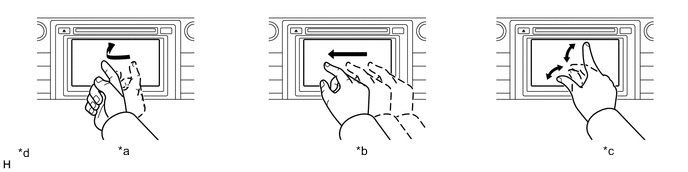
*a Flick Operation *b Drag Operation *c Pinch In/Pinch Out Operation *d The illustrations shown are examples only. The illustrations may differ from the actual audio head unit. -
The display of the map can be changed among 3 colors depending on the users preference.
-
For high altitude areas, the real terrain map, which enhances the map quality using gradient data in predetermined scales, is displayed.
-
When the fuel level is low, a warning message is displayed and a list of nearby gas stations can be displayed on the multi-information display. User can select a nearby gas station from the list and set it as the destination.
-
When an alternative route is traveled during route guidance, the alternative route is memorized. When a route other than the route guidance is traveled several times, the navigation system learns that route and displays it as an adaptive route in the route search results.
-
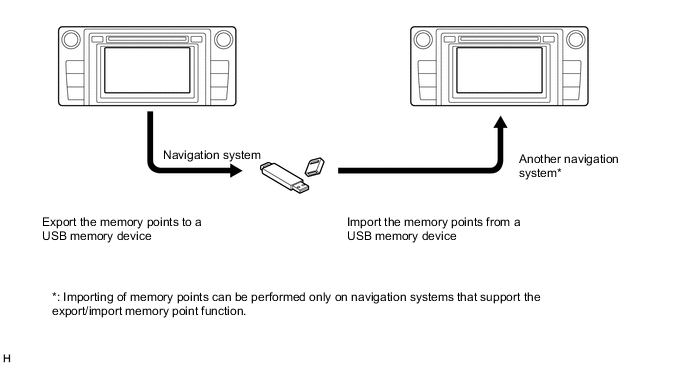
The navigation system supports a function used for the export/import of memory points. This function enables memory point data stored on the radio and display receiver assembly to be transferred to another navigation system (such as another radio and display receiver assembly) via a USB memory device.
-
The navigation system sends navigation information to the combination meter assembly or meter mirror sub-assembly*. The user can view a compass display and turn-by-turn directions to the destination on the multi-information display or headup display.
Tech Tips
*: Models with headup display
-
-
SPECIFICATION
Component Destination Australia Brazil and Argentina Multi-display 8-inch Wide LCD Navigation Computer Pioneer Gyro Sensor Piezoelectric Ceramic Element Map Database Stored Internally within Navigation ECU Language Supported Voice Guidance English English, Spanish and Portuguese Voice Recognition English - -
MAIN FEATURES
-
Keyword Search (Models for Australia)
-
Even if the name of the desired destination is unknown, by entering multiple free words in the keyword search screen, the desired destination can be searched for among a list of results.
-
-
Voice Recognition System (Models for Australia)
-
When the vehicle is being driven, the user can operate the navigation system such as searching for an address or POI using the voice recognition system.
-
Systems and commands which can be operated by voice recognition are displayed to assist users who are unfamiliar with the voice recognition system. Also, an indicator which displays a voice recognition status such as when to speak or the result of the voice recognition is provided.
-
By selecting a system from the menu screen and speaking according to the sample command, the user can operate the system with minimal words.
Tech Tips
The system operates as commanded by the user even when a command not shown on the current screen is spoken.
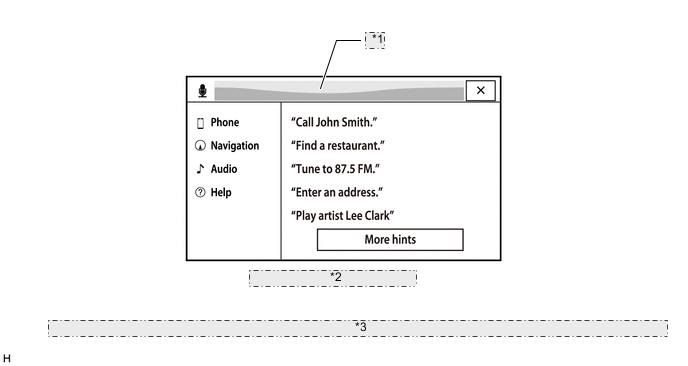
*1 Voice Recognition Status Indicator *2 Voice Recognition Menu Screen *3 The illustrations shown are examples only. The illustrations may differ from the actual vehicle screens.
-
-
Export/Import Memory Point Function
-
Memory point data stored in the radio and display receiver assembly can be transferred to another navigation system, enabling information sharing.
Figure 1. Export/Import Procedure for Memory Points Image
-
-
The main functions of the multi-display are listed below.
Function Outline Navigation System Through the use of the Global Positioning System (GPS) and map data which is stored on a navigation ECU, the navigation system analyzes the position of the vehicle and indicates the position on the map that is displayed on the screen.
In addition, it is possible to use the system to register memory points and navigate to a destination.
Audio/Video System Serves as the display and controls for the following:
-
Radio operation
-
CD player operation
-
Bluetooth-compatible portable player operation
-
USB memory device operation
-
iPod/iPhone operation
-
Portable audio player operation (AUX type)
Hands-free System When a Bluetooth-compatible cellular phone is registered to the navigation system, the driver can make and receive calls or talk hands-free on the cellular phone by operating the switches on the screen/steering pad. Speech Command System (Models for Australia) Operates the navigation, audio, and hands-free systems based on voice commands. Parking Assist Monitor System
(Models with Parking Assist Monitor System)
Displays a view of the area behind the vehicle that is captured by the rear television camera mounted on the luggage compartment door when the shift lever is moved to R. Monitor System
(Models with Monitor System)
Displays a view of the area behind the vehicle that is captured by the rear television camera mounted on the luggage compartment door when the shift lever is moved to R. Toyota Parking Assist Sensor System
(Models with Toyota Parking Assist Sensor System)
Detects obstacles and displays information on the multi-display to inform the driver. Others Fuel Consumption Screen Fuel consumption information such as average fuel consumption per minute, current fuel consumption per minute and past fuel consumption record is displayed. Maintenance Information The maintenance information function can be used to inform the driver of the inspection or replacement timing of the following items based on the calendar function and distance driven.
-
Engine oil: Replace engine oil
-
Oil filter: Replace engine oil filter
-
Rotation: Rotate tires
-
Tyres: Replace tyres
-
Battery: Replace battery
-
Brake pad: Replace brake pads
-
Wipers: Replace wiper blades
-
Coolant: Replace engine coolant
-
Brake oil: Replace brake fluid
-
Trans. fluid: Replace ATF
-
Service: Scheduled maintenance
-
Air filter: Replace air filter
-
Personal: New information items can be created separately from the provided items
Language Select (Destination Packages for Brazil and Argentina) The language of the screen buttons, pop-up messages and the voice guidance can be changed.
English, Spanish and Portuguese are available.
Beep Setting The beep sound can be turned off. Screen Color Theme Setting The screen color theme can be changed. Screen Setting This enables automatic return to the navigation screen from the audio screen. Keyboard Layout (Models for Australia) The keyboard layout can be changed. Delete Personal Data Deletes or returns registered or changed personal settings to their default conditions.
For example:
-
General settings
-
Navigation settings
-
Audio settings
-
Phone settings
Screen Button Sensitivity The button sensitivity of the capacitive touch screen can be changed. Screen Adjustment The brightness or contrast of the screen can be adjusted to suit the brightness of the surroundings. Map Database Update The map database in the navigation ECU can be completely updated. Diagnosis This menu contains the following items:
-
Failure Diagnosis
-
System Check
-
Storage Check
-
Diagnosis Recorder
-
MEU Check
-
Function Check/Setting
-
Panel & Steering Switch
-
Touch Switch
-
Microphone Check
-
Vehicle Signal
-
HF Voice Quality Setting
-
Camera Setting (Models with Parking Assist Monitor System)
-
DAB Reception Check (Models with Digital Audio Broadcast (DAB) Tuner)
-
DTV reception check (Models with Digital TV Tuner)
-
MEU Inspection
-
Service Information
-
MEU Information
-
Version Information
-
Product Information
-
-