NAVIGATION SYSTEM / MULTI INFORMATION SYSTEM
-
OUTLINE
-
The display is a wide 7.0-inch wide Video Graphics Array (VGA) with a pressure sensitive touch panel, offering improved ease of use.
-
The Hard Disk Drive (HDD) for the navigation receiver assembly can be supplied separately, enhancing serviceability. For details, refer to the Repair Manual.
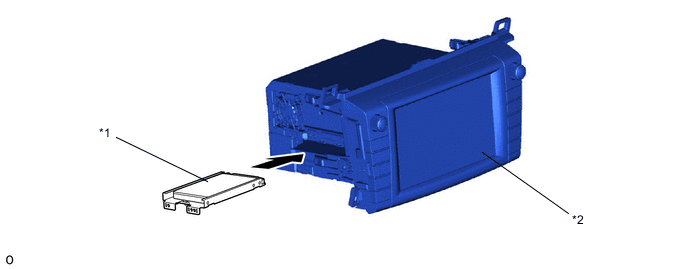
*1 HDD *2 Navigation Receiver Assembly -
A multiple display function is provided. Due to this function, a map screen and air conditioning operation screen, and an audio screen or vehicle information screen can be displayed on the single screen simultaneously.
-
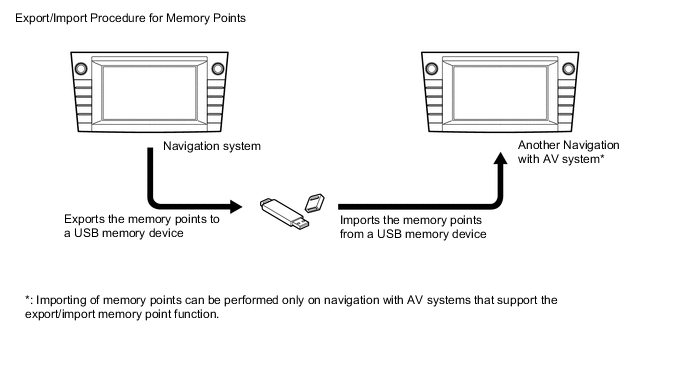
The navigation system supports a function used for the export/import of memory points. This function enables memory point data stored on the navigation receiver assembly to be transferred to another navigation system (such as another navigation receiver assembly) via a USB memory device.
-
-
SPECIFICATION
Multi-display 7.0-inch wide VGA Navigation ECU Manufacturer AISIN AW*1, DENSO*2 Gyro Sensor Piezoelectric Ceramic Element Map Data Media HDD Language Supported Voice Guidance English*3, German*4, French*4, Italian*4, Spanish*4, Dutch*4, Norwegian*4, Swedish*4, Portuguese*4, Danish*4, Finnish*4, Polish*4, Greek*4, Russian*4, Check*4, Romanian*4, Hungarian*4, Slovak*4, Turkish*4, Ukrainian*4, Arabic*5, Taiwanese*6 and Korean*2 Voice Recognition English*3, German*4, French*4, Italian*4, Spanish*4, Dutch*4, Russian*4, Arabic*5, Taiwanese*6, and Korean*2 Tech Tips
*1: Except models for Korea
*2: Models for Korea
*3: Except destination package for Taiwan
*4: Models for Europe
*5: Models for G.C.C. Countries
*6: Models for Taiwan
-
MAIN FEATURES
-
Connected Services (Models for Europe)
-
The following services are available by connecting the navigation system to Toyota's portal site via the internet using a cellular phone.
-
To use these connected services, Bluetooth setting and a portal account are required.
-
To get a portal account, access the Toyota portal site (URL:www.my.toyota.eu).
Contents Outline Online Search New establishments, such as restaurants and bars, that are not registered in the navigation system can be set as a destination. Importing Memory Points Downloading via a cellular phone POIs searched on Toyota's portal site can be downloaded to the navigation system and set as a destination or saved as memory points. Downloading from a USB memory 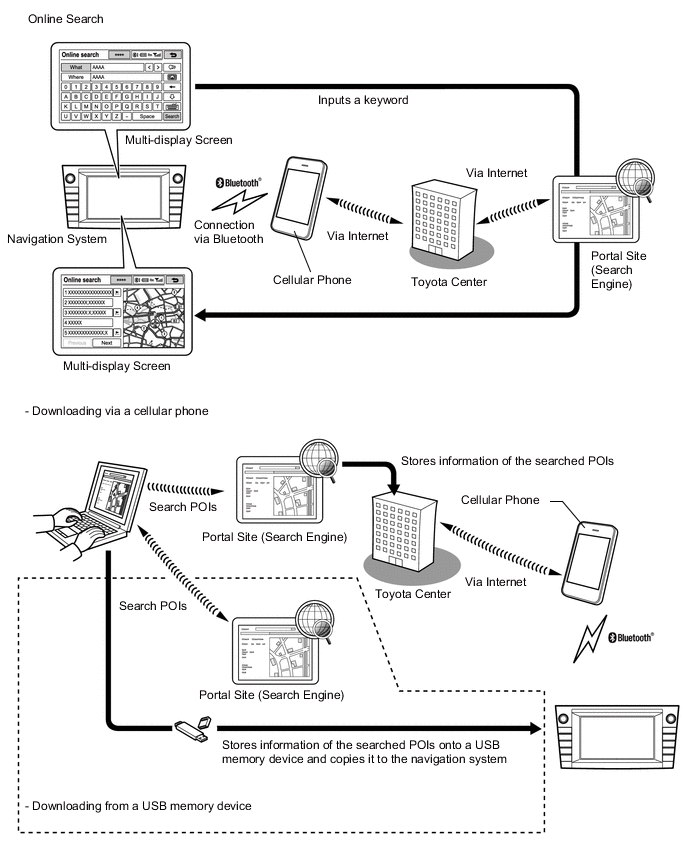
-
Export/Import Memory Point Function (Models for Europe)
-
Memory point data stored in the navigation receiver assembly can be transferred to another navigation with AV system, enabling information sharing.
-
-
-
-
PRECAUTION
-
Ignition Switch Expressions
-
The type of ignition switch used on this model differs depending on the specifications of the vehicle. The expressions listed in the table below are used in this section.
Expression Ignition Switch (Position) Engine Switch (Condition) Ignition Switch off LOCK Off (Lock) Ignition Switch ACC ACC On (ACC) Ignition Switch ON ON On (IG) Engine Start START On (Start)
-
-