ELECTRONICALLY CONTROLLED BRAKE SYSTEM(w/o Vacuum Brake Booster) PRECAUTION
-
HANDLING PRECAUTIONS
-
When replacing the skid control ECU assembly, always install a new one.
Note
Do not use a skid control ECU assembly from another vehicle (vehicle on display, etc.).
-
The removal or installation of the brake actuator assembly, brake master cylinder sub-assembly or brake stroke simulator cylinder sub-assembly as well as other procedures can cause the brake fluid level to drop below the outlet port of the fluid reservoir. If this happens when performing such work, be sure to remove the 2 ABS motor relays until the brake lines and brake actuator hose have been bled.
Tech Tips
-
If the pump motor is operated while there is air in the brake actuator hose, bleeding the air becomes difficult due to air in the brake actuator assembly.
-
With the engine switch off, the skid control ECU assembly may operate for 2 minutes after operating the brake pedal.
-
-
Wait for 2 minutes after turning the engine switch off, operating the brake pedal and closing the driver door before removing the relays.
Tech Tips
The skid control ECU assembly operates the pump motor just before the brake control system shuts down in order to prepare the system for the next time it is operated.
-
If the skid control ECU assembly or a sensor has been removed and installed, it is necessary to check the system for problems after the parts have been reassembled. Check for DTCs using the GTS. Also check that the system functions and signals received by the ECU are normal using Test Mode (signal check).
-
-
DTC PRECAUTION
-
Warnings for some DTCs cannot be cleared by only repairing the malfunctioning parts. If the warning is displayed even after repair work, the DTC should be cleared after turning the engine switch off.
Note
If a DTC for a malfunctioning part reappears after it is cleared, then it has been stored again.
-
When 2 or more DTCs are detected, perform circuit inspections one by one until the problem is identified.
-
-
BRAKE TESTER PRECAUTION
-
When inspecting the brakes using a brake tester, the braking force of the rear wheels may be reduced.
When the vehicle speed is 0 km/h (0 mph), the brake control system of the vehicle limits the rear brake fluid pressure to approximately 50% of the normal brake fluid pressure when driving the vehicle, in order to reduce energy consumption.
-
-
CHASSIS DYNAMOMETER PRECAUTION
When testing with a 2-wheel drum tester such as a speedometer tester, combination tester for the speedometer and brakes, or chassis dynamometer, or when jacking up the front wheels and turning the wheels, perform the following procedure to enter Inspection Mode and disable the TRC and VSC systems.
CAUTION:
-

Do not use the drum tester with any of the lock chains disconnected.
-
Using the drum tester with a lock chain disconnected could cause the vehicle to begin moving unexpectedly.
-
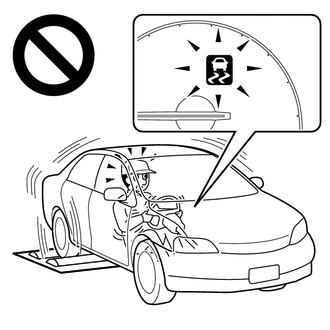
Do not use the drum tester while the TRC or VSC is able to operate.
-
TRC or VSC operation could cause the vehicle to begin moving unexpectedly.
Tech Tips
-
If Inspection Mode is not used, the vehicle may unexpectedly move off the dynamometer because of TRC and VSC operation.
-
The VSC OFF switch (No. 2 satellite switch set) must not be used to disable TRC and VSC operation when the vehicle is to be operated on a dynamometer. Pressing the VSC OFF switch (No. 2 satellite switch set) does not disable TRC and VSC operation completely.
-
Activating Inspection Mode (When Using the GTS)
-
Ensure that the engine switch is off and the engine is stopped.
-
Connect the GTS to the DLC3.
-
Turn the engine switch on (IG).
-
Turn the GTS on.
-
Enter the following menus: Chassis / ABS/VSC/TRC / Utility / Inspection Mode.
Chassis > ABS/VSC/TRC > UtilityTester Display Inspection Mode -
Check that the multi-information display (TRC OFF message) and VSC OFF indicator lights come on.
Tech Tips
-
If the multi-information display (TRC OFF message) and VSC OFF indicator lights do not come on, repeat the steps.
-
Using the GTS to cancel Inspection Mode causes the system to enter normal mode.
-
-
-
Activating Inspection Mode (When not Using the GTS)
Tech Tips
Perform steps "D" to "H" within 30 seconds.
-
Turn the engine switch on (IG) (Step "A").
-
Release the parking brake (Step "B").
-
Turn the engine switch off (Step "C").
-
With the brake pedal depressed, start the engine (Step "D").
-
While holding the brake pedal down, apply the parking brake (Step "E").
-
With the parking brake applied, release and depress the brake pedal twice: release→depress→release→depress (Step "F").
-
While holding the brake pedal down, release and apply the parking brake twice: release→apply→release→apply (Step "G").
-
With the parking brake applied, release and depress the brake pedal twice: release→depress→release→depress (Step "H").
-
Check that the multi-information display (TRC OFF message) and VSC OFF indicator lights come on (Step "I").
Note
Turn the engine switch off when 60 seconds or more have elapsed since inspection mode was entered. If the engine switch is turned off before 60 seconds or more elapse, inspection mode continues when the engine switch is turned on (IG).
Tech Tips
-
If the multi-information display (TRC OFF message) and VSC OFF indicator lights do not come on in step "I", repeat steps "A" to "I".
-
Turning the engine switch off ends Inspection Mode.
-
-
-